Playstore Link :

Bluetooth Audio Connect Widget - Apps on Google Play
Bluetooth widget to connect headphones, earbuds and speakers. Battery status.
The Widget App & Bluetooth Manager lets you easily connect Bluetooth headphones, earbuds, and speakers right from the home screen — with a separate widget for each device or a single widget listing all your Bluetooth devices. Includes a battery widget for AirPods and compatible earbuds.
If you want to listen to music, you have to go to settings and connect Bluetooth headphones?
Do you need to easily switch between car audio, phone or handsfree?
Simply connect to permanently powered Bluetooth devices such as soundbars?
Need to monitor battery level of your Bluetooth headphones?
I have a better solution – just add a widget to the home screen for all your favorite BT wireless devices.
One click on the widget to connect Bluetooth headphones and play Spotify without going into the settings menu. The widget always clearly displays the status of the Bluetooth connection. You can see connected Bluetooth profiles (music, call) on the widget, if headphones support it.
Option to view and change (requires Android 15) the Bluetooth codec used (SBC, AptX, etc.) depending on what your device supports.
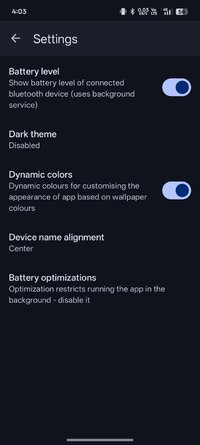
For supported devices, the widget displays the battery level of the Bluetooth devices (the manufacturer must support this feature).
The app supports enhanced reading battery level from the following popular TWS earbuds: Google Pixel, Apple AirPods, Samsung Galaxy Buds Pro, Buds Live, Buds Plus. In the App, on the widget or in notification you can see the battery level of each earbud and the case.
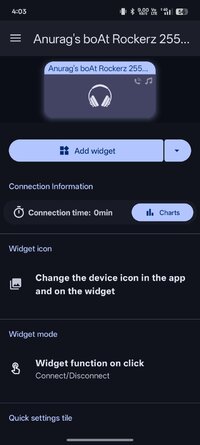
Enhanced widget mode: Tap the widget to display a menu with options to connect / disconnect, select the active device and control Bluetooth profiles (music, call).
Restore saved volume level when headphones connect.
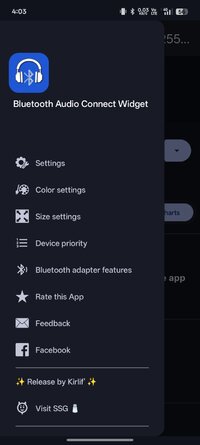
Customize widget size, color, margins, icon and transparency. On Android 12+, the widget supports dynamic color themes based on the user's wallpaper.
The app supports A2DP and Headset profiles, audio devices such as portable speakers, headphones, soundbars, handsfree, etc... On the widget and in the app, supported Bluetooth profiles are indicated by an icon in the top right corner. Note icon for A2DP - stream high quality audio (music) or phone icon for calls.
For help, visit: Help :: Bluetooth audio device widget
To avoid background restrictions: Don’t kill my app!
Highlighted features:
 Easy Headphones connect / disconnect
Easy connect / disconnect Bluetooth profiles (calls, music)
Switch BT audio output (active device)
Display info about codec
Info about connected Bluetooth profiles
Battery status (needs Android 8.1, not all devices support it)
Enhanced battery status for following TWS earbuds: Google Pixel, Apple AirPods, Samsung Galaxy Buds Pro, Buds Live, Buds Plus
Widget customization - colors, image, transparency, size
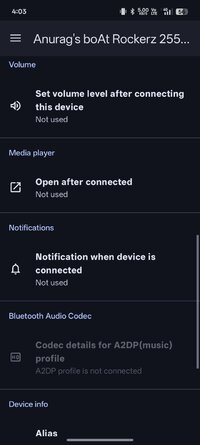
Open app after connecting (e.g. Spotify)
Set volume level after connect Bluetooth headphones
Notification when Bluetooth headphones are connected / disconnected
Quick settings tile
Auto resume of playback - Spotify is supported
Not supported features:
 Dual audio playback not supported - this is currently not possible on Android, sorry. In the near future it will be solved by Bluetooth LE Audio.
Bluetooth Scanner - App uses already paired Bluetooth devices!
If you are happy with my App, please take a minute to write a review or give me rating ☆☆☆☆☆ . If not, feel free to contact me. I'm sure we can solve it :-)
If you want to listen to music, you have to go to settings and connect Bluetooth headphones?
Do you need to easily switch between car audio, phone or handsfree?
Simply connect to permanently powered Bluetooth devices such as soundbars?
Need to monitor battery level of your Bluetooth headphones?
I have a better solution – just add a widget to the home screen for all your favorite BT wireless devices.
One click on the widget to connect Bluetooth headphones and play Spotify without going into the settings menu. The widget always clearly displays the status of the Bluetooth connection. You can see connected Bluetooth profiles (music, call) on the widget, if headphones support it.
Option to view and change (requires Android 15) the Bluetooth codec used (SBC, AptX, etc.) depending on what your device supports.
For supported devices, the widget displays the battery level of the Bluetooth devices (the manufacturer must support this feature).
The app supports enhanced reading battery level from the following popular TWS earbuds: Google Pixel, Apple AirPods, Samsung Galaxy Buds Pro, Buds Live, Buds Plus. In the App, on the widget or in notification you can see the battery level of each earbud and the case.
Enhanced widget mode: Tap the widget to display a menu with options to connect / disconnect, select the active device and control Bluetooth profiles (music, call).
Restore saved volume level when headphones connect.
Customize widget size, color, margins, icon and transparency. On Android 12+, the widget supports dynamic color themes based on the user's wallpaper.
The app supports A2DP and Headset profiles, audio devices such as portable speakers, headphones, soundbars, handsfree, etc... On the widget and in the app, supported Bluetooth profiles are indicated by an icon in the top right corner. Note icon for A2DP - stream high quality audio (music) or phone icon for calls.
For help, visit: Help :: Bluetooth audio device widget
To avoid background restrictions: Don’t kill my app!
Highlighted features:
Easy Headphones connect / disconnect Easy connect / disconnect Bluetooth profiles (calls, music) Switch BT audio output (active device) Display info about codec Info about connected Bluetooth profiles Battery status (needs Android 8.1, not all devices support it) Enhanced battery status for following TWS earbuds: Google Pixel, Apple AirPods, Samsung Galaxy Buds Pro, Buds Live, Buds Plus Widget customization - colors, image, transparency, size Open app after connecting (e.g. Spotify) Set volume level after connect Bluetooth headphones Notification when Bluetooth headphones are connected / disconnected Quick settings tile Auto resume of playback - Spotify is supportedNot supported features:
Dual audio playback not supported - this is currently not possible on Android, sorry. In the near future it will be solved by Bluetooth LE Audio. Bluetooth Scanner - App uses already paired Bluetooth devices!If you are happy with my App, please take a minute to write a review or give me rating ☆☆☆☆☆
. If not, feel free to contact me. I'm sure we can solve it :-)*Special Features*
● Premium Unlocked
● Firebase Stuff Removed
● Compression Flags Untouched
● No Third Party Patch/Hook/...
Credit to : Kirlif'
Free Download:
! Hidden Content !
You must be registered and either click Like under this post or leave a comment before you can see the hidden links.
You may need to refresh the page after clicking Like. If you’re still having trouble revealing the hidden links, please
read this.
Did you know? VIP Members can see all links instantly, no unlocking required.
Interested? Get VIP here.
Interested? Get VIP here.