Playstore Link :

Bugjaeger Mobile ADB - USB OTG - Apps on Google Play
Tool to debug, dissect, shell into and control Android device or TV via USB/WiFi
Before you post questions or bad reviews, see FAQ
 sisik.eu
If you want new feature, or something is not working, write directly to my email [email protected]
sisik.eu
If you want new feature, or something is not working, write directly to my email [email protected]
Bugjaeger tries to give you the expert tools used by Android developers for better control and deep understanding of your Android device internals.
Multitool that can save you the hassle of carrying a laptop.
If you're an Android power user, developer, geek, or hacker, this app should be in your toolkit.
How to use
1.) Enable developer options and USB debugging on your target device (Configure on-device developer options | Android Studio | Android Developers)
2.) Connect the device where you've installed this app to the target device via USB OTG cable
3.) Allow app to access USB device and make sure target device authorizes USB debugging
Inspecting device internals, running shell scripts, checking logs, making screenshots, sideloading, and many more tasks that are normally done on your laptop can now be performed directly between 2 mobile devices.
This app works as sort of Android to Android ADB (Android Debug Bridge) - it offers some features similar to ADB (Android Debug Bridge), but instead of running on your development machine, it runs directly on your Android device.
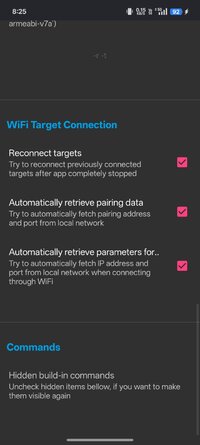
You connect your target device through USB OTG cable or through WiFi and you'll be able to play around with the device.
You can control your Android TV, Wear OS watch, or even Raspberry Pi with Android Things OS and Oculus VR.
Main features
- running shell scripts on target device
- sideload regular/split APKs (e.g. to Oculus Quest VR)
- sideload/flash AOSP images (e.g. Android Preview on Pixel)
- remote interactive shell
- TV remote controller
- mirroring screen + remotely control with touch gesture
- reading, filtering, and exporting device logs (logcat)
- pull APK files
- ADB backups, inspecting and extracting content of backup files
- screenshots
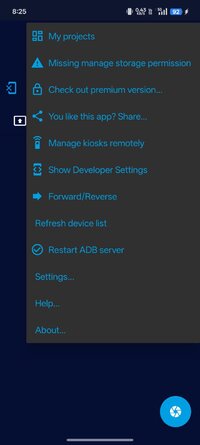
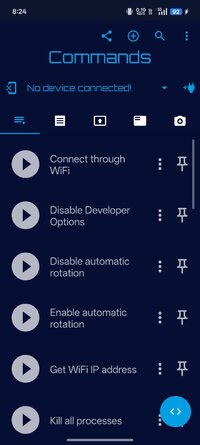
- performing various ADB commands for controlling your device (rebooting, going to bootloader, rotating screen, killing running apps, ...)
- launch, force-stop, disable apps
- uninstalling and installing packages, checking various details about installed apps
- copying apps between phones
- monitoring the processes, showing additional information related to processes, killing processes
- get system properties
- showing various details about Android version(e.g., SDK version, Android ID,..), Linux kernel, cpu, abi, display
- showing battery details (like e.g., temperature, health, technology, voltage,..)
- file management - pushing and pulling files from device, browsing the file system
- search and connect to Android devices on your network that configured adbd to listen on port 5555
- reading bootloader variables & info via fastboot protocol (e.g. dump some hw info, security state, or if the device was tampered)
- exec fastboot commands
- show extensive system info
For some tricks and examples of what you can do, see
www.sisik.eu
For starting a youtube video or url in browser, add following custom command (or paste this into shell) in the first tab
am start -a android.intent.action.VIEW -d "yt_url"
If you liked this app, check out the ad-free premium version which also contains additional features

 play.google.com
Requirements
- Enabled USB debugging in Developer options and authorise the development device
- Fastboot protocol support
Please note
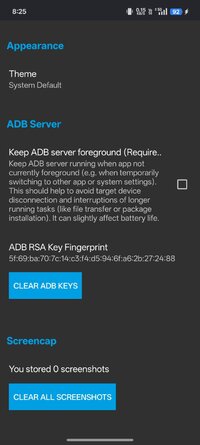
This app uses the normal way of communicating with Android devices which requires authorisation.
The app does not bypass Android's security mechanisms or anything similar!
This means you won't be able to do some privileged tasks on non-rooted devices.
Frequently asked questions about the Bugjaeger app | sisik
Android, embedded systems, graphics, and various information about mobile app development
sisik.eu
Bugjaeger tries to give you the expert tools used by Android developers for better control and deep understanding of your Android device internals.
Multitool that can save you the hassle of carrying a laptop.
If you're an Android power user, developer, geek, or hacker, this app should be in your toolkit.
How to use
1.) Enable developer options and USB debugging on your target device (Configure on-device developer options | Android Studio | Android Developers)
2.) Connect the device where you've installed this app to the target device via USB OTG cable
3.) Allow app to access USB device and make sure target device authorizes USB debugging
Inspecting device internals, running shell scripts, checking logs, making screenshots, sideloading, and many more tasks that are normally done on your laptop can now be performed directly between 2 mobile devices.
This app works as sort of Android to Android ADB (Android Debug Bridge) - it offers some features similar to ADB (Android Debug Bridge), but instead of running on your development machine, it runs directly on your Android device.
You connect your target device through USB OTG cable or through WiFi and you'll be able to play around with the device.
You can control your Android TV, Wear OS watch, or even Raspberry Pi with Android Things OS and Oculus VR.
Main features
- running shell scripts on target device
- sideload regular/split APKs (e.g. to Oculus Quest VR)
- sideload/flash AOSP images (e.g. Android Preview on Pixel)
- remote interactive shell
- TV remote controller
- mirroring screen + remotely control with touch gesture
- reading, filtering, and exporting device logs (logcat)
- pull APK files
- ADB backups, inspecting and extracting content of backup files
- screenshots
- performing various ADB commands for controlling your device (rebooting, going to bootloader, rotating screen, killing running apps, ...)
- launch, force-stop, disable apps
- uninstalling and installing packages, checking various details about installed apps
- copying apps between phones
- monitoring the processes, showing additional information related to processes, killing processes
- get system properties
- showing various details about Android version(e.g., SDK version, Android ID,..), Linux kernel, cpu, abi, display
- showing battery details (like e.g., temperature, health, technology, voltage,..)
- file management - pushing and pulling files from device, browsing the file system
- search and connect to Android devices on your network that configured adbd to listen on port 5555
- reading bootloader variables & info via fastboot protocol (e.g. dump some hw info, security state, or if the device was tampered)
- exec fastboot commands
- show extensive system info
For some tricks and examples of what you can do, see
Blog | sisik
Android, embedded systems, graphics, and various information about mobile app development
www.sisik.eu
For starting a youtube video or url in browser, add following custom command (or paste this into shell) in the first tab
am start -a android.intent.action.VIEW -d "yt_url"
If you liked this app, check out the ad-free premium version which also contains additional features
Bugjaeger® Premium - Apps on Google Play
Debugging and maintenance tool for Android devices
Requirements
- Enabled USB debugging in Developer options and authorise the development device
- Fastboot protocol support
Please note
This app uses the normal way of communicating with Android devices which requires authorisation.
The app does not bypass Android's security mechanisms or anything similar!
This means you won't be able to do some privileged tasks on non-rooted devices.
*Special Features*
Ads Removed
Free Download:
! Hidden Content !
You must be registered and either click Like under this post or leave a comment before you can see the hidden links.
You may need to refresh the page after clicking Like. If you’re still having trouble revealing the hidden links, please
read this.
Did you know? VIP Members can see all links instantly, no unlocking required.
Interested? Get VIP here.
Interested? Get VIP here.