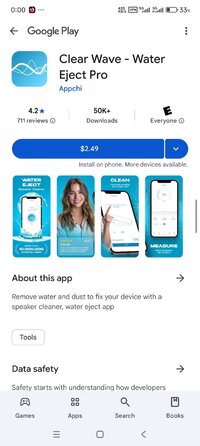
Playstore Link:
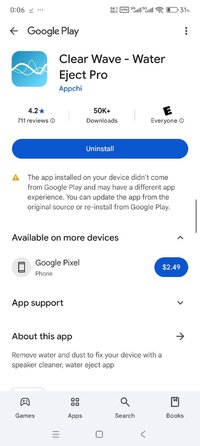
Clear Wave - Water Eject Pro - Apps on Google Play
Remove water and dust to fix your device with a speaker cleaner, water eject app
Meet Clear Wave Pro, the perfect speaker cleaner app for making your smartphone's speakers and other audio equipment sound brand new again!
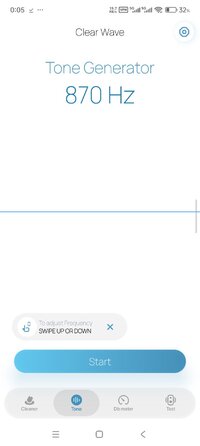
With sound waves and vibrations technology, our Water Ejector Speaker app addresses common issues like water eject app, sound decibel meter, dust cleaner, noise meter, and speaker cleaning.
This speaker cleaner app for audio equipment is super simple and easy for everyone to use. Clear Wave Pro: Speaker Booster uses a smart speaker cleaner trick to get water out of phone and remove dust from your speakers by playing special sounds. It's the ultimate water eject and sound decibel meter solution!
What the Speaker Cleaner does:
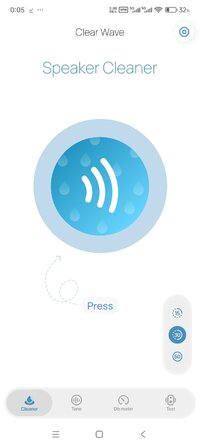
- Smart Cleaner
The fixer and dust cleaner app automatically removes water and blowly dirt from your speakers with unique sounds. It's like having a water ejector and clear speaker in your pocket. By cleansing, you will be able to get an audio booster. So get water out of phone.
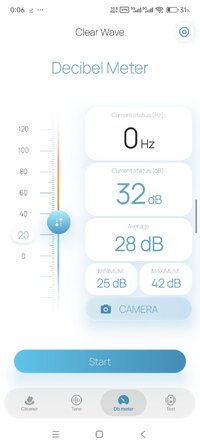
- Decibel Meter Checker
Tells you how loud things are around your phone thanks to the noise meter. This decibel meter helps you pick quieter stuff like washing machines or stay away from loud places to keep your ears safe. You will also be able to measure the noise level after using the dust cleaner speaker and water remover app.
- Make It Louder
After cleaning thanks speaker cleaner, your speaker will sound louder and clearer, like a volume booster. It acts as speaker booster. Not only can it clean speaker, but it can also blowly away dust. Once the contaminants are gone, the device gets an audio booster.
- Record Sounds
After use dust cleaner app, while checking noise levels thanks decibel meter, it can also record the sounds around you. So clear speaker, get an audio booster and run speaker test with the recording.
- Volume Sound Booster
This water remover app can be used as volume booster for Android. If you use this speaker cleaner app on two phones and one sounds quieter, it could mean that the phone's microphone needs cleaning. Clear Wave Pro - Sound Cleaner will clean speaker and get it fixed.
- Works with Many Devices
You can use speaker cleaner app on Android phones, headphones, tablets, laptops, and any speakers you connect to your phone. Make a sound booster for your device. You can also check sound thanks to the noise meter in the water remover app.
Clear Wave Pro - Water Ejector is a great speaker cleaner and speaker booster, offering a get water out of phone and simple way to make your speakers sound clear and loud. It can remove dust, coffee spills, juice, tea, or any other liquid and also get a sound booster for phone. It's like a clear speaker for your devices. The app also features such functions as: volume booster for android, speaker test, sound decibel meter, speaker boost, and water eject for android.
Please remember: Clear Wave Pro - Speaker Cleaner isn’t a physical water remover and doesn't physically remove water from inside your phone. However, it excels as a water eject app.
We'd love to hear from you, how you eject water from phone! Send us your thoughts about clean speaker at [email protected]. Let's make Clear Wave Pro - Speaker Cleaner and Water Ejector a success together!
With sound waves and vibrations technology, our Water Ejector Speaker app addresses common issues like water eject app, sound decibel meter, dust cleaner, noise meter, and speaker cleaning.
This speaker cleaner app for audio equipment is super simple and easy for everyone to use. Clear Wave Pro: Speaker Booster uses a smart speaker cleaner trick to get water out of phone and remove dust from your speakers by playing special sounds. It's the ultimate water eject and sound decibel meter solution!
What the Speaker Cleaner does:
- Smart Cleaner
The fixer and dust cleaner app automatically removes water and blowly dirt from your speakers with unique sounds. It's like having a water ejector and clear speaker in your pocket. By cleansing, you will be able to get an audio booster. So get water out of phone.
- Decibel Meter Checker
Tells you how loud things are around your phone thanks to the noise meter. This decibel meter helps you pick quieter stuff like washing machines or stay away from loud places to keep your ears safe. You will also be able to measure the noise level after using the dust cleaner speaker and water remover app.
- Make It Louder
After cleaning thanks speaker cleaner, your speaker will sound louder and clearer, like a volume booster. It acts as speaker booster. Not only can it clean speaker, but it can also blowly away dust. Once the contaminants are gone, the device gets an audio booster.
- Record Sounds
After use dust cleaner app, while checking noise levels thanks decibel meter, it can also record the sounds around you. So clear speaker, get an audio booster and run speaker test with the recording.
- Volume Sound Booster
This water remover app can be used as volume booster for Android. If you use this speaker cleaner app on two phones and one sounds quieter, it could mean that the phone's microphone needs cleaning. Clear Wave Pro - Sound Cleaner will clean speaker and get it fixed.
- Works with Many Devices
You can use speaker cleaner app on Android phones, headphones, tablets, laptops, and any speakers you connect to your phone. Make a sound booster for your device. You can also check sound thanks to the noise meter in the water remover app.
Clear Wave Pro - Water Ejector is a great speaker cleaner and speaker booster, offering a get water out of phone and simple way to make your speakers sound clear and loud. It can remove dust, coffee spills, juice, tea, or any other liquid and also get a sound booster for phone. It's like a clear speaker for your devices. The app also features such functions as: volume booster for android, speaker test, sound decibel meter, speaker boost, and water eject for android.
Please remember: Clear Wave Pro - Speaker Cleaner isn’t a physical water remover and doesn't physically remove water from inside your phone. However, it excels as a water eject app.
We'd love to hear from you, how you eject water from phone! Send us your thoughts about clean speaker at [email protected]. Let's make Clear Wave Pro - Speaker Cleaner and Water Ejector a success together!
*Special Features*
● Supported Languages: af, am, ar, as, az, be, bg, bn, bs, ca, cs, da, de, el, en-AU, en-CA, en-GB, en-IN, en-XC, es, es-419, es-US, et, eu, fa, fi, fr, fr-CA, gl, gu, hi, hr, hu, hy, in, is, it, iw, ja, ka, kk, km, kn, ko, ky, lo, lt, lv, mk, ml, mn, mr, ms, my, nb, ne, nl, or, pa, pl, pt, pt-BR, pt-PT, ro, ru, si, sk, sl, sq, sr, sr-Latn, sv, sw, ta, te, th, tl, tr, uk, ur, uz, vi, zh-CN, zh-HK, zh-TW, zu;
● Supported Cpu Architecture: Armeabi-v7a, Arm64-v8a, X86, X86_64;
● Supported Screen Dpi: Ldpi, Mdpi, Tvdpi, Hdpi, Xhdpi, Xxhdpi, Xxxhdpi.
● Untouch Paid Apk With Original Hash Signature.
● Certificate MD5 Digest: 4e008a778af707b9cd9c3851d5299c18.
.Apks Bundle Installation:
SAI Instructions: [No Root]
1. Download And Install Latest SAI App (Split APK Installer) - Releases · Aefyr/SAI
2. Download this .apks Archive App;
3. Install And Open SAI / Choose "Install APKs" Button / Find And Select Downloaded .apks Archive App;
4. Wait For Install And Done. Enjoy!.
Lucky Patcher Instructions: [No Root]
1. Download And Install Latest Lucky Patcher App;
2. Install And Open Lucky Patcher And Choose 'Rebuild & Install';
3. Find And Select Downloaded This .apks Archive App;
4. Wait For Install And Done. Enjoy!.
PS: Make Sure After Open SAI or Lucky Patcher You Allowed Storage Permission And Install Unknown Apps Permission!
Free Download: