Playstore Link :

Compress Image - MB to KB - Apps on Google Play
Compress photos from MB to KB and resize images fast - no visible quality loss
Compress Image - MB to KB Ver. 1.2.3 MOD APK | Pro / Paid Unlocked
Requirements: 6.0 and up
Overview: Compress large photos into smaller size photos, losing minimum quality.
Easily compress and resize your photos and images with our user-friendly image compressor.
Simply select the image you want to compress or resize, choose your desired compression level, and let our app do the rest.
With our app, you can reduce the size of your images without sacrificing quality, making it perfect for saving space on your device or for sharing images online. Try it now and see the difference!
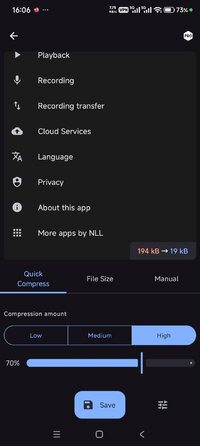
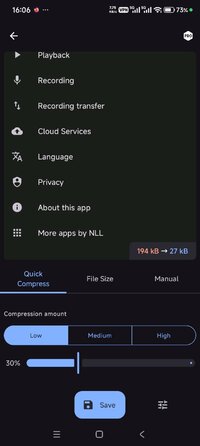
This app offers a live preview of the compressed photo - before creating the image you will know how it's going to look like and how much space it's going to take on disk.
This app has three modes to compress images:
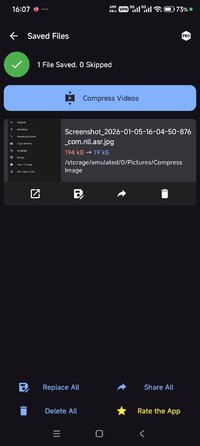
1. Quick Compress: The easiest way to compress photos. Simply select the amount of compression and click “compress”, the app will optimize the image to save space while looking as good as the original.
2. Compress to a specific file size: You specify the size of the photo in KB (kilobytes), press "compress" and let the app to the optimizations. This feature is recommended when you need to compress photos to an exact file size.
3. Manual: here you can manually select the desired width and height of the image, as well as the compression amount. This mode gives you full control on the compression and resizing process.
Each mode supports batch compression and batch resizing.
Features of the app:
* Free to use
* Batch compression/resizing (multiple photos compression/resize)
* Compress Photos to a specified file size
* Compress photos to a specific width and height
* Save storage space on your device, phones and tables are supported
* Convert any image format, supports conversion from JPEG, JPG, PNG, WEBP format
Supported image formats: jpeg, jpg, png, webp.
What's New:
- Changelog not provided.
Requirements: 6.0 and up
Overview: Compress large photos into smaller size photos, losing minimum quality.
Easily compress and resize your photos and images with our user-friendly image compressor.
Simply select the image you want to compress or resize, choose your desired compression level, and let our app do the rest.
With our app, you can reduce the size of your images without sacrificing quality, making it perfect for saving space on your device or for sharing images online. Try it now and see the difference!
This app offers a live preview of the compressed photo - before creating the image you will know how it's going to look like and how much space it's going to take on disk.
This app has three modes to compress images:
1. Quick Compress: The easiest way to compress photos. Simply select the amount of compression and click “compress”, the app will optimize the image to save space while looking as good as the original.
2. Compress to a specific file size: You specify the size of the photo in KB (kilobytes), press "compress" and let the app to the optimizations. This feature is recommended when you need to compress photos to an exact file size.
3. Manual: here you can manually select the desired width and height of the image, as well as the compression amount. This mode gives you full control on the compression and resizing process.
Each mode supports batch compression and batch resizing.
Features of the app:
* Free to use
* Batch compression/resizing (multiple photos compression/resize)
* Compress Photos to a specified file size
* Compress photos to a specific width and height
* Save storage space on your device, phones and tables are supported
* Convert any image format, supports conversion from JPEG, JPG, PNG, WEBP format
Supported image formats: jpeg, jpg, png, webp.
What's New:
- Changelog not provided.
*Special Features*
1 . Pro / Paid Features Unlocked
Free Download:
! Hidden Content !
You must be registered and either click Like under this post or leave a comment before you can see the hidden links.
You may need to refresh the page after clicking Like. If you’re still having trouble revealing the hidden links, please
read this.
Did you know? VIP Members can see all links instantly, no unlocking required.
Interested? Get VIP here.
Interested? Get VIP here.