Playstore Link :

Compress Video Size Compressor - Apps on Google Play
Compress Video without quality loss. Convert Video, Change resolution & Bitrate
Compress Video Size Compressor Ver. 18.4.2 build 4000327 MOD APK | Premium Unlocked
Requirements: 8.0+
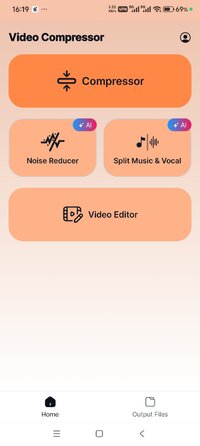
Overview: Convert and Compress Video without quality loss almost any format of videos. Change resolution & Bitrate. This is the best Video compressor and converter app in the market which provides every possible settings for compressing your video.
Supported Video Formats
MP4, MKV, AVI, 3GP, FLV, MTS, MPEG, MPG, WMV, M4V, MOV, VOB
 KEY FEATURES
 Compress an uncompressed video by keeping original quality.
Choose from predefined multiple compression profiles with different quality and size settings.
Compress video to a manually inputted size.
Shows a preview of small duration for the chosen compression settings before the compression process starts. Helps users to understand the quality of the compression beforehand.
Queue multiple videos to compress them in batch mode.
Choose between X264 and X265(HEVC) codec for compression. HEVC codec provides much more compression than X264 codec. But X264 is much faster than X265 in terms of compression speed.
Choose Compression process speed. Higher the speed larger the compressed video size.
Choose custom resolution.
Compresses a video by decreasing resolution, video bitrate. In this option the user can see the estimated compressed video size before compressing. This doesn’t preserve original quality.
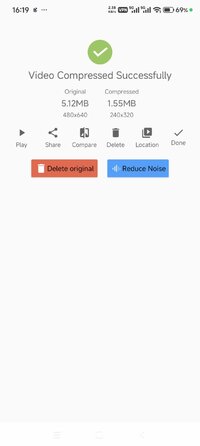
Compare compressed and original video by playing them simultaneously in the same screen.
Delete compressed or original file after compression from the app.
Reduces video size, shrink video, save and clear device's storage space.
High quality video compression and Low quality video compression.
Convert video to MP4, MKV, AVI, 3GP, FLV, MTS, M4V, MOV formats.(PRO Feature)
Convert video from MP4, MKV, AVI, 3GP, FLV, MTS, MPEG, MPG, WMV, M4V, MOV, VOB formats.
Play Compressed and Converted Video.
Share compressed, converted and size reduced videos.
Video Compressor - Compact Video application can compress and convert almost any format of videos. It provides users with default compress/preset profiles. Users can choose desired compression quality, compression speed, video resolution, bitrate etc. Also this compressor and converter lets the user input the desired compressed video size and it compresses the video to that size. Also you can compress videos in batch mode by queuing multiple videos.
This Video Compressor can compress an uncompressed video without losing quality using X264 and X265(HEVC) codec. It can also compress a compressed video by decreasing the quality which is Resolution, Bitrate. This video compressor gives the user a transparent and flexible way to choose the compression level by customizing resolution and bitrate of the video. It shows the estimated size of the compressed video before the compression begins. This helps you decide how much space you want to save with what quality of the compression. It supports many video formats.
This is the best Video compressor and converter app in the market which provides every possible settings for compressing your video.
◉ Premium activated
◉ Analytics disabled
◉ GooglePlayServices disabled
◉ InAppBillingService disabled
◉ Advertising disabled
◉ Rating window disabled
◉ Debug information removed
◉ Resources optimized
➡ Languages: Full Multi Languages
➡ CPU architectures: arm64-v8a, armeabi-v7a
➡ Screen DPIs: 120dpi, 160dpi, 240dpi, 320dpi, 480dpi, 640dpi
► Credit : NURIK
Note :
The time balance may be linked to your Google account on the server side
Whats New:
+ Fixed several bugs and crashes to improve stability.
+ Updated the user interface for a better experience.
Requirements: 8.0+
Overview: Convert and Compress Video without quality loss almost any format of videos. Change resolution & Bitrate. This is the best Video compressor and converter app in the market which provides every possible settings for compressing your video.
Supported Video Formats
MP4, MKV, AVI, 3GP, FLV, MTS, MPEG, MPG, WMV, M4V, MOV, VOB
KEY FEATURES Compress an uncompressed video by keeping original quality. Choose from predefined multiple compression profiles with different quality and size settings. Compress video to a manually inputted size. Shows a preview of small duration for the chosen compression settings before the compression process starts. Helps users to understand the quality of the compression beforehand. Queue multiple videos to compress them in batch mode. Choose between X264 and X265(HEVC) codec for compression. HEVC codec provides much more compression than X264 codec. But X264 is much faster than X265 in terms of compression speed. Choose Compression process speed. Higher the speed larger the compressed video size. Choose custom resolution. Compresses a video by decreasing resolution, video bitrate. In this option the user can see the estimated compressed video size before compressing. This doesn’t preserve original quality. Compare compressed and original video by playing them simultaneously in the same screen. Delete compressed or original file after compression from the app. Reduces video size, shrink video, save and clear device's storage space. High quality video compression and Low quality video compression. Convert video to MP4, MKV, AVI, 3GP, FLV, MTS, M4V, MOV formats.(PRO Feature) Convert video from MP4, MKV, AVI, 3GP, FLV, MTS, MPEG, MPG, WMV, M4V, MOV, VOB formats. Play Compressed and Converted Video. Share compressed, converted and size reduced videos.Video Compressor - Compact Video application can compress and convert almost any format of videos. It provides users with default compress/preset profiles. Users can choose desired compression quality, compression speed, video resolution, bitrate etc. Also this compressor and converter lets the user input the desired compressed video size and it compresses the video to that size. Also you can compress videos in batch mode by queuing multiple videos.
This Video Compressor can compress an uncompressed video without losing quality using X264 and X265(HEVC) codec. It can also compress a compressed video by decreasing the quality which is Resolution, Bitrate. This video compressor gives the user a transparent and flexible way to choose the compression level by customizing resolution and bitrate of the video. It shows the estimated size of the compressed video before the compression begins. This helps you decide how much space you want to save with what quality of the compression. It supports many video formats.
This is the best Video compressor and converter app in the market which provides every possible settings for compressing your video.
◉ Premium activated
◉ Analytics disabled
◉ GooglePlayServices disabled
◉ InAppBillingService disabled
◉ Advertising disabled
◉ Rating window disabled
◉ Debug information removed
◉ Resources optimized
➡ Languages: Full Multi Languages
➡ CPU architectures: arm64-v8a, armeabi-v7a
➡ Screen DPIs: 120dpi, 160dpi, 240dpi, 320dpi, 480dpi, 640dpi
► Credit : NURIK
Note :
The time balance may be linked to your Google account on the server side
Whats New:
+ Fixed several bugs and crashes to improve stability.
+ Updated the user interface for a better experience.
*Special Features*
◉ Premium activated
◉ Analytics disabled
◉ GooglePlayServices disabled
◉ InAppBillingService disabled
◉ Advertising disabled
Note :
The time balance may be linked to your Google account on the server side
Credit to : NURIK
Free Download:
! Hidden Content !
You must be registered and either click Like under this post or leave a comment before you can see the hidden links.
You may need to refresh the page after clicking Like. If you’re still having trouble revealing the hidden links, please
read this.
Did you know? VIP Members can see all links instantly, no unlocking required.
Interested? Get VIP here.
Interested? Get VIP here.