Playstore Link:

Cut & Paste Photo Editor - Apps on Google Play
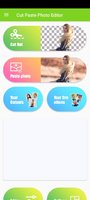
Remove background, cut objects & paste photos easily with powerful photo editor.
AutoCut is a free-to-use photo editor app that lets you easily cut and synthesize the background of your photos.
AutoCut comes with many professional photo editing tools like:
- Smart Cutout - Auto Erase: By simple taps, Auto Cut Paste will select and extract objects through Detect AI, so you can paste that area on any our existing backgrounds.
- Manual Erase: for finger rub (traditional) background removal.
- Auto photo Background Changer: Change the background of your photo automagically.
- Transparent photo editor: Making a picture's background transparent.
- Text Stickers: Add text and change font, style for text
- Multiple Stickers: 500+ funny sticker
Download Now! The Best Photo Edit App Only for You.
Edit, Share and Enjoy Your Life!
What's New:
Performance improvement
AutoCut comes with many professional photo editing tools like:
- Smart Cutout - Auto Erase: By simple taps, Auto Cut Paste will select and extract objects through Detect AI, so you can paste that area on any our existing backgrounds.
- Manual Erase: for finger rub (traditional) background removal.
- Auto photo Background Changer: Change the background of your photo automagically.
- Transparent photo editor: Making a picture's background transparent.
- Text Stickers: Add text and change font, style for text
- Multiple Stickers: 500+ funny sticker
Download Now! The Best Photo Edit App Only for You.
Edit, Share and Enjoy Your Life!
What's New:
Performance improvement
*Special Features*
✪ Premium Features Unlocked
✪ Multi Languages
✪ CPUs: armeabi-v7a
✪ Debug Info Removed
✪ Original Signature Changed
♤ credit ♤ ????
Free Download:
! Hidden Content !
You must be registered and either click Like under this post or leave a comment before you can see the hidden links.
You may need to refresh the page after clicking Like. If you’re still having trouble revealing the hidden links, please
read this.
Did you know? VIP Members can see all links instantly, no unlocking required.
Interested? Get VIP here.
Interested? Get VIP here.
Last edited by a moderator: