Playstore Link :

Data Usage Monitor - Apps on Google Play
Auto-track data and avoid throttling with alerts, widget, and status bar meter.
Data Usage Monitor Ver. 1.22.2938 MOD APK | Premium Unlocked
Requirements: Android 7.0 and up
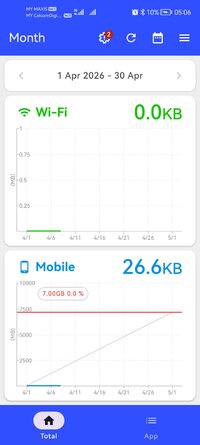
Overview: Stop hitting data caps with Data Usage Monitor. This app automatically measures mobile and Wi‑Fi traffic, graphs your daily, weekly, or monthly usage, and warns you before throttling kicks in. Keep your network speeds steady and your bills predictable with live widgets and per-app analytics right at your fingertips.
MAIN FEATURES
➤ Automatic tracking: uses Android background API; keeps measuring after device reboot; minimal battery impact.
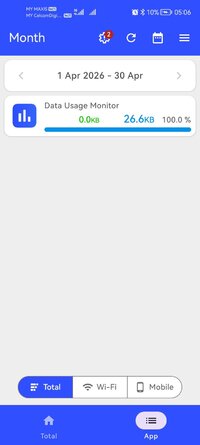
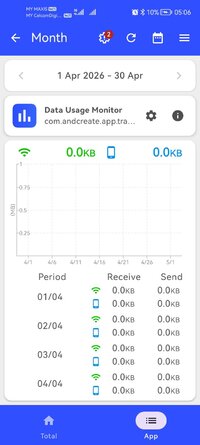
➤ Precise breakdown: separate mobile / Wi‑Fi totals; per-SSID stats; app-by-app usage so you can spot data hogs.
➤ Clear analytics: trend graphs by day/week/month with color cues for approaching limits.
➤ Smart alerts: push notifications when nearing the cap; customizable thresholds.
➤ Widgets & status bar: live remaining data on home screen and in the notification bar.
PREMIUM
➤ Ad-free experience: Removes all advertisements from the app.
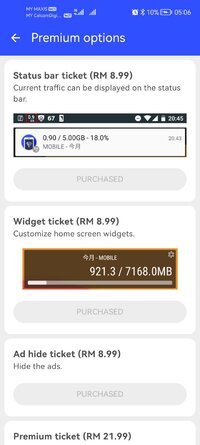
➤ Enhanced features: Always-on status bar meter and enhanced widgets for better tracking.
SUPPORTED CARRIERS
Works with major carriers and MVNOs: Verizon, AT&T, T-Mobile, Docomo, au, SoftBank, Rakuten, UQ, Y!mobile, IIJmio, OCN, BIGLOBE, mineo, and more.
PERMISSIONS
• Usage Access: required for per-app data stats.
• Wi‑Fi info & Location: needed by Android to read SSID for Wi‑Fi usage.
• Network access: ads and anonymized improvement data.
• Run at startup: resume background tracking after reboot.
• Google Play Billing: premium purchase.
FAQ
• How do I set the alert limit?
Settings > Data Alerts to set cap and warning levels.
• Widget not updating?
Disable battery saver for the app and allow background activity.
Modifications:
✪ Premium features unlocked;
✪ Cleaned all useless files;
✪ All Debug Codes Removed;
✪ CPUs: armeabi-v7a, arm64-v8a;
➥ Modded By TRUMods
What's New:
Ver 1.22.2938
- Improvements to the top screen UI
- Improvements to the processing for reflecting purchase status
- Other minor bug fixes
Love the app? Please consider giving us 5 stars—it helps a lot!
Ver 1.22.2924
- Fixed an issue where Wi-Fi and mobile data usage could not be displayed simultaneously in the app list's total order.
- Other minor bug fixes.
Ver 1.22.2918
- Improved UI on the top screen and detail screen
- Fixed layout issues with 1x1 widgets
- Adjusted Wi-Fi and mobile network notations
- Other minor bug fixes
Requirements: Android 7.0 and up
Overview: Stop hitting data caps with Data Usage Monitor. This app automatically measures mobile and Wi‑Fi traffic, graphs your daily, weekly, or monthly usage, and warns you before throttling kicks in. Keep your network speeds steady and your bills predictable with live widgets and per-app analytics right at your fingertips.
MAIN FEATURES
➤ Automatic tracking: uses Android background API; keeps measuring after device reboot; minimal battery impact.
➤ Precise breakdown: separate mobile / Wi‑Fi totals; per-SSID stats; app-by-app usage so you can spot data hogs.
➤ Clear analytics: trend graphs by day/week/month with color cues for approaching limits.
➤ Smart alerts: push notifications when nearing the cap; customizable thresholds.
➤ Widgets & status bar: live remaining data on home screen and in the notification bar.
PREMIUM
➤ Ad-free experience: Removes all advertisements from the app.
➤ Enhanced features: Always-on status bar meter and enhanced widgets for better tracking.
SUPPORTED CARRIERS
Works with major carriers and MVNOs: Verizon, AT&T, T-Mobile, Docomo, au, SoftBank, Rakuten, UQ, Y!mobile, IIJmio, OCN, BIGLOBE, mineo, and more.
PERMISSIONS
• Usage Access: required for per-app data stats.
• Wi‑Fi info & Location: needed by Android to read SSID for Wi‑Fi usage.
• Network access: ads and anonymized improvement data.
• Run at startup: resume background tracking after reboot.
• Google Play Billing: premium purchase.
FAQ
• How do I set the alert limit?
Settings > Data Alerts to set cap and warning levels.
• Widget not updating?
Disable battery saver for the app and allow background activity.
Modifications:
✪ Premium features unlocked;
✪ Cleaned all useless files;
✪ All Debug Codes Removed;
✪ CPUs: armeabi-v7a, arm64-v8a;
➥ Modded By TRUMods
What's New:
Ver 1.22.2938
- Improvements to the top screen UI
- Improvements to the processing for reflecting purchase status
- Other minor bug fixes
Love the app? Please consider giving us 5 stars—it helps a lot!
Ver 1.22.2924
- Fixed an issue where Wi-Fi and mobile data usage could not be displayed simultaneously in the app list's total order.
- Other minor bug fixes.
Ver 1.22.2918
- Improved UI on the top screen and detail screen
- Fixed layout issues with 1x1 widgets
- Adjusted Wi-Fi and mobile network notations
- Other minor bug fixes
*Special Features*
1 . Premium features unlocked
Credit to : TRUMods
Free Download:
! Hidden Content !
You must be registered and either click Like under this post or leave a comment before you can see the hidden links.
You may need to refresh the page after clicking Like. If you’re still having trouble revealing the hidden links, please
read this.
Did you know? VIP Members can see all links instantly, no unlocking required.
Interested? Get VIP here.
Interested? Get VIP here.