Playstore Link:

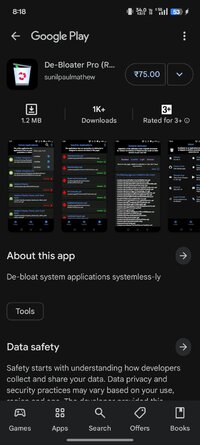
De-Bloater Pro (ROOT) - Apps on Google Play
De-bloat system applications systemless-ly
De-Bloater is an application using the power of Magisk/Kernel SU to de-bloat unwanted applications systemless-ly.
De-Bloater requires Root Access and a fully functional Magisk environment, including modules, for proper working. As a result, De-Bloater won't work with other rooting solutions as well as in Magisk core-only mode.
Features
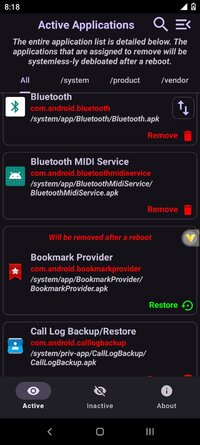
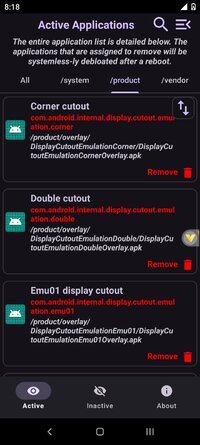
- Easily remove system applications from "/system", "/vendor", and "/product" directories (Reboot required).
- Restore de-bloated apps, either individually or as a whole (Reboot required).
- Includes pre-defined de-bloated scripts (Universal Android and Tomatot debloater).
- Elegantly designed user interface with an auto-dark/light theme.
- A lot more.
Requirement
De-Bloater requires Root Access and a fully functional Magisk environment, including modules, for proper working. As a result, De-Bloater won't work with other rooting solutions as well as in Magisk core-only mode.
How to Use
Open the app, click the remove button on each app you want to remove. The selected apps will be removed systemless-ly after a reboot. To restore an app, either Reset Module (on the top menu) or selectively restore from the second page. Please note that a restart is necessary to get any of the changes in effect.
How it works
The app will systemless-ly replace the selected APKs by making a Magisk module. As a result, you will see a new Module (name: De-bloater).
Troubleshooting
In case, if you accidentally remove some important apps and your phone bootloops, please delete "/data/adb/modules/De-bloater" via recovery.
De-Bloater requires Root Access and a fully functional Magisk environment, including modules, for proper working. As a result, De-Bloater won't work with other rooting solutions as well as in Magisk core-only mode.
Features
- Easily remove system applications from "/system", "/vendor", and "/product" directories (Reboot required).
- Restore de-bloated apps, either individually or as a whole (Reboot required).
- Includes pre-defined de-bloated scripts (Universal Android and Tomatot debloater).
- Elegantly designed user interface with an auto-dark/light theme.
- A lot more.
Requirement
De-Bloater requires Root Access and a fully functional Magisk environment, including modules, for proper working. As a result, De-Bloater won't work with other rooting solutions as well as in Magisk core-only mode.
How to Use
Open the app, click the remove button on each app you want to remove. The selected apps will be removed systemless-ly after a reboot. To restore an app, either Reset Module (on the top menu) or selectively restore from the second page. Please note that a restart is necessary to get any of the changes in effect.
How it works
The app will systemless-ly replace the selected APKs by making a Magisk module. As a result, you will see a new Module (name: De-bloater).
Troubleshooting
In case, if you accidentally remove some important apps and your phone bootloops, please delete "/data/adb/modules/De-bloater" via recovery.
*Special Features*
● Untouched Free Apk With Original Hash Signature.
Credit: sunilpaulmathew
Free Download:
! Hidden Content !
You must be registered and either click Like under this post or leave a comment before you can see the hidden links.
You may need to refresh the page after clicking Like. If you’re still having trouble revealing the hidden links, please
read this.
Did you know? VIP Members can see all links instantly, no unlocking required.
Interested? Get VIP here.
Interested? Get VIP here.