Playstore Link :

Game Mode - Apps on Google Play
Game booster, launcher and tools for a better gaming experience.
Game Mode Ver. 0.1.0-rc248 build 248 MOD APK l Premium Unlocked
Requirements: Android 8.0+
Overview: Game Booster & Game Space, Boost gaming experience with GameMode
Boost your gaming experience with Game Mode
Features
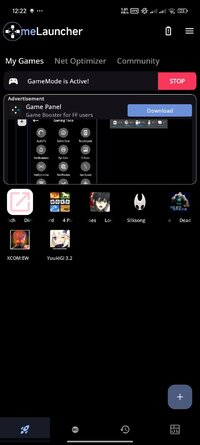
Game Launcher - create your own game space where you can add apps/games to the My Games section and directly launch your favourite game from the game launcher.
Sceencast - record or screenshot your screen
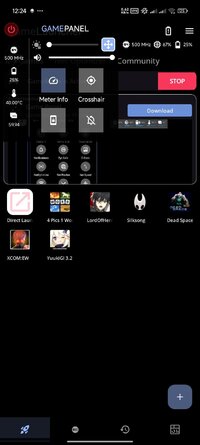
GameMode - it consist of various features listed below
1. Brightness Controller
2. Brightness Lock/Unlock Mode
3. Meter Info
4. Crosshair
5. Touch Lock Mode
6. Sound Viz
7. Rotation Lock Mode
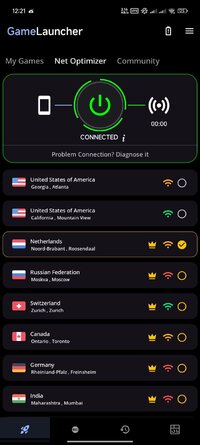
8. Net Optimizer
Net Optimizer uses a VPN Service to only setup a local VPN Interface to change the DNS server address.
Your Device Network traffic will not be sent to a remote VPN Server.
How to use GameMode and its features ?
1. Turn on GameMode in the GameMode section.
2. Add your favourite apps or games to "My Games" in Game Launcher.
3. Click on a game in "My Games" to launch it and activate GameMode.
For support, feedback and suggestions, please contact us at [email protected].
 Mod info:
× Premium Features Unlocked
× All debug info removed
× APK Fully Cleaned
× CPUs: arm64-v8a
× Languages: Multi
× File size optimized
 Modded by TurboMods
Requirements: Android 8.0+
Overview: Game Booster & Game Space, Boost gaming experience with GameMode
Boost your gaming experience with Game Mode
Features
Game Launcher - create your own game space where you can add apps/games to the My Games section and directly launch your favourite game from the game launcher.
Sceencast - record or screenshot your screen
GameMode - it consist of various features listed below
1. Brightness Controller
2. Brightness Lock/Unlock Mode
3. Meter Info
4. Crosshair
5. Touch Lock Mode
6. Sound Viz
7. Rotation Lock Mode
8. Net Optimizer
Net Optimizer uses a VPN Service to only setup a local VPN Interface to change the DNS server address.
Your Device Network traffic will not be sent to a remote VPN Server.
How to use GameMode and its features ?
1. Turn on GameMode in the GameMode section.
2. Add your favourite apps or games to "My Games" in Game Launcher.
3. Click on a game in "My Games" to launch it and activate GameMode.
For support, feedback and suggestions, please contact us at [email protected].
Mod info:× Premium Features Unlocked
× All debug info removed
× APK Fully Cleaned
× CPUs: arm64-v8a
× Languages: Multi
× File size optimized
Modded by TurboMods*Special Features*
1 . Premium Features Unlocked
Credit to : TurboMods
Free Download:
! Hidden Content !
You must be registered and either click Like under this post or leave a comment before you can see the hidden links.
You may need to refresh the page after clicking Like. If you’re still having trouble revealing the hidden links, please
read this.
Did you know? VIP Members can see all links instantly, no unlocking required.
Interested? Get VIP here.
Interested? Get VIP here.