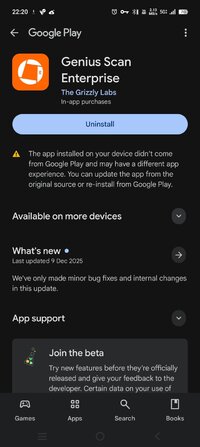
Playstore Link :

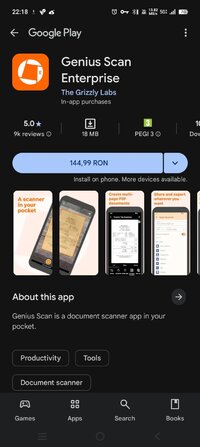
Genius Scan Enterprise - Apps on Google Play
Genius Scan is a document scanner app in your pocket.
Genius Scan Enterprise Ver. 7.33.6 build 7103 l Paid Bundle
Requirements: 8.0+
Overview: Turn your device into a scanner. Quickly scan your paper documents on the go and export them as multi-page PDF files.
Genius Scan is a document scanner app in your pocket.
Genius Scan is a scanner app that turns your device into a scanner, lets you quickly scan your paper documents on the go and export them as multi-scan PDF files.
*** 20+ million users and 1000s of small businesses use the Genius Scan scanner app ***
The Genius Scan scanner app will replace your desktop scanner and you will never look back.
== KEY FEATURES ==
Smart Scanning:
The Genius Scan scanner app includes all the features to make great scans.
- Document detection & background removal
- Distortion correction
- Shadow removal and defect cleanup
- Batch scanner
PDF Creation & Editing:
Genius Scan is the best PDF scanner. Scan not just to images, but full PDF documents.
- Combine scans into PDF documents
- Document merging & splitting
- Multi-page PDF creation
Security & Privacy:
A scanner app that preserves your privacy.
- On-device document processing
- Biometric unlock
- PDF encryption
Scan Organization:
More than just a PDF scanner app, Genius Scan also lets you organize your scans.
- Document tagging
- Metadata and content search
- Smart document renaming (custom templates, …)
- Backup and multi-device sync
Export:
Your scans aren't stuck in your scanner app, you can export them to any other app or services you use.
- Email
- Box, Dropbox, Evernote, Expensify, Google Drive, OneDrive, FTP, WebDAV.
- Any WebDAV compatible service.
OCR (Text Recognition):
In addition to scanning, this scanner app gives you additional understanding of your scans.
+ Extract text from each scan
+ Searchable PDF creation
== ABOUT US ==
It’s in the heart of Paris, France that The Grizzly Labs develops the Genius Scan scanner app. We hold ourselves to the highest standards in terms of quality and privacy.
.apks Bundle Installation:
SAI Instructions: [no root]
1. Download and install latest SAI app (Split APK Installer) - Releases · Aefyr/SAI
2. Download this .apks archive app;
3. Install and Open SAI / Choose "Install APKs" button / Find and Select downloaded .apks archive app;
4. Wait for install and done. Enjoy!
Lucky Patcher Instructions: [no root]
1. Download and install latest Lucky Patcher app;
2. Install and Open Lucky Patcher and choose 'Rebuild & Install';
3. Find and Select downloaded this .apks archive app;
4. Wait for install and done. Enjoy!
PS: Make sure after open SAI or Lucky Patcher you allowed STORAGE Permission and Install Unknown Apps Permission!
★ Untouched Paid apk with Original Hash Signature
★ Certificate MD5 digest: 4ce5fe93c0e874be9b8b506d66770b62
★ No changes were applied
➡ Languages: Full Multi Languages
➡ CPU architectures: arm64-v8a, armeabi-v7a
What's New:
We've only made minor bug fixes and internal changes in this update.
Requirements: 8.0+
Overview: Turn your device into a scanner. Quickly scan your paper documents on the go and export them as multi-page PDF files.
Genius Scan is a document scanner app in your pocket.
Genius Scan is a scanner app that turns your device into a scanner, lets you quickly scan your paper documents on the go and export them as multi-scan PDF files.
*** 20+ million users and 1000s of small businesses use the Genius Scan scanner app ***
The Genius Scan scanner app will replace your desktop scanner and you will never look back.
== KEY FEATURES ==
Smart Scanning:
The Genius Scan scanner app includes all the features to make great scans.
- Document detection & background removal
- Distortion correction
- Shadow removal and defect cleanup
- Batch scanner
PDF Creation & Editing:
Genius Scan is the best PDF scanner. Scan not just to images, but full PDF documents.
- Combine scans into PDF documents
- Document merging & splitting
- Multi-page PDF creation
Security & Privacy:
A scanner app that preserves your privacy.
- On-device document processing
- Biometric unlock
- PDF encryption
Scan Organization:
More than just a PDF scanner app, Genius Scan also lets you organize your scans.
- Document tagging
- Metadata and content search
- Smart document renaming (custom templates, …)
- Backup and multi-device sync
Export:
Your scans aren't stuck in your scanner app, you can export them to any other app or services you use.
- Box, Dropbox, Evernote, Expensify, Google Drive, OneDrive, FTP, WebDAV.
- Any WebDAV compatible service.
OCR (Text Recognition):
In addition to scanning, this scanner app gives you additional understanding of your scans.
+ Extract text from each scan
+ Searchable PDF creation
== ABOUT US ==
It’s in the heart of Paris, France that The Grizzly Labs develops the Genius Scan scanner app. We hold ourselves to the highest standards in terms of quality and privacy.
.apks Bundle Installation:
SAI Instructions: [no root]
1. Download and install latest SAI app (Split APK Installer) - Releases · Aefyr/SAI
2. Download this .apks archive app;
3. Install and Open SAI / Choose "Install APKs" button / Find and Select downloaded .apks archive app;
4. Wait for install and done. Enjoy!
Lucky Patcher Instructions: [no root]
1. Download and install latest Lucky Patcher app;
2. Install and Open Lucky Patcher and choose 'Rebuild & Install';
3. Find and Select downloaded this .apks archive app;
4. Wait for install and done. Enjoy!
PS: Make sure after open SAI or Lucky Patcher you allowed STORAGE Permission and Install Unknown Apps Permission!
★ Untouched Paid apk with Original Hash Signature
★ Certificate MD5 digest: 4ce5fe93c0e874be9b8b506d66770b62
★ No changes were applied
➡ Languages: Full Multi Languages
➡ CPU architectures: arm64-v8a, armeabi-v7a
What's New:
We've only made minor bug fixes and internal changes in this update.
*Special Features*
1 . Paid Bundle
2 . Untouched Paid apk with Original Hash Signature
Free Download:
! Hidden Content !
You must be registered and either click Like under this post or leave a comment before you can see the hidden links.
You may need to refresh the page after clicking Like. If you’re still having trouble revealing the hidden links, please
read this.
Did you know? VIP Members can see all links instantly, no unlocking required.
Interested? Get VIP here.
Interested? Get VIP here.