Playstore Link :

Lua Player: Float Video, Audio - Apps on Google Play
Multitasking Media Player! Play 4K videos in a floating screen with subtitles!
Lua Player: Pop-up All format Ver. 3.6.3 MOD APK | Pro / Paid Unlocked
Requirements: 6.0 and up
Overview: Experience the ultimate multitasking media player with a floating pop-up window that works on any screen. Play all video formats in HD, 4K, and even stream network content while you chat, game, or browse—without missing a moment.
Experience the most powerful multitasking media player!
Lua Player is a top-tier media player that supports all formats, high-resolution videos, and subtitles—all within a fully customizable floating window (Picture-in-Picture). Enjoy your favorite content while gaming, chatting, or browsing.
Smart Floating Window & Playback Controls
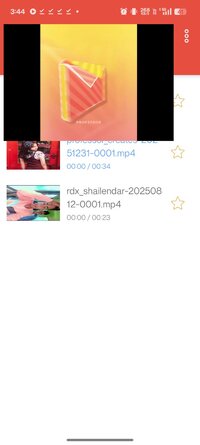
Ultimate Multitasking: Resize and move the pop-up player anywhere on your screen. Watch videos without interrupting your work.
Background Playback: Keep the audio or video running even when the app is minimized.
A-B Repeat: Easily loop specific sections (Point A to Point B) for learning or fun.
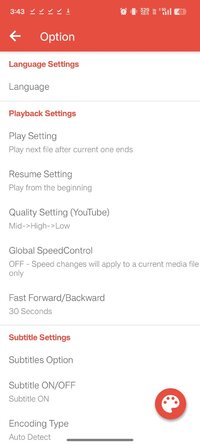
Playback Speed: Adjust speed from 0.3x up to 2.0x to suit your pace.
Intuitive Gestures: Swipe to control brightness, volume, and video seeking instantly.
Extra Tools: Supports screen capture, screen rotation, and continuous play for an uninterrupted experience.
Universal Support for All Formats & Codecs
Ultra HD Quality: Seamlessly plays HD, Full HD, and 4K Ultra HD (4k player) videos.
Video Codecs: H.264, H.265 (HEVC), MPEG4, XVID, VP8, VP9, and more.
Audio Codecs: AAC, AC3, Vorbis, MP3, FLAC, WMA, etc.
Network Streaming: Supports RTSP, RTMP, HLS (m3u8), and MMS for live content.
Multi-Audio: Easily toggle between multiple audio tracks.
Advanced Subtitle Management
Formats: SAMI(.smi), .ssa/.ass, Subrip(.srt), MicroDVD(.sub), and more.
Total Control: Sync subtitles, replace tracks, and support for both internal/external subtitles.
Customization: Personalize your viewing with adjustable subtitle color, size, and position.
Flexible Display & Theme Settings
Aspect Ratios: Supports 16:9, 4:3, 21:9, 1:1, and other custom ratios.
Mirror Mode: Flip video horizontally for dance practice or mirrored viewing.
Dynamic UI: Change theme colors to match your style.
Smart Additional Features
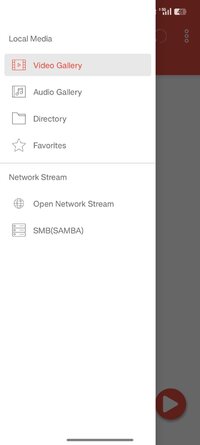
Network Play (SMB/NAS): Stream media directly from Windows shares or NAS via SMB/CIFS.
URL Player: Paste any web URL to stream videos directly in the app.
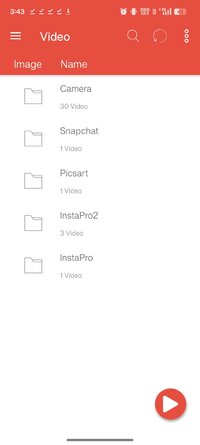
Easy Management: Search, add, or delete media files and favorites with ease.
Permissions Guide
Read Phone Status: Pauses playback during incoming calls.
Storage Access: Manages media files and thumbnails.
Network Access: Enables online streaming.
Draw Over Other Apps: Essential for the floating window (PIP) functionality.
Some of the screens are from the Big Buck Bunny licensed under the Creative Commons Attribution 3.0.
(c) copyright 2008, Blender Foundation / Big Buck Bunny
Some of the screens are from the Sintel licensed under the Creative Commons Attribution 3.0.
(c) copyright Blender Foundation | Sintel, the Durian Open Movie Project
Modifications:
✪ Pro / Paid features unlocked;
✪ Cleaned all useless files;
✪ All Debug Codes Removed;
✪ CPUs: armeabi-v7a, arm64-v8a;
➥ Modded By TRUMods #FirstTimeOnNet
What's New:
Added: Ads consent popup
Updated: Improved app performance
Requirements: 6.0 and up
Overview: Experience the ultimate multitasking media player with a floating pop-up window that works on any screen. Play all video formats in HD, 4K, and even stream network content while you chat, game, or browse—without missing a moment.
Experience the most powerful multitasking media player!
Lua Player is a top-tier media player that supports all formats, high-resolution videos, and subtitles—all within a fully customizable floating window (Picture-in-Picture). Enjoy your favorite content while gaming, chatting, or browsing.
Smart Floating Window & Playback Controls
Ultimate Multitasking: Resize and move the pop-up player anywhere on your screen. Watch videos without interrupting your work.
Background Playback: Keep the audio or video running even when the app is minimized.
A-B Repeat: Easily loop specific sections (Point A to Point B) for learning or fun.
Playback Speed: Adjust speed from 0.3x up to 2.0x to suit your pace.
Intuitive Gestures: Swipe to control brightness, volume, and video seeking instantly.
Extra Tools: Supports screen capture, screen rotation, and continuous play for an uninterrupted experience.
Universal Support for All Formats & Codecs
Ultra HD Quality: Seamlessly plays HD, Full HD, and 4K Ultra HD (4k player) videos.
Video Codecs: H.264, H.265 (HEVC), MPEG4, XVID, VP8, VP9, and more.
Audio Codecs: AAC, AC3, Vorbis, MP3, FLAC, WMA, etc.
Network Streaming: Supports RTSP, RTMP, HLS (m3u8), and MMS for live content.
Multi-Audio: Easily toggle between multiple audio tracks.
Advanced Subtitle Management
Formats: SAMI(.smi), .ssa/.ass, Subrip(.srt), MicroDVD(.sub), and more.
Total Control: Sync subtitles, replace tracks, and support for both internal/external subtitles.
Customization: Personalize your viewing with adjustable subtitle color, size, and position.
Flexible Display & Theme Settings
Aspect Ratios: Supports 16:9, 4:3, 21:9, 1:1, and other custom ratios.
Mirror Mode: Flip video horizontally for dance practice or mirrored viewing.
Dynamic UI: Change theme colors to match your style.
Smart Additional Features
Network Play (SMB/NAS): Stream media directly from Windows shares or NAS via SMB/CIFS.
URL Player: Paste any web URL to stream videos directly in the app.
Easy Management: Search, add, or delete media files and favorites with ease.
Permissions Guide
Read Phone Status: Pauses playback during incoming calls.
Storage Access: Manages media files and thumbnails.
Network Access: Enables online streaming.
Draw Over Other Apps: Essential for the floating window (PIP) functionality.
Some of the screens are from the Big Buck Bunny licensed under the Creative Commons Attribution 3.0.
(c) copyright 2008, Blender Foundation / Big Buck Bunny
Some of the screens are from the Sintel licensed under the Creative Commons Attribution 3.0.
(c) copyright Blender Foundation | Sintel, the Durian Open Movie Project
Modifications:
✪ Pro / Paid features unlocked;
✪ Cleaned all useless files;
✪ All Debug Codes Removed;
✪ CPUs: armeabi-v7a, arm64-v8a;
➥ Modded By TRUMods #FirstTimeOnNet
What's New:
Added: Ads consent popup
Updated: Improved app performance
*Special Features*
1 . Pro / Paid features unlocked
Note:
First Time On Net
Credit to : TRUMods
Free Download:
! Hidden Content !
You must be registered and either click Like under this post or leave a comment before you can see the hidden links.
You may need to refresh the page after clicking Like. If you’re still having trouble revealing the hidden links, please
read this.
Did you know? VIP Members can see all links instantly, no unlocking required.
Interested? Get VIP here.
Interested? Get VIP here.