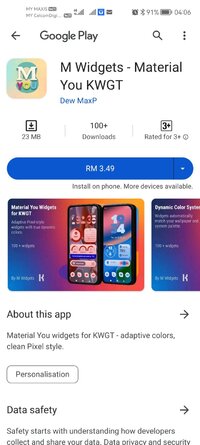
Playstore Link :

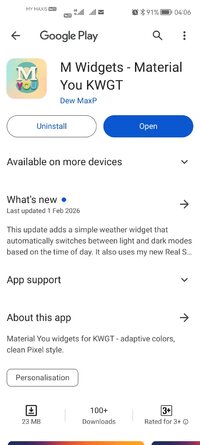
M Widgets - Material You KWGT - Apps on Google Play
Material You widgets for KWGT - adaptive colors, clean Pixel style.
M Widgets - Material You KWGT Ver. v22e3k36t260123 MOD APK | Paid Patched
Requirements: 8.0 and up
Overview:Material You widgets for KWGT - adaptive colors, clean Pixel style.
M Widgets – Material You KWGT
Bring the clean Pixel-inspired design of Android 15 to your home screen.
M Widgets – Material You KWGT is a modern widget collection built around Google’s Material You (M3) design language.
The pack focuses on adaptive colors, smooth transitions, and clean layouts that automatically match your wallpaper and system style.
What’s Included
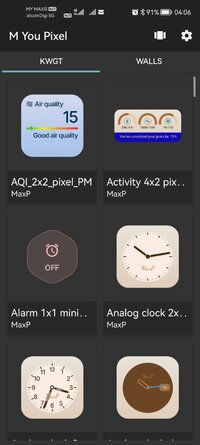
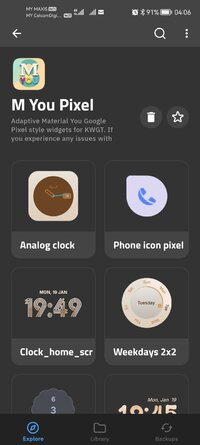
• Material You calendar widget
• Adaptive weather widget with smooth color transitions
• Minimal digital and circular clock widgets
• Battery and system status widgets
• Music player widget
• 6 exclusive circular widgets: Weather, Seasons, Month, Days of the Week, Status, and Time-of-Day indicator (Morning / Day / Evening / Night)
All widgets are minimalist, colorful, and fully M3-ready.
Material You Features
• True dynamic color support — adapts automatically to your wallpaper
• Inspired by Google’s Material You (M3 Expressive) color system
• Pixel-style layouts with rounded corners and balanced spacing
• Multiple formats: compact tiles, horizontal widgets, and full dashboards
Compatibility
• Works in both English and Russian
• Optimized for Pixel and non-Pixel devices
• Automatic adaptation to light and dark backgrounds (no manual mode needed)
Requirements
This is not a standalone app.
You need KWGT Kustom Widget Maker and KWGT Pro to use these widgets.
Please consider leaving a genuine review — it really helps support development.
If you have any issues or questions, feel free to contact us before leaving a negative rating. We’re happy to help.
Contact & Support
What's New:
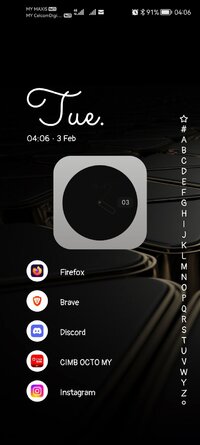
Added the first folder in Pixel / Material You style.
Icons switch from monochrome to colored on tap, and each one opens the correct app.
The tap area for switching icons is placed in the top‑left corner, and a small center tap opens the Kustom editor.
Paid Package Info:
● No root or Lucky Patcher or Google Play Modded required;
● - Paid / Patched;
✗ Cleaned all useless files;
✄ All Debug Codes Removed;
● Languages: Multi Languages;
● CPUs: Universal Architecture;
● Original package signature changed;
Requirements: 8.0 and up
Overview:Material You widgets for KWGT - adaptive colors, clean Pixel style.
M Widgets – Material You KWGT
Bring the clean Pixel-inspired design of Android 15 to your home screen.
M Widgets – Material You KWGT is a modern widget collection built around Google’s Material You (M3) design language.
The pack focuses on adaptive colors, smooth transitions, and clean layouts that automatically match your wallpaper and system style.
What’s Included
• Material You calendar widget
• Adaptive weather widget with smooth color transitions
• Minimal digital and circular clock widgets
• Battery and system status widgets
• Music player widget
• 6 exclusive circular widgets: Weather, Seasons, Month, Days of the Week, Status, and Time-of-Day indicator (Morning / Day / Evening / Night)
All widgets are minimalist, colorful, and fully M3-ready.
Material You Features
• True dynamic color support — adapts automatically to your wallpaper
• Inspired by Google’s Material You (M3 Expressive) color system
• Pixel-style layouts with rounded corners and balanced spacing
• Multiple formats: compact tiles, horizontal widgets, and full dashboards
Compatibility
• Works in both English and Russian
• Optimized for Pixel and non-Pixel devices
• Automatic adaptation to light and dark backgrounds (no manual mode needed)
Requirements
This is not a standalone app.
You need KWGT Kustom Widget Maker and KWGT Pro to use these widgets.
Please consider leaving a genuine review — it really helps support development.
If you have any issues or questions, feel free to contact us before leaving a negative rating. We’re happy to help.
Contact & Support
What's New:
Added the first folder in Pixel / Material You style.
Icons switch from monochrome to colored on tap, and each one opens the correct app.
The tap area for switching icons is placed in the top‑left corner, and a small center tap opens the Kustom editor.
Paid Package Info:
● No root or Lucky Patcher or Google Play Modded required;
● - Paid / Patched;
✗ Cleaned all useless files;
✄ All Debug Codes Removed;
● Languages: Multi Languages;
● CPUs: Universal Architecture;
● Original package signature changed;
*Special Features*
1 . Paid / Patched
2 . No root or Lucky Patcher or Google Play Modded required
Credit to : SAGUN12
Free Download:
! Hidden Content !
You must be registered and either click Like under this post or leave a comment before you can see the hidden links.
You may need to refresh the page after clicking Like. If you’re still having trouble revealing the hidden links, please
read this.
Did you know? VIP Members can see all links instantly, no unlocking required.
Interested? Get VIP here.
Interested? Get VIP here.