Playstore Link :

MacroDroid - Device Automation - Apps on Google Play
Number one automation app for Android - Over 20 million Downloads.
MacroDroid - Device Automation Ver. 5.63.4 build 896300004 MOD APK | Pro Unlocked
Requirements: 6.0+
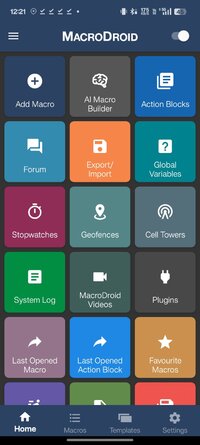
Overview: MacroDroid is a task automation and configuration app that focuses heavily on usability with a simple, attractive UI and logical step by step process.
==========
A few examples of what MacroDroid can automate:
==========
Turn on the Wifi connection when you launch a particular app (and off again when closed).
Auto respond to a specific incoming SMS by sending your current location.
Toggle the power button to tell you the time (without taking out of your pocket).
Use NFC tags to configure the device (turn on bluetooth, set volume etc).
==========
Creating a custom macro is easy:
==========
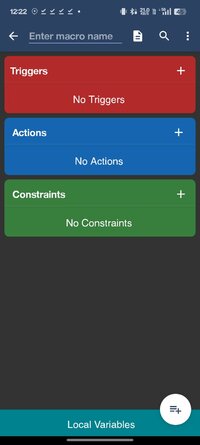
Click 'Add Macro'
Select a trigger from the list - (e.g. Battery Level).
Configure trigger specific settings (e.g. Battery Level - 10%)
Select an action from the list (e.g Configure Wifi)
Configure action specific setting (e.g. Disable Wifi)
Add more actions as required
(Optionally) add constraints from the list (e.g. Day of the Week)
Configure constraints as required (e.g. Saturday and Sunday)
Add more constraints as required
Choose a name and category for the macro
MacroDroid includes many built in and user shared templates to demonstrate the power and flexibility of the application and help you get started. These templates can be used as is, or easily customised to meet your needs.
This app uses the Device Administrator permission (BIND_DEVICE_ADMIN). This permission is used by the failed login trigger (nothing else) and will only be enabled if you explicitly give MacroDroid device admin access from within the app.
This app uses Accessibility services. It is a useful tool to help those with disabilities use their device more easily. MacroDroid is widely embraced by the blind community and those with limited motor skills to provide simple automations to greatly simplify device usage.
==========
Pro Version
==========
The free version of MacroDroid is limited to five macros and displays adverts. You can upgrade in the application to allow unlimited macros and remove all adverts. In addition Pro users can share their macros with the community using the built in template store.
=======
Support
=======
Please use the in-app forum for all usage questions and feature requests, or access the forums via _MacroDroid - Device Automation.
To report bugs or other issues please contact me at [email protected] with as much information as possible (including device and OS version).
► Credit : NURIK
What's New:
Version 5.63 (April 2026)
===========================
Added AI Macro Builder.
Significant improvements to MacroDroid Drawer to support multiple scene-based drawers.
Added camera trigger when in use.
Added camera when using restriction.
Added limitation for microphone recording.
Added: Shizuku stopped the trigger.
Added custom trigger “Custom scene trigger displayed/dismissed”.
Added restriction on enabling/disabling the application.
Buttons, icons, and scene images can now be configured to perform specific actions when pressed.
Scene text now supports clicks (close scene on click and launch, action blocks and macros).
Updated MacroDroid Variable. Modified the trigger to support monitoring of any changes to the dictionary/variable and added additional trigger-specific magic text.
Updated the Intent Received trigger to add support for storing additional intent content into a dictionary variable.
Updated the Record Microphone action to add support for Access to All Files.
Updated the Record Video action to add support for Access to All Files.
Updated the Take Picture action to support 'Access all files'.
Updated floating button trigger by adding 'Popup X,Y location on move' option.
Updated the Custom Scene action to add a 'Popup X,Y location on move' blend mode option.
Updated the floating text action to add an 'Update Variable on Move' option when using variables to set the X,Y position.
Updated the “Read QR Code” action and added the ability to read directly from the screen (Android 11+).
Updated Macro Invoked. Recently there was a limitation to support entering the macro name via text (including support for magic text).
Updated the Delete Macro action to support entering the macro name via text (including support for magic text).
Updated macro screen to support explicit compression of ELSE IF and ELSE conditions.
Updated the file operation action so that the file list option can output to an array and sort by file name, file size, or last modified time.
Updated the Create Chart action to add an option to block the following actions until the chart is closed.
Updated floating button trigger to support icon tinting.
Updated the Record Video action to specify video orientation.
Updated the JSON Parse action to add support for direct output to arrays.
Added test button to display dialog, options dialog and selection dialog.
Added a search function when adding a macro to the Quick Run Macro tile.
Added search function in user query when executing a macro and disabling macros.
Added a timeout option to the Tasker/Locale plugin when using Block next actions.
Updated screen content triggers refresh rate settings to support values < 0.1s.
Fixed the 'Capture Next Click' action to be able to capture a click from the status bar/navigation bar when launching a non-immersive app.
Fixed an issue where the notification trigger could fire twice in some rare cases.
Fixed an issue where the Application Running constraint did not work correctly when mapping to an array or dictionary.
Requirements: 6.0+
Overview: MacroDroid is a task automation and configuration app that focuses heavily on usability with a simple, attractive UI and logical step by step process.
==========
A few examples of what MacroDroid can automate:
==========
Turn on the Wifi connection when you launch a particular app (and off again when closed).
Auto respond to a specific incoming SMS by sending your current location.
Toggle the power button to tell you the time (without taking out of your pocket).
Use NFC tags to configure the device (turn on bluetooth, set volume etc).
==========
Creating a custom macro is easy:
==========
Click 'Add Macro'
Select a trigger from the list - (e.g. Battery Level).
Configure trigger specific settings (e.g. Battery Level - 10%)
Select an action from the list (e.g Configure Wifi)
Configure action specific setting (e.g. Disable Wifi)
Add more actions as required
(Optionally) add constraints from the list (e.g. Day of the Week)
Configure constraints as required (e.g. Saturday and Sunday)
Add more constraints as required
Choose a name and category for the macro
MacroDroid includes many built in and user shared templates to demonstrate the power and flexibility of the application and help you get started. These templates can be used as is, or easily customised to meet your needs.
This app uses the Device Administrator permission (BIND_DEVICE_ADMIN). This permission is used by the failed login trigger (nothing else) and will only be enabled if you explicitly give MacroDroid device admin access from within the app.
This app uses Accessibility services. It is a useful tool to help those with disabilities use their device more easily. MacroDroid is widely embraced by the blind community and those with limited motor skills to provide simple automations to greatly simplify device usage.
==========
Pro Version
==========
The free version of MacroDroid is limited to five macros and displays adverts. You can upgrade in the application to allow unlimited macros and remove all adverts. In addition Pro users can share their macros with the community using the built in template store.
=======
Support
=======
Please use the in-app forum for all usage questions and feature requests, or access the forums via _MacroDroid - Device Automation.
To report bugs or other issues please contact me at [email protected] with as much information as possible (including device and OS version).
► Credit : NURIK
What's New:
Version 5.63 (April 2026)
===========================
Added AI Macro Builder.
Significant improvements to MacroDroid Drawer to support multiple scene-based drawers.
Added camera trigger when in use.
Added camera when using restriction.
Added limitation for microphone recording.
Added: Shizuku stopped the trigger.
Added custom trigger “Custom scene trigger displayed/dismissed”.
Added restriction on enabling/disabling the application.
Buttons, icons, and scene images can now be configured to perform specific actions when pressed.
Scene text now supports clicks (close scene on click and launch, action blocks and macros).
Updated MacroDroid Variable. Modified the trigger to support monitoring of any changes to the dictionary/variable and added additional trigger-specific magic text.
Updated the Intent Received trigger to add support for storing additional intent content into a dictionary variable.
Updated the Record Microphone action to add support for Access to All Files.
Updated the Record Video action to add support for Access to All Files.
Updated the Take Picture action to support 'Access all files'.
Updated floating button trigger by adding 'Popup X,Y location on move' option.
Updated the Custom Scene action to add a 'Popup X,Y location on move' blend mode option.
Updated the floating text action to add an 'Update Variable on Move' option when using variables to set the X,Y position.
Updated the “Read QR Code” action and added the ability to read directly from the screen (Android 11+).
Updated Macro Invoked. Recently there was a limitation to support entering the macro name via text (including support for magic text).
Updated the Delete Macro action to support entering the macro name via text (including support for magic text).
Updated macro screen to support explicit compression of ELSE IF and ELSE conditions.
Updated the file operation action so that the file list option can output to an array and sort by file name, file size, or last modified time.
Updated the Create Chart action to add an option to block the following actions until the chart is closed.
Updated floating button trigger to support icon tinting.
Updated the Record Video action to specify video orientation.
Updated the JSON Parse action to add support for direct output to arrays.
Added test button to display dialog, options dialog and selection dialog.
Added a search function when adding a macro to the Quick Run Macro tile.
Added search function in user query when executing a macro and disabling macros.
Added a timeout option to the Tasker/Locale plugin when using Block next actions.
Updated screen content triggers refresh rate settings to support values < 0.1s.
Fixed the 'Capture Next Click' action to be able to capture a click from the status bar/navigation bar when launching a non-immersive app.
Fixed an issue where the notification trigger could fire twice in some rare cases.
Fixed an issue where the Application Running constraint did not work correctly when mapping to an array or dictionary.
*Special Features*
1 . Pro Features Unlocked
Credit to : NURIK
Free Download:
! Hidden Content !
You must be registered and either click Like under this post or leave a comment before you can see the hidden links.
You may need to refresh the page after clicking Like. If you’re still having trouble revealing the hidden links, please
read this.
Did you know? VIP Members can see all links instantly, no unlocking required.
Interested? Get VIP here.
Interested? Get VIP here.