Playstore Link :

Magnifier & Microscope+ [Cozy] - Apps on Google Play
Good magnifier app to see tiny things bigger and more clearly!
Magnifier & Microscope+ [Cozy] Ver. 7.0.1 build 44 MOD APK | Paid Patched
Requirements: 6.0+
Overview: This app turns your phone into a digital magnifier. You don't need to carry a magnifier anymore.
This app turns your phone into a digital magnifier. You don't need to carry a magnifier anymore.
* Basic features
⊙ Magnification (H/W, S/W)
⊙ Microscope (more fine picture)
⊙ LED Flashlight
⊙ Macro Camera
⊙ Image Freezing
⊙ Embedded photo viewer
⊙ Image filters(Negative, Sepia, Mono)
⊙ WYSIWYG saves
* Plus version features
★ Basic features
★ No Ads
★ Full screen mode
★ Enhanced gallery viewer
★ Exposure control
★ Saving low definition pictures
Do you have to remove your glasses to read a business card?
Do you have to carry a big magnifying glass to read the model number of a tiny semiconductor?
Do you use a microscope to observe legs of a tiny insect?
Fantastic solution is here!
Use your smartphone as a nice magnifier!
Use your smartphone as a nice microscope!
Use your smartphone as a nice macro camera!
Magnifier & Microscope+ makes you a smart guy!
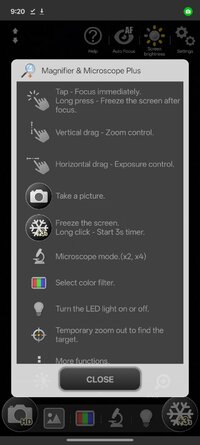
1. Magnifier
- Live H/W magnification.
- Live S/W magnification(x4).
- Taking pictures.
- Continuous auto focus(If possible).
2. Freeze shot
- Freezing screen to see picture stably.
- Useful in moving car.
- Useful to write a memo on paper.
3. Microscope
- More fine picture than magnifier mode.
- More magnification.
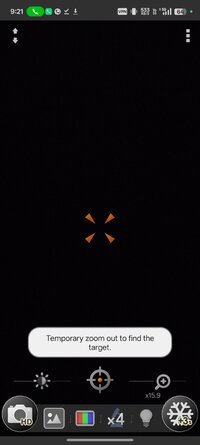
4. Zooming controls
- Zooming control bar.
- Pinching to zoom everywhere.
5. Image Effects
- Support frequently used picture effects.(Negative, Sepia, Mono)
6. Flash light
- Flash light ON/OFF
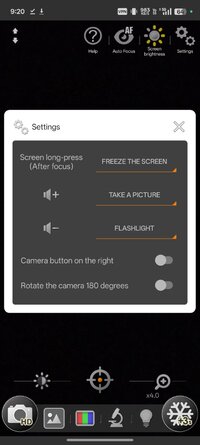
- Volume-down button to turn flash light on or off.
7. Taking pictures
- Taking a picture by pressing volume-up button or touching camera icon.
- Saving a picture by touching save icon.
- Support WYSIWYG(What You See Is What You Get) saving in microscope mode & freezing mode.
8. Image Viewer
- Quick image viewing for saved image.
- Image effects.(Negative, Mono, Sepia)
- Image sharing.
- Image rotation.
9. Full Screen
- 'Menu' button switches full screen on & off.
* Some devices can't use some functions.
* This is not a real microscope. ;)
★ No Root or Lucky Patcher or Google Play Modded required
★ .source attributes of the corresponding java files removed
★ All Debug code removed
➡ CPU architectures: arm64-v8a, armeabi-v7a, x86, x86_64
➡ Screen DPIs: 120dpi, 160dpi, 240dpi, 320dpi, 480dpi, 640dpi
What's New:
✔ Shows the status bar at the top of the screen.
✔ Supports 180-degree camera rotation.
✔ Supports text highlight color filters for the screen.
✔ Enhanced internal gallery.
- Supports rotating pictures.
- Supports advanced sharpness control.
- Supports text highlight color filters for pictures.
* Magnifying glass images are saved in the DCIM/CozyMag directory.
Requirements: 6.0+
Overview: This app turns your phone into a digital magnifier. You don't need to carry a magnifier anymore.
This app turns your phone into a digital magnifier. You don't need to carry a magnifier anymore.
* Basic features
⊙ Magnification (H/W, S/W)
⊙ Microscope (more fine picture)
⊙ LED Flashlight
⊙ Macro Camera
⊙ Image Freezing
⊙ Embedded photo viewer
⊙ Image filters(Negative, Sepia, Mono)
⊙ WYSIWYG saves
* Plus version features
★ Basic features
★ No Ads
★ Full screen mode
★ Enhanced gallery viewer
★ Exposure control
★ Saving low definition pictures
Do you have to remove your glasses to read a business card?
Do you have to carry a big magnifying glass to read the model number of a tiny semiconductor?
Do you use a microscope to observe legs of a tiny insect?
Fantastic solution is here!
Use your smartphone as a nice magnifier!
Use your smartphone as a nice microscope!
Use your smartphone as a nice macro camera!
Magnifier & Microscope+ makes you a smart guy!
1. Magnifier
- Live H/W magnification.
- Live S/W magnification(x4).
- Taking pictures.
- Continuous auto focus(If possible).
2. Freeze shot
- Freezing screen to see picture stably.
- Useful in moving car.
- Useful to write a memo on paper.
3. Microscope
- More fine picture than magnifier mode.
- More magnification.
4. Zooming controls
- Zooming control bar.
- Pinching to zoom everywhere.
5. Image Effects
- Support frequently used picture effects.(Negative, Sepia, Mono)
6. Flash light
- Flash light ON/OFF
- Volume-down button to turn flash light on or off.
7. Taking pictures
- Taking a picture by pressing volume-up button or touching camera icon.
- Saving a picture by touching save icon.
- Support WYSIWYG(What You See Is What You Get) saving in microscope mode & freezing mode.
8. Image Viewer
- Quick image viewing for saved image.
- Image effects.(Negative, Mono, Sepia)
- Image sharing.
- Image rotation.
9. Full Screen
- 'Menu' button switches full screen on & off.
* Some devices can't use some functions.
* This is not a real microscope. ;)
★ No Root or Lucky Patcher or Google Play Modded required
★ .source attributes of the corresponding java files removed
★ All Debug code removed
➡ CPU architectures: arm64-v8a, armeabi-v7a, x86, x86_64
➡ Screen DPIs: 120dpi, 160dpi, 240dpi, 320dpi, 480dpi, 640dpi
What's New:
✔ Shows the status bar at the top of the screen.
✔ Supports 180-degree camera rotation.
✔ Supports text highlight color filters for the screen.
✔ Enhanced internal gallery.
- Supports rotating pictures.
- Supports advanced sharpness control.
- Supports text highlight color filters for pictures.
* Magnifying glass images are saved in the DCIM/CozyMag directory.
*Special Features*
1 . Paid Patched
2 . No Root or Lucky Patcher or Google Play Modded required
Free Download:
! Hidden Content !
You must be registered and either click Like under this post or leave a comment before you can see the hidden links.
You may need to refresh the page after clicking Like. If you’re still having trouble revealing the hidden links, please
read this.
Did you know? VIP Members can see all links instantly, no unlocking required.
Interested? Get VIP here.
Interested? Get VIP here.