Playstore Link :

Microsoft SwiftKey AI Keyboard - Apps on Google Play
AI-powered Copilot. Personalized keyboard with gifs, stickers & themes
Microsoft SwiftKey AI Keyboard Ver. 9.12.24.7 b1234698352 MOD APK l Coin, Full Unlocked + Themes
Requirements: 8.0+
Overview: AI-powered Copilot. Personalized keyboard with gifs, stickers & themes
Microsoft SwiftKey is the intelligent keyboard that learns your writing style, so you can type faster.
Use your personalized keyboard to type and send emoji, GIFs and stickers just the way you like.
Microsoft SwiftKey comes with Copilot - your everyday AI companion. You can ask AI anything in your favourite apps.
The Microsoft SwiftKey swipe keyboard is always learning and adapting to match your unique way of typing - including your slang, nicknames and emoji.
Microsoft SwiftKey caters to all typing tastes, with free designs and themes to fit any style. The custom keyboard provides autocorrect that actually works. Microsoft SwiftKey provides helpful predictions, so you can get your point across fast, without errors. Type and text any way you like, with swipe-to-type, tap-to-type, and searchable emojis and GIFs.
TYPE LESS, DO MORE
Typing
- Swipe to type or tap to type
- Spell checker and auto text with AI-powered predictions
- Custom keyboard toolbar with an expandable menu of quick shortcuts
- Rewrite your text in a different tone and Compose text to effortlessly transform your ideas into polished drafts via AI
Rich content
- Use emoji, GIFs and stickers to express yourself
- Emoji keyboard is adaptive, learning and predicting your favorite emoticons for any conversation
- Search emojis and GIFs to find the best one for your reaction
- Create unique AI-powered images and memes to stand out from the crowd
Customize
- 100+ colorful keyboard themes
- Make your own custom keyboard theme with your photo as the background
- Customize your keyboard size and layout
Multilingual
- Enable up to five languages at once
- Keyboard supports over 700 languages
Get the custom keyboard that always matches your style – download Microsoft SwiftKey Keyboard today!
Find out more about Microsoft SwiftKey’s key features: Microsoft SwiftKey
SUPPORTS 700+ LANGUAGES including:
English (US, UK, AU, CA)
Spanish (ES, LA, US)
Portuguese (PT, BR)
German
Turkish
French
Arabic
Russian
Italian
Polish
Microsoft SwiftKey AI Keyboard may request the following optional permissions, which require your consent. You can continue to use Microsoft SwiftKey AI Keyboard without granting these permissions; however, some features may be limited or unavailable.
For more information, please see below:
- Microphone: To enter text via voice using the voice-to-text functionality.
- Photos and videos: To select images stored on your device and insert or share them in messages.
- Contacts: To access your contacts for easy entry when composing messages.
- Camera: To take photos to insert or share them in messages.
Mod Info:
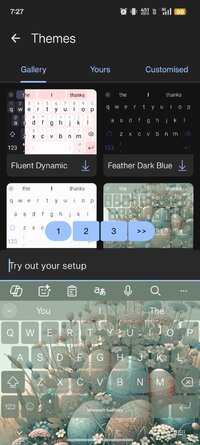
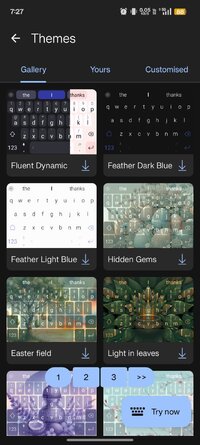
✰ Added all mihz mod's themes. Thanks to him for all these themes.
✰ Few extra themes added from an unknown mod, identity is not known of themer.
✰ Added iOS keypress sounds as an extra option.
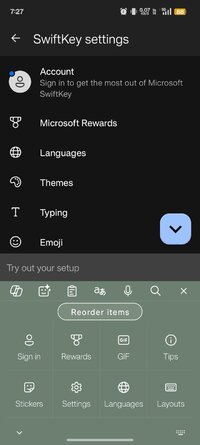
✰ Keyboard switcher added. To access it, click on "..." on your toolbar, click on Tips, and then on top, "Switch Keyboard".
✰ Autopunctuation corrected for colons, dashes, hyphens and some other characters. Switch it on under "Layout & Keys -> add space in more punctuation". Add space option must be turned on for this under Typing settings. (Credits: mihz+tufi)
✰ Additional characters added to keys. (some characters are exclusive to English language). To enable it, Enable Settings → Layout & Keys → Show additional characters (only for English (US) and Russian (RU))
✰ Added an option under clipboard settings to remove all unpinned entries at once.
✰ Import/Export option added.
•• Both options are under clipboard settings.
•• Export option will export all clips to "sdcard/download/clipboard_export.txt"
•• Import option allows you to choose any ".txt" file to import clips to your existing clipboard items.
•• Every single line till there's a (new line break) will be considered as a single entry.
✰ SwiftKey's own backup/import function implemented.
✰ Allows you to backup all your settings, custom themes etc (some parts may still not be backed up)..
✰ Find both options in clipboard section along with clipboard related import/export option.
✰ Backup file is saved under sdcard/download named Swiftkey_Backup.enc
✰ All non essential receivers / permissions / activities/ services / providers and meta-data removed from manifest.
✰ Telemetry removed. Used adguard to trace the traffic, it was clean. Report if you find any.
Notes:
Import/Export functions:
EXPAND: HIDE
Export-
• Each export file can later be imported to keep clips and shortcuts intact.
• Export format is this,
•• (1.) *# tk thank you (* represents the shortcut and # represents pinned status)
•• (2.) thank you.
Import:
• Two ways to import,
•• If the file name is "shortcut.txt", first word would be considered as a shortcut and rest of the entry till there's a "
" would be the text part.
•• Any other file name must have this format,
••• (1.) *# tk thank you (* for shortcut and # for pinned status)
••• (2.) no thank you (saved as a whole without any shortcut)
Letters with additional characters:
EXPAND: HIDE
C - angle brackets <> and herringbone quotes « »
G - hyphen, middle hyphen — –
K - opening bracket and opening brace [{
L - closing bracket and closing brace ]}
M - backslash \
V - apostrophes ʼ `
R - copyright mark and rupee sign © ℗ ₹
U, I - arrows ↑ → ↓ ←
F - list marker, check mark and star • ✓ ✰
J - not equal to, approximately ≠ ≈
Q - degrees symbol °
H - plus minus symbol ±
Incase you have SwiftKey pre-installed in system partition, install clone.
Clone package: com.touchtype.swiftkez
Clone name changed to "SwiftKey"
Apk Details:
arm7+arm64
Size: 63.7 MB
SHA-256: 5fd52d0a63315eacc8cfbbf036e9f277fa3adb91885acf4f70acc8e908cc9966
Clone
arm7+arm64
Size: 63.7 MB
SHA-256: 4a6aac9de95e3cf4eb067d05e798d55a148175398c58aac1df59ba3b7d9ad87f
What's New:
- Add hyphen to Rusyn and Georgian layouts, ཻ and ཽ to Tibetan layout, ZWNJ and ZWJ to Hindi, Malayalam, Marathi, Punjabi and Tamil layouts
Requirements: 8.0+
Overview: AI-powered Copilot. Personalized keyboard with gifs, stickers & themes
Microsoft SwiftKey is the intelligent keyboard that learns your writing style, so you can type faster.
Use your personalized keyboard to type and send emoji, GIFs and stickers just the way you like.
Microsoft SwiftKey comes with Copilot - your everyday AI companion. You can ask AI anything in your favourite apps.
The Microsoft SwiftKey swipe keyboard is always learning and adapting to match your unique way of typing - including your slang, nicknames and emoji.
Microsoft SwiftKey caters to all typing tastes, with free designs and themes to fit any style. The custom keyboard provides autocorrect that actually works. Microsoft SwiftKey provides helpful predictions, so you can get your point across fast, without errors. Type and text any way you like, with swipe-to-type, tap-to-type, and searchable emojis and GIFs.
TYPE LESS, DO MORE
Typing
- Swipe to type or tap to type
- Spell checker and auto text with AI-powered predictions
- Custom keyboard toolbar with an expandable menu of quick shortcuts
- Rewrite your text in a different tone and Compose text to effortlessly transform your ideas into polished drafts via AI
Rich content
- Use emoji, GIFs and stickers to express yourself
- Emoji keyboard is adaptive, learning and predicting your favorite emoticons for any conversation
- Search emojis and GIFs to find the best one for your reaction
- Create unique AI-powered images and memes to stand out from the crowd
Customize
- 100+ colorful keyboard themes
- Make your own custom keyboard theme with your photo as the background
- Customize your keyboard size and layout
Multilingual
- Enable up to five languages at once
- Keyboard supports over 700 languages
Get the custom keyboard that always matches your style – download Microsoft SwiftKey Keyboard today!
Find out more about Microsoft SwiftKey’s key features: Microsoft SwiftKey
SUPPORTS 700+ LANGUAGES including:
English (US, UK, AU, CA)
Spanish (ES, LA, US)
Portuguese (PT, BR)
German
Turkish
French
Arabic
Russian
Italian
Polish
Microsoft SwiftKey AI Keyboard may request the following optional permissions, which require your consent. You can continue to use Microsoft SwiftKey AI Keyboard without granting these permissions; however, some features may be limited or unavailable.
For more information, please see below:
- Microphone: To enter text via voice using the voice-to-text functionality.
- Photos and videos: To select images stored on your device and insert or share them in messages.
- Contacts: To access your contacts for easy entry when composing messages.
- Camera: To take photos to insert or share them in messages.
Mod Info:
✰ Added all mihz mod's themes. Thanks to him for all these themes.
✰ Few extra themes added from an unknown mod, identity is not known of themer.
✰ Added iOS keypress sounds as an extra option.
✰ Keyboard switcher added. To access it, click on "..." on your toolbar, click on Tips, and then on top, "Switch Keyboard".
✰ Autopunctuation corrected for colons, dashes, hyphens and some other characters. Switch it on under "Layout & Keys -> add space in more punctuation". Add space option must be turned on for this under Typing settings. (Credits: mihz+tufi)
✰ Additional characters added to keys. (some characters are exclusive to English language). To enable it, Enable Settings → Layout & Keys → Show additional characters (only for English (US) and Russian (RU))
✰ Added an option under clipboard settings to remove all unpinned entries at once.
✰ Import/Export option added.
•• Both options are under clipboard settings.
•• Export option will export all clips to "sdcard/download/clipboard_export.txt"
•• Import option allows you to choose any ".txt" file to import clips to your existing clipboard items.
•• Every single line till there's a (new line break) will be considered as a single entry.
✰ SwiftKey's own backup/import function implemented.
✰ Allows you to backup all your settings, custom themes etc (some parts may still not be backed up)..
✰ Find both options in clipboard section along with clipboard related import/export option.
✰ Backup file is saved under sdcard/download named Swiftkey_Backup.enc
✰ All non essential receivers / permissions / activities/ services / providers and meta-data removed from manifest.
✰ Telemetry removed. Used adguard to trace the traffic, it was clean. Report if you find any.
Notes:
Import/Export functions:
EXPAND: HIDE
Export-
• Each export file can later be imported to keep clips and shortcuts intact.
• Export format is this,
•• (1.) *# tk thank you (* represents the shortcut and # represents pinned status)
•• (2.) thank you.
Import:
• Two ways to import,
•• If the file name is "shortcut.txt", first word would be considered as a shortcut and rest of the entry till there's a "
" would be the text part.
•• Any other file name must have this format,
••• (1.) *# tk thank you (* for shortcut and # for pinned status)
••• (2.) no thank you (saved as a whole without any shortcut)
Letters with additional characters:
EXPAND: HIDE
C - angle brackets <> and herringbone quotes « »
G - hyphen, middle hyphen — –
K - opening bracket and opening brace [{
L - closing bracket and closing brace ]}
M - backslash \
V - apostrophes ʼ `
R - copyright mark and rupee sign © ℗ ₹
U, I - arrows ↑ → ↓ ←
F - list marker, check mark and star • ✓ ✰
J - not equal to, approximately ≠ ≈
Q - degrees symbol °
H - plus minus symbol ±
Incase you have SwiftKey pre-installed in system partition, install clone.
Clone package: com.touchtype.swiftkez
Clone name changed to "SwiftKey"
Apk Details:
arm7+arm64
Size: 63.7 MB
SHA-256: 5fd52d0a63315eacc8cfbbf036e9f277fa3adb91885acf4f70acc8e908cc9966
Clone
arm7+arm64
Size: 63.7 MB
SHA-256: 4a6aac9de95e3cf4eb067d05e798d55a148175398c58aac1df59ba3b7d9ad87f
What's New:
- Add hyphen to Rusyn and Georgian layouts, ཻ and ཽ to Tibetan layout, ZWNJ and ZWJ to Hindi, Malayalam, Marathi, Punjabi and Tamil layouts
*Special Features*
✰ Added all mihz mod's themes. Thanks to him for all these themes.
✰ Few extra themes added from an unknown mod, identity is not known of themer.
✰ Added iOS keypress sounds as an extra option.
✰ Keyboard switcher added. To access it, click on "..." on your toolbar, click on Tips, and then on top, "Switch Keyboard".
✰ Autopunctuation corrected for colons, dashes, hyphens and some other characters. Switch it on under "Layout & Keys -> add space in more punctuation". Add space option must be turned on for this under Typing settings. (Credits: mihz+tufi)
✰ Additional characters added to keys. (some characters are exclusive to English language). To enable it, Enable Settings → Layout & Keys → Show additional characters (only for English (US) and Russian (RU))
✰ Added an option under clipboard settings to remove all unpinned entries at once.
✰ Import/Export option added.
•• Both options are under clipboard settings.
•• Export option will export all clips to "sdcard/download/clipboard_export.txt"
•• Import option allows you to choose any ".txt" file to import clips to your existing clipboard items.
•• Every single line till there's a (new line break) will be considered as a single entry.
✰ SwiftKey's own backup/import function implemented.
✰ Allows you to backup all your settings, custom themes etc (some parts may still not be backed up)..
✰ Find both options in clipboard section along with clipboard related import/export option.
✰ Backup file is saved under sdcard/download named Swiftkey_Backup.enc
✰ All non essential receivers / permissions / activities/ services / providers and meta-data removed from manifest.
✰ Telemetry removed. Used adguard to trace the traffic, it was clean. Report if you find any.
Export-
• Each export file can later be imported to keep clips and shortcuts intact.
• Export format is this,
•• (1.) *# tk thank you (* represents the shortcut and # represents pinned status)
•• (2.) thank you.
Import:
• Two ways to import,
•• If the file name is "shortcut.txt", first word would be considered as a shortcut and rest of the entry till there's a "
" would be the text part.
•• Any other file name must have this format,
••• (1.) *# tk thank you (* for shortcut and # for pinned status)
••• (2.) no thank you (saved as a whole without any shortcut)
• Each export file can later be imported to keep clips and shortcuts intact.
• Export format is this,
•• (1.) *# tk thank you (* represents the shortcut and # represents pinned status)
•• (2.) thank you.
Import:
• Two ways to import,
•• If the file name is "shortcut.txt", first word would be considered as a shortcut and rest of the entry till there's a "
" would be the text part.
•• Any other file name must have this format,
••• (1.) *# tk thank you (* for shortcut and # for pinned status)
••• (2.) no thank you (saved as a whole without any shortcut)
C - angle brackets <> and herringbone quotes « »
G - hyphen, middle hyphen — –
K - opening bracket and opening brace [{
L - closing bracket and closing brace ]}
M - backslash \
V - apostrophes ʼ `
R - copyright mark and rupee sign © ℗ ₹
U, I - arrows ↑ → ↓ ←
F - list marker, check mark and star • ✓ ✰
J - not equal to, approximately ≠ ≈
Q - degrees symbol °
H - plus minus symbol ±
G - hyphen, middle hyphen — –
K - opening bracket and opening brace [{
L - closing bracket and closing brace ]}
M - backslash \
V - apostrophes ʼ `
R - copyright mark and rupee sign © ℗ ₹
U, I - arrows ↑ → ↓ ←
F - list marker, check mark and star • ✓ ✰
J - not equal to, approximately ≠ ≈
Q - degrees symbol °
H - plus minus symbol ±
Note:
Incase you have SwiftKey pre-installed in system partition, install clone.
Clone package: com.touchtype.swiftkez
Clone name changed to "SwiftKey"
Credit to : youarefinished
Free Download:
! Hidden Content !
You must be registered and either click Like under this post or leave a comment before you can see the hidden links.
You may need to refresh the page after clicking Like. If you’re still having trouble revealing the hidden links, please
read this.
Did you know? VIP Members can see all links instantly, no unlocking required.
Interested? Get VIP here.
Interested? Get VIP here.