Playstore Link :

MobiOffice: Word, Sheets, PDF - Apps on Google Play
Mobile office documents — Word docs, Excel sheets, PowerPoint slides, PDF editor
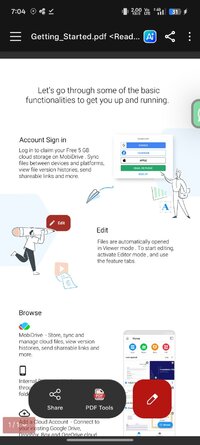
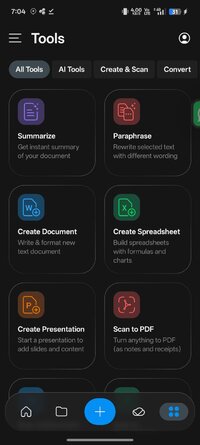
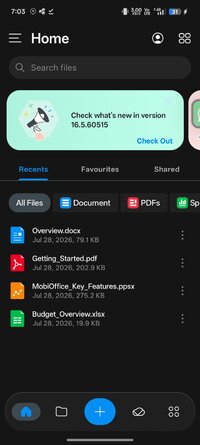
MobiOffice now gives you full access to core office features — create, edit, format, and manage documents, spreadsheets, presentations, and PDF files in one powerful mobile office app. Whether you’re working at home, in the office, or on the go, MobiOffice helps you stay productive and organized wherever you are.
Work with Word documents, Excel spreadsheets, PowerPoint presentations, and PDF files with powerful editing tools and seamless compatibility with Microsoft Office (Word, Excel, PowerPoint), Google Docs, Google Sheets, Google Slides, OpenOffice, LibreOffice, WPS Office, Polaris Office, Adobe PDF, and more.
 Create and edit documents
Create and edit Word documents using powerful formatting tools, track changes, comments, and advanced layout options to keep your documents professional and organized.
 Work with spreadsheets
Open and edit Excel spreadsheets, apply formulas, conditional formatting, and data tools to manage calculations, budgets, and reports directly from your mobile device.
 Build presentations
Create and edit PowerPoint slides, adjust layouts, add images, and present your ideas with confidence wherever you are.
 Manage PDF files
View, annotate, fill, and sign PDF documents or convert Office files to PDF for easier sharing and document management.
 Access your files anywhere
Connect your Google Drive, OneDrive, Box, or Dropbox accounts and keep your documents synchronized across devices.
 Designed for productivity on the go
Enjoy a fast, intuitive interface optimized for Android that makes it easy to read, edit, and manage documents wherever you are.
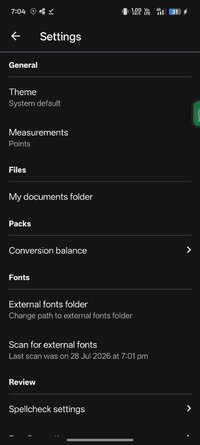
Core office features are fully unlocked in this version. A one-time $9.99 purchase unlocks additional fonts, Office file conversions, 50GB MobiDrive storage, removes ads, and includes up to 150 document conversion pages.
Help Center: https://support.mobisystems.com/hc/en-us/sections/21745595904797-MobiOffice-Android
Privacy Policy: Privacy Policy | MobiSystems
Terms of Use: Terms of Use | MobiSystems
Work with Word documents, Excel spreadsheets, PowerPoint presentations, and PDF files with powerful editing tools and seamless compatibility with Microsoft Office (Word, Excel, PowerPoint), Google Docs, Google Sheets, Google Slides, OpenOffice, LibreOffice, WPS Office, Polaris Office, Adobe PDF, and more.
Create and edit documentsCreate and edit Word documents using powerful formatting tools, track changes, comments, and advanced layout options to keep your documents professional and organized.
Work with spreadsheetsOpen and edit Excel spreadsheets, apply formulas, conditional formatting, and data tools to manage calculations, budgets, and reports directly from your mobile device.
Build presentationsCreate and edit PowerPoint slides, adjust layouts, add images, and present your ideas with confidence wherever you are.
Manage PDF filesView, annotate, fill, and sign PDF documents or convert Office files to PDF for easier sharing and document management.
Access your files anywhereConnect your Google Drive, OneDrive, Box, or Dropbox accounts and keep your documents synchronized across devices.
Designed for productivity on the goEnjoy a fast, intuitive interface optimized for Android that makes it easy to read, edit, and manage documents wherever you are.
Core office features are fully unlocked in this version. A one-time $9.99 purchase unlocks additional fonts, Office file conversions, 50GB MobiDrive storage, removes ads, and includes up to 150 document conversion pages.
Help Center: https://support.mobisystems.com/hc/en-us/sections/21745595904797-MobiOffice-Android
Privacy Policy: Privacy Policy | MobiSystems
Terms of Use: Terms of Use | MobiSystems
*Special Features*
◉ Premium activated.
◉ Attachments are not forwarded with a caption or link.
◉ Google Drive Cloud will not work.
◉ Languages: Multi Languages.
◉ Separated by architecture.
◉ Debug information removed.
◉ Resources optimized.
Credit to : NURIK
Free Download:
! Hidden Content !
You must be registered and either click Like under this post or leave a comment before you can see the hidden links.
You may need to refresh the page after clicking Like. If you’re still having trouble revealing the hidden links, please
read this.
Did you know? VIP Members can see all links instantly, no unlocking required.
Interested? Get VIP here.
Interested? Get VIP here.