Playstore Link :

Overlay Monitor CPU/Battery - Apps on Google Play
Monitor CPU and battery in real time with a floating on-screen overlay.
Overlay Monitor CPU/Battery Ver. 0.1.2 MOD APK | Pro / Paid Unlocked
Requirements: Android 8.0 and up
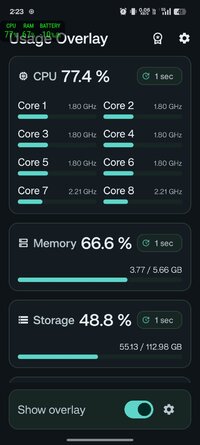
Overview: Keep a close eye on your device's performance in real-time without leaving your favorite games or apps. This floating system monitor provides instant insights into your CPU, memory, storage, and battery health, perfectly tailored for power users wanting reliable system tracking.
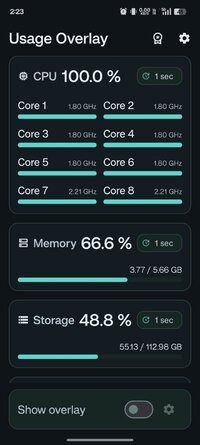
See CPU usage, memory usage, storage usage, and battery information in real time while using games and other apps.
Usage Overlay is a floating monitor that keeps important system info visible on screen. You can check device status without leaving the current app, making it useful for gaming, performance checks, charging checks, and daily device monitoring.
Features
➤ Floating system monitor: overlay over games and apps
➤ Estimated CPU usage: based on current and maximum CPU frequency
➤ Memory usage: percentage
➤ Internal storage usage: percentage
➤ Battery details: including total capacity, remaining capacity, temperature, battery health, current, voltage, charging and discharging power, and charge or drain rate
➤ Adjustable interface: overlay position and size
➤ Customizable view: Select the items you want to display
➤ Auto start: support
Made for real-time monitoring
Usage Overlay helps you keep the information you need visible at all times. Place the overlay where it is easiest to read, resize it for your screen, and show only the data you care about.
Pro version
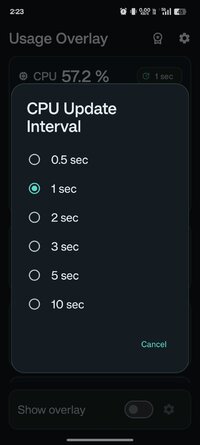
➤ Update interval settings: Control how frequently data refreshes
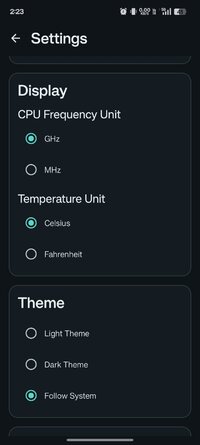
➤ Custom overlay colors: Personalize the look of your monitor
➤ Ad removal: Enjoy a seamless, ad-free experience
Pro is a one-time purchase. No subscription.
Notes
• Internal storage is supported. External storage is not currently supported.
• Available values may vary depending on device and Android version.
• Overlay permission is required.
If you want a simple and reliable floating CPU monitor, system monitor overlay, or battery overlay, Usage Overlay makes real-time device information easy to see.
Modifications:
✪ Pro / Paid features unlocked;
✪ Cleaned all useless files;
✪ All Debug Codes Removed;
✪ CPUs: armeabi-v7a, arm64-v8a;
➥ Modded By TRUMods #FirstTimeOnNet
What's New:
Ver 0.1.2
• Fixed an issue where the app would not launch on Android 8
Ver 0.1.1
• Improved battery information retrieval process
• Fixed a crash on the billing screen
• Other minor bug fixes
Ver 0.1.0
• Beta release
Requirements: Android 8.0 and up
Overview: Keep a close eye on your device's performance in real-time without leaving your favorite games or apps. This floating system monitor provides instant insights into your CPU, memory, storage, and battery health, perfectly tailored for power users wanting reliable system tracking.
See CPU usage, memory usage, storage usage, and battery information in real time while using games and other apps.
Usage Overlay is a floating monitor that keeps important system info visible on screen. You can check device status without leaving the current app, making it useful for gaming, performance checks, charging checks, and daily device monitoring.
Features
➤ Floating system monitor: overlay over games and apps
➤ Estimated CPU usage: based on current and maximum CPU frequency
➤ Memory usage: percentage
➤ Internal storage usage: percentage
➤ Battery details: including total capacity, remaining capacity, temperature, battery health, current, voltage, charging and discharging power, and charge or drain rate
➤ Adjustable interface: overlay position and size
➤ Customizable view: Select the items you want to display
➤ Auto start: support
Made for real-time monitoring
Usage Overlay helps you keep the information you need visible at all times. Place the overlay where it is easiest to read, resize it for your screen, and show only the data you care about.
Pro version
➤ Update interval settings: Control how frequently data refreshes
➤ Custom overlay colors: Personalize the look of your monitor
➤ Ad removal: Enjoy a seamless, ad-free experience
Pro is a one-time purchase. No subscription.
Notes
• Internal storage is supported. External storage is not currently supported.
• Available values may vary depending on device and Android version.
• Overlay permission is required.
If you want a simple and reliable floating CPU monitor, system monitor overlay, or battery overlay, Usage Overlay makes real-time device information easy to see.
Modifications:
✪ Pro / Paid features unlocked;
✪ Cleaned all useless files;
✪ All Debug Codes Removed;
✪ CPUs: armeabi-v7a, arm64-v8a;
➥ Modded By TRUMods #FirstTimeOnNet
What's New:
Ver 0.1.2
• Fixed an issue where the app would not launch on Android 8
Ver 0.1.1
• Improved battery information retrieval process
• Fixed a crash on the billing screen
• Other minor bug fixes
Ver 0.1.0
• Beta release
*Special Features*
1 . Pro / Paid features unlocked
Note:
First Time On Net
Credit to : TRUMods
Free Download:
! Hidden Content !
You must be registered and either click Like under this post or leave a comment before you can see the hidden links.
You may need to refresh the page after clicking Like. If you’re still having trouble revealing the hidden links, please
read this.
Did you know? VIP Members can see all links instantly, no unlocking required.
Interested? Get VIP here.
Interested? Get VIP here.