Playstore Link :

PDF Merge: Scan, Sign & Edit - Apps on Google Play
Merge, Scan, and Sign PDFs 100% Offline. Your data never leaves your phone.
PDF Merge: Scan, Sign & Edit Ver. 4.1.7 MOD APK | Premium Unlocked
Requirements: 7.0 and up
Overview: Merge, Scan, Sign & Split PDF. Convert Text or HTML to PDF. Compress & Watermark
Image
The Only PDF Toolkit You Will Ever Need.
Stop wasting time with multiple apps. PDF Merge: Scan, Sign & Edit is a powerful, all-in-one document solution designed to help you handle every PDF task quickly and professionally. Whether you are a student, a business professional, or a freelancer, this app provides the tools you need to stay productive on the go.
From high-quality scanning to secure document signing, we have built a lightweight and fast application that puts a complete office suite in your pocket.
From high-quality scanning to secure document signing, we have built a lightweight and fast application that puts a complete office suite in your pocket.
CORE FEATURES
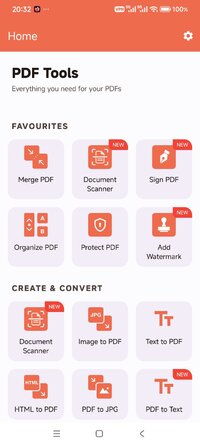
Merge and Split PDF
PDF Merge: Combine multiple documents into a single, organized file.
PDF Split: Extract specific pages or divide large files into smaller sections.
Professional PDF Scanner
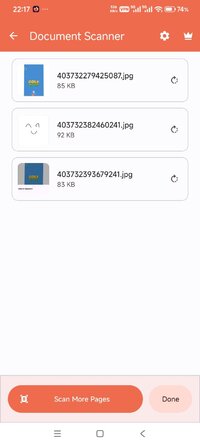
Scan PDF: Turn your camera into a high-quality document scanner.
Perfect for receipts, ID cards, certificates, and handwritten notes.
Automatic edge detection for clean, professional results.
Digital Signature and Editing
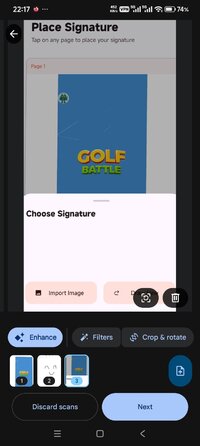
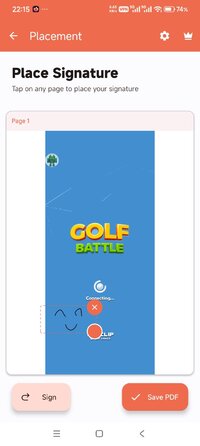
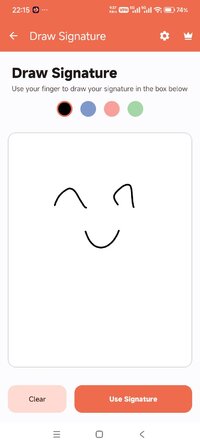
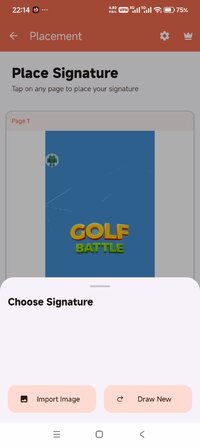
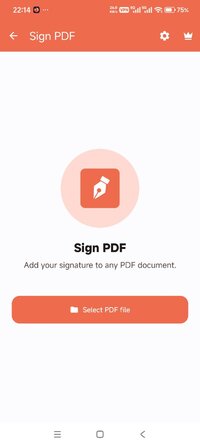
Sign PDF: Draw your signature and apply it to any document instantly.
Save your signature to reuse on contracts, invoices, and legal forms.
Organise PDF: Reorder, delete, or manage pages within your document with ease.
Advanced Conversions
Text to PDF: Convert plain text files or notes into professional PDF documents.
HTML to PDF: Save any webpage as a PDF for offline reading or easy sharing.
Optimization and Security
Compress PDF: Shrink large file sizes for fast email sharing without losing quality.
Protect PDF: Secure your sensitive data with strong password encryption.
Watermark PDF: Add custom text or image watermarks to protect your work.
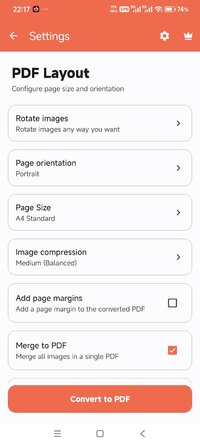
Rotate PDF: Fix incorrectly oriented scans or pages instantly.
WHY CHOOSE THIS APP?
Fast and Lightweight: Designed to work smoothly on all devices.
Privacy Focused: Your documents are processed locally on your phone.
User-Friendly: A clean interface that gets the job done in seconds.
High Quality: No blurred scans or messy conversions.
WHO IS THIS FOR?
Students: Merge assignments and scan study materials.
Business Owners: Sign contracts and manage invoices from anywhere.
Freelancers: Watermark portfolios and protect intellectual property.
General Users: Organize personal documents, insurance papers, and IDs.
Take control of your digital documents today. Download PDF Editor: Merge, Scan, Sign and experience the fastest way to manage, edit, and secure your PDFs.
Mod Info:
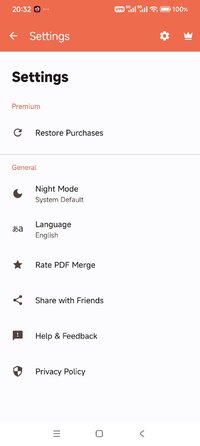
✪ Premium Features Unlocked
✪ CPUs: arm64-v8a, armeabi-v7a
✪ Languages: af, am, ar, as, az, be, bg, bn, bs, ca, cs, da, de, el, en-AU, en-CA, en-GB, en-IN, en-XC, es, es-GT, es-US, et, eu, fa, fi, fr, fr-CA, gl, gu, hi, hr, hu, hy, id, in, is, it, iw, ja, ka, kk, km, kn, ko, ky, lo, lt, lv, mk, ml, mn, mr, ms, my, nb, ne, nl, or, pa, pl, pt, pt-BR, pt-PT, ro, ru, ru-RU, si, sk, sl, sq, sr, sv, sw, ta, te, th, tl, tr, uk, ur, uz, vi, zh, zh-CN, zh-HK, zh-TW, zu
✪ Debug Info Removed
What's New:
Added below new PDF tools
1. Sign PDF
2. Rotate PDF
3. Scan Document
4. Add Watermark
5. PDF to Text
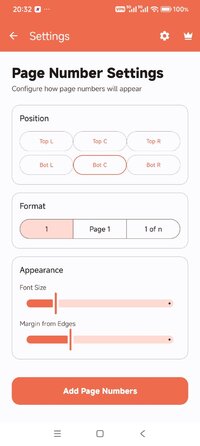
6. Add Page Numbers
Enhanced the UI of the application.
Fixed application crash issues
Requirements: 7.0 and up
Overview: Merge, Scan, Sign & Split PDF. Convert Text or HTML to PDF. Compress & Watermark
Image
The Only PDF Toolkit You Will Ever Need.
Stop wasting time with multiple apps. PDF Merge: Scan, Sign & Edit is a powerful, all-in-one document solution designed to help you handle every PDF task quickly and professionally. Whether you are a student, a business professional, or a freelancer, this app provides the tools you need to stay productive on the go.
From high-quality scanning to secure document signing, we have built a lightweight and fast application that puts a complete office suite in your pocket.
From high-quality scanning to secure document signing, we have built a lightweight and fast application that puts a complete office suite in your pocket.
CORE FEATURES
Merge and Split PDF
PDF Merge: Combine multiple documents into a single, organized file.
PDF Split: Extract specific pages or divide large files into smaller sections.
Professional PDF Scanner
Scan PDF: Turn your camera into a high-quality document scanner.
Perfect for receipts, ID cards, certificates, and handwritten notes.
Automatic edge detection for clean, professional results.
Digital Signature and Editing
Sign PDF: Draw your signature and apply it to any document instantly.
Save your signature to reuse on contracts, invoices, and legal forms.
Organise PDF: Reorder, delete, or manage pages within your document with ease.
Advanced Conversions
Text to PDF: Convert plain text files or notes into professional PDF documents.
HTML to PDF: Save any webpage as a PDF for offline reading or easy sharing.
Optimization and Security
Compress PDF: Shrink large file sizes for fast email sharing without losing quality.
Protect PDF: Secure your sensitive data with strong password encryption.
Watermark PDF: Add custom text or image watermarks to protect your work.
Rotate PDF: Fix incorrectly oriented scans or pages instantly.
WHY CHOOSE THIS APP?
Fast and Lightweight: Designed to work smoothly on all devices.
Privacy Focused: Your documents are processed locally on your phone.
User-Friendly: A clean interface that gets the job done in seconds.
High Quality: No blurred scans or messy conversions.
WHO IS THIS FOR?
Students: Merge assignments and scan study materials.
Business Owners: Sign contracts and manage invoices from anywhere.
Freelancers: Watermark portfolios and protect intellectual property.
General Users: Organize personal documents, insurance papers, and IDs.
Take control of your digital documents today. Download PDF Editor: Merge, Scan, Sign and experience the fastest way to manage, edit, and secure your PDFs.
Mod Info:
✪ Premium Features Unlocked
✪ CPUs: arm64-v8a, armeabi-v7a
✪ Languages: af, am, ar, as, az, be, bg, bn, bs, ca, cs, da, de, el, en-AU, en-CA, en-GB, en-IN, en-XC, es, es-GT, es-US, et, eu, fa, fi, fr, fr-CA, gl, gu, hi, hr, hu, hy, id, in, is, it, iw, ja, ka, kk, km, kn, ko, ky, lo, lt, lv, mk, ml, mn, mr, ms, my, nb, ne, nl, or, pa, pl, pt, pt-BR, pt-PT, ro, ru, ru-RU, si, sk, sl, sq, sr, sv, sw, ta, te, th, tl, tr, uk, ur, uz, vi, zh, zh-CN, zh-HK, zh-TW, zu
✪ Debug Info Removed
What's New:
Added below new PDF tools
1. Sign PDF
2. Rotate PDF
3. Scan Document
4. Add Watermark
5. PDF to Text
6. Add Page Numbers
Enhanced the UI of the application.
Fixed application crash issues
*Special Features*
1 . Premium Features Unlocked
Free Download:
! Hidden Content !
You must be registered and either click Like under this post or leave a comment before you can see the hidden links.
You may need to refresh the page after clicking Like. If you’re still having trouble revealing the hidden links, please
read this.
Did you know? VIP Members can see all links instantly, no unlocking required.
Interested? Get VIP here.
Interested? Get VIP here.