Playstore Link :

Quikshort: Shortcut Creator - Apps on Google Play
An app that lets you create Shortcuts and Tiles from variety of categories
Quikshort: Shortcut Creator Ver. 1.9.8 MOD APK | Pro Unlocked
Requirements: Android 8.1 and up
Overview: Quikshort lets you create shortcuts on homescreen, tiles in quick settings and also provides a functionality to group the shortcuts that you have created.
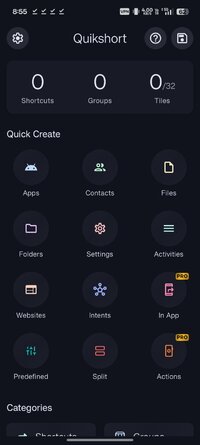
Create shortcuts and tiles from variety of categories such as
- Apps
- Activities
- Contacts
- Files
- Folders
- Websites
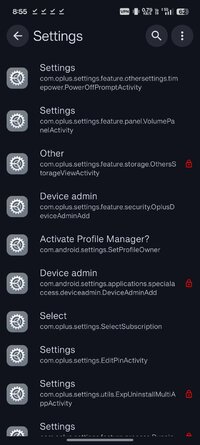
- Settings
- System Intents
- Custom Intents
You can create unlimited shortcuts and groups on your home screen and up to 15 tiles in your quick settings using Quikshort.
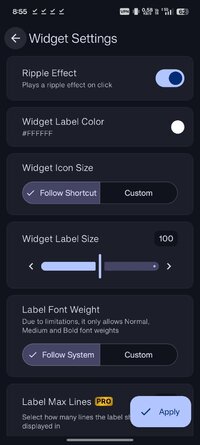
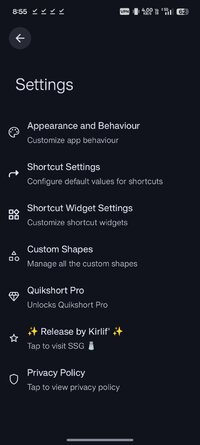
Customize your shortcut with variety of customization features like select icon from icon packs, add a background, change background to solid or gradient colors, adjust icon size and shape and many more.
Quikshort allows you to try out your shortcut before you put them on your homescreen.
It saves your shortcuts and provides you the ability to modify and update them in future.
Quikshort provides group feature to group your shortcuts together and access all at a time with single shortcut.
Quikshort also allows you to create action shortcuts to quickly access and control system functions such as adjusting brightness, volume, and sound modes, as well as performing actions like taking a screenshot, locking the device, or opening the power menu.
==== Accessibility Service Usage ====
Quikshort uses the Accessibility Service API strictly to enable specific action shortcuts such as Power Menu, Lock Device, and Screenshot. This permission is not required for general use of the app and is only requested when a user creates any of the specific mentioned action shortcuts. Quikshort does not collect, store, or share any personal or sensitive data through the Accessibility Service. The service is used solely for the purpose of executing the mentioned action shortcuts and for no other function.
Create a shortcuts with Quikshort and save few clicks in your day.
What's New:
- Added Integration Shortcut for other apps integration
- Added Actions shortcuts
- Updated website shortcut to fetch website icon only on demand
- Minor UI improvements
- Fixed few bugs and performance issues
Short Info:
● Pro Unlocked
● 5.5 MB
● arm/arm64
● Release by Kirlif'
Requirements: Android 8.1 and up
Overview: Quikshort lets you create shortcuts on homescreen, tiles in quick settings and also provides a functionality to group the shortcuts that you have created.
Create shortcuts and tiles from variety of categories such as
- Apps
- Activities
- Contacts
- Files
- Folders
- Websites
- Settings
- System Intents
- Custom Intents
You can create unlimited shortcuts and groups on your home screen and up to 15 tiles in your quick settings using Quikshort.
Customize your shortcut with variety of customization features like select icon from icon packs, add a background, change background to solid or gradient colors, adjust icon size and shape and many more.
Quikshort allows you to try out your shortcut before you put them on your homescreen.
It saves your shortcuts and provides you the ability to modify and update them in future.
Quikshort provides group feature to group your shortcuts together and access all at a time with single shortcut.
Quikshort also allows you to create action shortcuts to quickly access and control system functions such as adjusting brightness, volume, and sound modes, as well as performing actions like taking a screenshot, locking the device, or opening the power menu.
==== Accessibility Service Usage ====
Quikshort uses the Accessibility Service API strictly to enable specific action shortcuts such as Power Menu, Lock Device, and Screenshot. This permission is not required for general use of the app and is only requested when a user creates any of the specific mentioned action shortcuts. Quikshort does not collect, store, or share any personal or sensitive data through the Accessibility Service. The service is used solely for the purpose of executing the mentioned action shortcuts and for no other function.
Create a shortcuts with Quikshort and save few clicks in your day.
What's New:
- Added Integration Shortcut for other apps integration
- Added Actions shortcuts
- Updated website shortcut to fetch website icon only on demand
- Minor UI improvements
- Fixed few bugs and performance issues
Short Info:
● Pro Unlocked
● 5.5 MB
● arm/arm64
● Release by Kirlif'
*Special Features*
1 . Pro Unlocked
Credit to : Kirlif'
Free Download:
! Hidden Content !
You must be registered and either click Like under this post or leave a comment before you can see the hidden links.
You may need to refresh the page after clicking Like. If you’re still having trouble revealing the hidden links, please
read this.
Did you know? VIP Members can see all links instantly, no unlocking required.
Interested? Get VIP here.
Interested? Get VIP here.