Playstore Link:

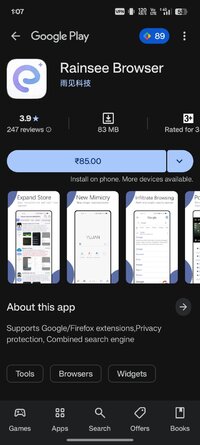
Rainsee Browser - Apps on Google Play
Supports Google/Firefox extensions,Privacy protection, Combined search engine
Supports Google/Firefox extensions,Privacy protection, Combined search engine
Rainsee Browser is a fully-featured, highly customizable browser.
Features:
- Many extensions: You can install various fun-enhancing extensions like Tampermonkey, Adguard/ublock for ad blocking, and Privacy Badger for extra privacy protection.
- Privacy and security: We don't collect your private data and incorporate Firefox security components to safeguard your privacy while you browse.
- Site settings: You can individually adjust permissions for websites to prevent clipboard writes, access to your location, pop-ups, and more.
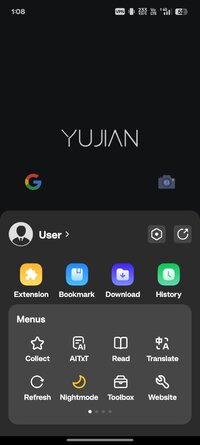
- AiTxt: Summarizes the webpage you're visiting with just one click, and you can keep asking—it's the age of AI.
- Aggregated search: Switch to Rainsee Search for aggregated search mode, making it easy to switch between search engines.
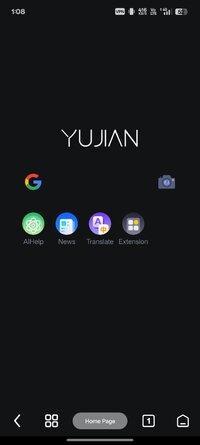
- Customizable appearance: You can customize the homepage, bottom toolbar, and menu bar according to your preferences.
Rainsee Browser is a fully-featured, highly customizable browser.
Features:
- Many extensions: You can install various fun-enhancing extensions like Tampermonkey, Adguard/ublock for ad blocking, and Privacy Badger for extra privacy protection.
- Privacy and security: We don't collect your private data and incorporate Firefox security components to safeguard your privacy while you browse.
- Site settings: You can individually adjust permissions for websites to prevent clipboard writes, access to your location, pop-ups, and more.
- AiTxt: Summarizes the webpage you're visiting with just one click, and you can keep asking—it's the age of AI.
- Aggregated search: Switch to Rainsee Search for aggregated search mode, making it easy to switch between search engines.
- Customizable appearance: You can customize the homepage, bottom toolbar, and menu bar according to your preferences.
*Special Features*
● Supported Languages: af, am, ar, as, az, az-AZ, be, bg, bn, bo-CN, bs, ca, ceb, co, cs, da, de, el, en, en-AU, en-CA, en-GB, en-IN, en-XC, eo, es, es-US, et, eu, eu-ES, fa, fi, fil, fj, fr, fr-CA, fy, ga, gl, gl-ES, gu, ha, haw, hi, hmn, hr, ht, hu, hy, ig, in, in-ID, is, it, iw, ja, jv, jv-Latn, ka, ka-GE, kk, kk-KZ, km, km-KH, kn, ko, ku, ky, la, lb, lo, lo-LA, lt, lv, mai, mg, mi, mk, ml, mn, mr, ms, mt, my, my-MM, my-Qaag, my-ZG, nb, ne, nl, no, ny, or, pa, pl, ps, pt, pt-BR, pt-PT, ro, ru, si, si-LK, sk, sl, sm, sq, sr, sr-Latn, sv, sw, ta, te, th, tl, tr, ug, uk, ur, uz, uz-UZ, vi, zh, zh-CN, zh-HK, zh-TW, zu;
● Supported Cpu Architecture: Armeabi-v7a, Arm64-v8a;
● Supported Screen Dpi: Ldpi, Mdpi, Hdpi, Xhdpi, Xxhdpi, Xxxhdpi, Anydpi, Nodpi.
● Untouch Paid Apk With Original Hash Signature.
● Certificate MD5 Digest: 8ccbe889048746fa76f60c6fbd2a69f9.
.Apks Bundle Installation:
SAI Instructions: [No Root]
1. Download And Install Latest SAI App (Split APK Installer) - Releases · Aefyr/SAI
2. Download this .apks Archive App;
3. Install And Open SAI / Choose "Install APKs" Button / Find And Select Downloaded .apks Archive App;
4. Wait For Install And Done. Enjoy!.
Lucky Patcher Instructions: [No Root]
1. Download And Install Latest Lucky Patcher App;
2. Install And Open Lucky Patcher And Choose 'Rebuild & Install';
3. Find And Select Downloaded This .apks Archive App;
4. Wait For Install And Done. Enjoy!.
PS: Make Sure After Open SAI or Lucky Patcher You Allowed Storage Permission And Install Unknown Apps Permission!
Credit: TryRoom
Free Download:
! Hidden Content !
You must be registered and either click Like under this post or leave a comment before you can see the hidden links.
You may need to refresh the page after clicking Like. If you’re still having trouble revealing the hidden links, please
read this.
Did you know? VIP Members can see all links instantly, no unlocking required.
Interested? Get VIP here.
Interested? Get VIP here.