Playstore Link :

Smart Remote for LG ThinQ TV - Apps on Google Play
Remote control for your LG Smart TV with the LG ThinQ & WebOS app
Smart Remote for LG ThinQ TV Ver. 7.3 b194 MOD APK l Premium Unlocked
Requirements: 7.0+
Overview: Remote control for your LG Smart TV with the LG ThinQ & WebOS app
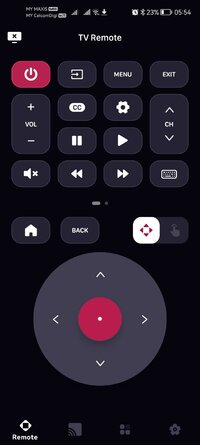
LG ThinQ TV Remote: Transform your smartphone into a powerful LG TV remote control! This app connects via WiFi, letting you manage your LG TV with ease, more comfortable than LG TV Plus
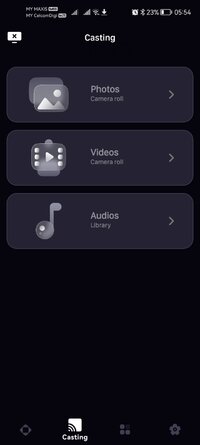
With the LG ThinQ Remote, you can turn your LG TV off, switch channels, and adjust the volume easily. Enjoy typing with a real keyboard, navigating with a touchpad, and accessing all smart TV features, including casting media directly from your device, instantly connect to your favorite media streaming apps like Netflix, Hulu Live TV, and YouTube.
Key Features:
Switch channels or enter channel numbers quickly.
Adjust volume remotely on your LG Smart TV.
Control multiple LG TV from one app.
️ Navigate LG ThinQ TV features.
Browse the web using the built-in touchpad.
 Type easily with the on-screen keyboard.
Quick access to favorite media apps like Netflix, Hulu Live TV & YouTube.
SmartCast feature for streaming media directly to your LG Smart TV.
The LG ThinQ Remote is compatible with all LG Smart TVs running WebOS.
 Setup: Ensure both your smartphone and LG TV are connected to the same WiFi network. Select your LG TV in the app and grant permission when prompted. It’s that simple!
Upgrade from your traditional LG remote to the advanced LG Smart TV Remote app and enjoy a more convenient viewing experience!
*DISCLAIMER: This TV Remote For LG application is not affiliated with nor endorsed by LG Electronics, Inc. and is not an official product of it or of its affiliates.
(Please note that this application cannot turn on your LG TV. Your LG TV is not connected to WiFi when it is OFF, so it can't accept commands.)
Privacy Policy: Privacy Policy – Metaverse Labs
Terms of use: Terms of Use – Metaverse Labs
Requirements: 7.0+
Overview: Remote control for your LG Smart TV with the LG ThinQ & WebOS app
LG ThinQ TV Remote: Transform your smartphone into a powerful LG TV remote control!
This app connects via WiFi, letting you manage your LG TV with ease, more comfortable than LG TV PlusWith the LG ThinQ Remote, you can turn your LG TV off, switch channels, and adjust the volume easily. Enjoy typing with a real keyboard, navigating with a touchpad, and accessing all smart TV features, including casting media directly from your device, instantly connect to your favorite media streaming apps like Netflix, Hulu Live TV, and YouTube.
Key Features:
Switch channels or enter channel numbers quickly.
Adjust volume remotely on your LG Smart TV.
Control multiple LG TV from one app.
️ Navigate LG ThinQ TV features.
Browse the web using the built-in touchpad.
Type easily with the on-screen keyboard.Quick access to favorite media apps like Netflix, Hulu Live TV & YouTube.
SmartCast feature for streaming media directly to your LG Smart TV.
The LG ThinQ Remote is compatible with all LG Smart TVs running WebOS.
Setup: Ensure both your smartphone and LG TV are connected to the same WiFi network. Select your LG TV in the app and grant permission when prompted. It’s that simple!Upgrade from your traditional LG remote to the advanced LG Smart TV Remote app and enjoy a more convenient viewing experience!
*DISCLAIMER: This TV Remote For LG application is not affiliated with nor endorsed by LG Electronics, Inc. and is not an official product of it or of its affiliates.
(Please note that this application cannot turn on your LG TV. Your LG TV is not connected to WiFi when it is OFF, so it can't accept commands.)
Privacy Policy: Privacy Policy – Metaverse Labs
Terms of use: Terms of Use – Metaverse Labs
*Special Features*
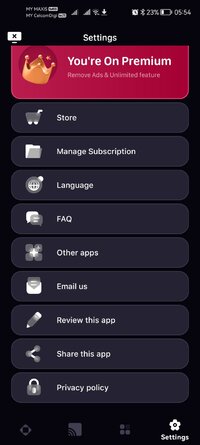
1 . Premium Features Unlocked
Credit to : youarefinished
Free Download:
! Hidden Content !
You must be registered and either click Like under this post or leave a comment before you can see the hidden links.
You may need to refresh the page after clicking Like. If you’re still having trouble revealing the hidden links, please
read this.
Did you know? VIP Members can see all links instantly, no unlocking required.
Interested? Get VIP here.
Interested? Get VIP here.