Playstore Link:

SpotEQ31 - 31 Band Equalizer - Apps on Google Play
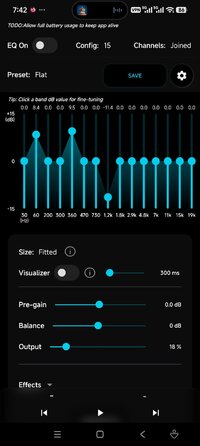
7, 15 or 31 band dual EQ for your music apps. Separate Left / Right ear.
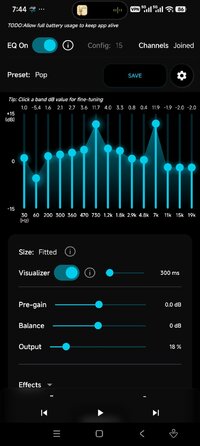
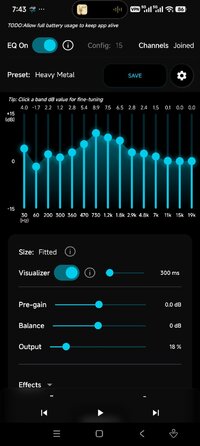
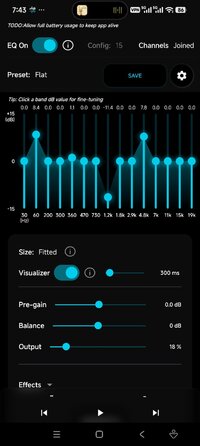
Enjoy your favorite music player in a highly customizable way with a 7-31 band equalizer, multiple sound presets, balance and pre-gain volume.
Choose between 7, 11, 15, 21 or 31 bands for the equalizer - depending on how much precision you need.
Whether you want to adjust uneven headphones with different frequency and volume output - or compensate a hearing loss - this app is for you.
The ability to pinpoint a frequency band for a particular ear/side makes SpotEQ31 unique.
From version 2.0 there is a built-in media and podcast player.
You can use it for free to change the sound quality of your music player app and, if choosing to, unlock basic features like saving custom presets for a one-time fee. There is also a premium subscription available.
If you have difficulties getting the app to work please retry the setup instructions carefully and then reach out for support by mail.
Please do not buy features before you managed to connect your music player successfully.
The app EQ bands show center-frequencies, meaning the lowest band should also affect the lowest possible Hz your device can reproduce.
Features:
- 31 bands (7 to 41 custom bands EQ possible)
- Choose Joined or Separate sides EQ configuration
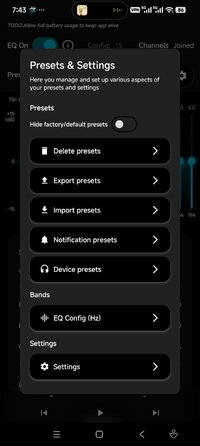
- Multiple presets, save your own
- Export/import presets
- Works in the background, for long-running audio sessions
- Great for compensating sound differences in headphones
- Balance an uneven hearing impairment, right/left ear
- Boost bass or clarify treble
- Limiter and 3d sound stereop expansion
- Set extra loudness with the pre-gain volume
- Volume control directly from notification
- Update EQ preset on headset connection
- Visualizer
- Works on Android 9 (Pie) and up
- Tested with several music apps.
Follow the in-app instructions for best results
1. It's safest to uninstall all other equalizer apps.
(Many problems arise from having multiple apps using audio effects)
2. Press ENABLE in SpotEQ31
A notification indicates the app is working in the background.
3. RESTART PLAYER APP and play music
Force stop the app, then reopen and play a new track. Easily hear change with preset Low Cut.
Please checkout the in-app instructions and our web page for tips on how to use this app: SpotEQ31 - Equalizer for Android and iOS
Fix bad headphones
If you have bad or broken headphones/earphones where the sound is uneven in left and right ear, you should be able to compensate for this by using this app. Some headphones may sound better and avoid distortions if you lower the pre-gain.
Improve your music experience without a hearing aid
If you have a hearing impairment and are using a hearing aid in your daily life, you can try to compensate the sound with this app. Just adjust both left and right side frequency bands, and depending on your specific hearing loss you might find a setting that hits your sweet spot for listening to music without your hearing aid! Consulting your audiologist or audiogram is advisable. Sometimes a simple volume balance to left or right side can do wonders.
Thank you for trying out SpotEQ31! If you have any suggestions please contact by mail.
== Disclaimer ==
This app is not connected in any way to any other music player app/company.
Listening to music at a too high volume for a too long time may damage your hearing. Be especially careful when using earphones with this equaliser. Also beware that your device or speakers may be damaged by loud sounds. This app is provided 'as is' without any kind of warranty, and you may use it at your own risk.
Choose between 7, 11, 15, 21 or 31 bands for the equalizer - depending on how much precision you need.
Whether you want to adjust uneven headphones with different frequency and volume output - or compensate a hearing loss - this app is for you.
The ability to pinpoint a frequency band for a particular ear/side makes SpotEQ31 unique.
From version 2.0 there is a built-in media and podcast player.
You can use it for free to change the sound quality of your music player app and, if choosing to, unlock basic features like saving custom presets for a one-time fee. There is also a premium subscription available.
If you have difficulties getting the app to work please retry the setup instructions carefully and then reach out for support by mail.
Please do not buy features before you managed to connect your music player successfully.
The app EQ bands show center-frequencies, meaning the lowest band should also affect the lowest possible Hz your device can reproduce.
Features:
- 31 bands (7 to 41 custom bands EQ possible)
- Choose Joined or Separate sides EQ configuration
- Multiple presets, save your own
- Export/import presets
- Works in the background, for long-running audio sessions
- Great for compensating sound differences in headphones
- Balance an uneven hearing impairment, right/left ear
- Boost bass or clarify treble
- Limiter and 3d sound stereop expansion
- Set extra loudness with the pre-gain volume
- Volume control directly from notification
- Update EQ preset on headset connection
- Visualizer
- Works on Android 9 (Pie) and up
- Tested with several music apps.
Follow the in-app instructions for best results
1. It's safest to uninstall all other equalizer apps.
(Many problems arise from having multiple apps using audio effects)
2. Press ENABLE in SpotEQ31
A notification indicates the app is working in the background.
3. RESTART PLAYER APP and play music
Force stop the app, then reopen and play a new track. Easily hear change with preset Low Cut.
Please checkout the in-app instructions and our web page for tips on how to use this app: SpotEQ31 - Equalizer for Android and iOS
Fix bad headphones
If you have bad or broken headphones/earphones where the sound is uneven in left and right ear, you should be able to compensate for this by using this app. Some headphones may sound better and avoid distortions if you lower the pre-gain.
Improve your music experience without a hearing aid
If you have a hearing impairment and are using a hearing aid in your daily life, you can try to compensate the sound with this app. Just adjust both left and right side frequency bands, and depending on your specific hearing loss you might find a setting that hits your sweet spot for listening to music without your hearing aid! Consulting your audiologist or audiogram is advisable. Sometimes a simple volume balance to left or right side can do wonders.
Thank you for trying out SpotEQ31! If you have any suggestions please contact by mail.
== Disclaimer ==
This app is not connected in any way to any other music player app/company.
Listening to music at a too high volume for a too long time may damage your hearing. Be especially careful when using earphones with this equaliser. Also beware that your device or speakers may be damaged by loud sounds. This app is provided 'as is' without any kind of warranty, and you may use it at your own risk.
*Special Features*
● Vip Subscription Unlock.
● A Skip Thank You For Using SpotEQ31 Dialog.
● A Skip Onboarding Screens.
● A Skip Privacy Policy, Disclaimer And Terms Of Use Updated Dialog.
● A Skip New Version Changelog Dialog.
● Ads Removed / Disabled.
● Ads Related Activity & Code Removed / Disabled.
● Ads Related Layouts Visibility Gone.
● Analytics / Crashlytics Removed / Disabled.
● Receivers, Services And Provider Removed / Disabled.
● Google Play Services Check Removed / Disabled.
● Google Play Store Install Package Removed / Disabled.
● In-App Billing Service Removed / Disabled.
● Play Services, Transport, Firebase Properties Removed.
● All Unnecessary Garbage Folder & File Removed.
● Duplicate Dpi Item Remove Like:
- Bar Length, Drawable Size, Gap Between Bars.
● Splits0 File Removed (Resources & AndroidManifest).
● Splits0 Releated Unnecessary Meta-Data Remove Like:
- Stamp Source, Stamp Type Standalone Apk, Android Vending Splits, Android Vending Derived Apk.
● Removed Debug Information (Source, Line, Param, Prologue, Local).
Credit: TryRoom
Free Download:
! Hidden Content !
You must be registered and either click Like under this post or leave a comment before you can see the hidden links.
You may need to refresh the page after clicking Like. If you’re still having trouble revealing the hidden links, please
read this.
Did you know? VIP Members can see all links instantly, no unlocking required.
Interested? Get VIP here.
Interested? Get VIP here.