Playstore Link:

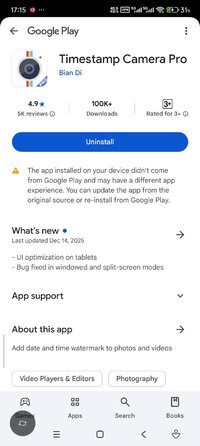
Timestamp Camera Pro - Apps on Google Play
Add date and time watermark to photos and videos
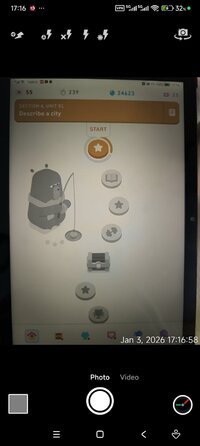
Timestamp Camera can add timestamp watermark on camera in real time. Easy to take photos and videos.
- Add current time and location when recording videos or taking photos, you can change time format or select the location around easily. Timestamp Camera is the only App that can record video with the time watermark accurate to millisecond(0.001 second).
- Support 61 timestamp formats
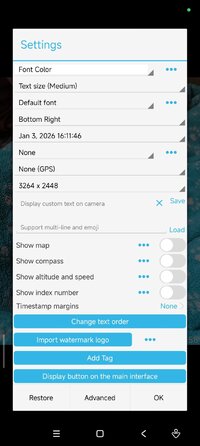
- Support change font, font color, font size
- Support set timestamp in 7 positions: top left, top center, top right, bottom left, bottom center, bottom right, center
- Support auto add location address and GPS
- Support change timestamp opacity and background
- Support add altitude and speed on camera
- Support display custom text and emoji on camera. For example, you can input "Good day at the zoo"
- Support display map, you can change the map scale, transparency, size, position
- Support display custom logo image on camera
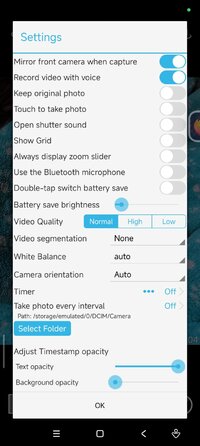
- Support record video with or without audio
- Support "Battery saver mode", the brightness of screen will be 0%~100% of normal when turn it on. Support double-tap to turn on the "Battery saver mode"
- Support turn off the shutter sound when shooting
- All of the time effects are real-time and can be used when taking photo or video
- Can change effect, toggle camera when recording
- Support portrait and landscape
- Support change resolution
- Support capture photo when recording
- Support save photo and video to SD card directly, enable it in the advance setting
- Add current time and location when recording videos or taking photos, you can change time format or select the location around easily. Timestamp Camera is the only App that can record video with the time watermark accurate to millisecond(0.001 second).
- Support 61 timestamp formats
- Support change font, font color, font size
- Support set timestamp in 7 positions: top left, top center, top right, bottom left, bottom center, bottom right, center
- Support auto add location address and GPS
- Support change timestamp opacity and background
- Support add altitude and speed on camera
- Support display custom text and emoji on camera. For example, you can input "Good day at the zoo"
- Support display map, you can change the map scale, transparency, size, position
- Support display custom logo image on camera
- Support record video with or without audio
- Support "Battery saver mode", the brightness of screen will be 0%~100% of normal when turn it on. Support double-tap to turn on the "Battery saver mode"
- Support turn off the shutter sound when shooting
- All of the time effects are real-time and can be used when taking photo or video
- Can change effect, toggle camera when recording
- Support portrait and landscape
- Support change resolution
- Support capture photo when recording
- Support save photo and video to SD card directly, enable it in the advance setting
*Special Features*
● Supported Languages: af, am, ar, as, az, be, bg, bn, bs, ca, cs, da, de, el, en-AU, en-CA, en-GB, en-IN, en-XC, es, es-US, et, eu, fa, fi, fr, fr-CA, gl, gu, hi, hr, hu, hy, in, is, it, iw, ja, ka, kk, km, kn, ko, ky, lo, lt, lv, mk, ml, mn, mr, ms, my, nb, ne, nl, or, pa, pl, pt, pt-BR, pt-PT, ro, ru, ru-RU, si, sk, sl, sq, sr, sr-Latn, sv, sw, ta, te, th, tl, tr, uk, ur, uz, vi, zh-CN, zh-HK, zh-TW, zu;
● Supported Cpu Architecture: None;
● Supported Screen Dpi: Ldpi, Mdpi, Tvdpi, Hdpi, Xhdpi, Xxhdpi, Xxxhdpi.
● Untouched Paid Apk With Original Hash Signature.
● Certificate MD5 Digest: c5dc32dcc26ac9cef292e3bf9ea735aa.
.Apks Bundle Installation:
SAI Instructions: [No Root]
1. Download And Install Latest SAI App (Split APK Installer) - Releases · Aefyr/SAI
2. Download this .apks Archive App;
3. Install And Open SAI / Choose "Install APKs" Button / Find And Select Downloaded .apks Archive App;
4. Wait For Install And Done. Enjoy!.
Lucky Patcher Instructions: [No Root]
1. Download And Install Latest Lucky Patcher App;
2. Install And Open Lucky Patcher And Choose 'Rebuild & Install';
3. Find And Select Downloaded This .apks Archive App;
4. Wait For Install And Done. Enjoy!.
PS: Make Sure After Open SAI or Lucky Patcher You Allowed Storage Permission And Install Unknown Apps Permission!
Credit: TryRoom
Free Download:
! Hidden Content !
You must be registered and either click Like under this post or leave a comment before you can see the hidden links.
You may need to refresh the page after clicking Like. If you’re still having trouble revealing the hidden links, please
read this.
Did you know? VIP Members can see all links instantly, no unlocking required.
Interested? Get VIP here.
Interested? Get VIP here.
Last edited by a moderator: