Playstore Link:
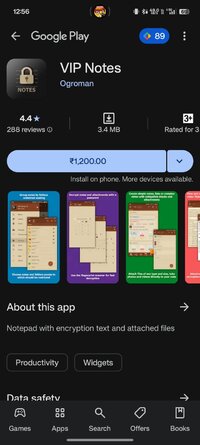
VIP Notes v9.9.80 [Paid]
Requirements: 6.0+
Overview: Remember one password for: - see all other important information ( accounts, passwords, pin codes, credit cards details, etc.) - see photos of important documents and any other files.
Remember one password for:
- see all other important information ( accounts, passwords, pin codes, credit cards details, etc.)
- see photos of important documents and any other files
- edit attached files (text and html)
- store all of this encrypted in a secure storage not accessible for other applications
The size of attachments is limited only by the capabilities of your device.
Features:
- encryption AES-256
- attachments (will encrypted if enabled encryption for note)
- view and edit attached files inside application (text and html, photo)
- folders: unlimited nesting (only in full version)
- formatting text
- password's input methods ( digital/full/pattern 3x3/pattern 4x4)
- quick login (short password/fingerprint scanner/biometric)
- clearing data after many attempt to wrong password
- separate password for imperceptible data clearing
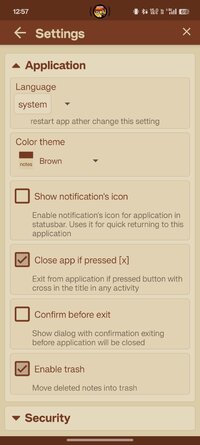
- auto-lock by time
- widgets and shortcuts for notes or attached files
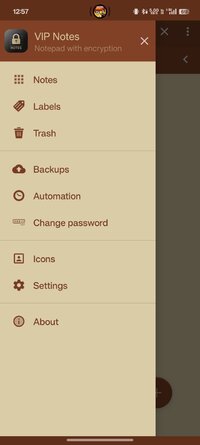
- icon library (custom icons)
- color themes
- backup/restore database
- reminders
- labels
- support "Samsung DEX"
- does not contain advertising
- does not require Internet access
Some explanation::
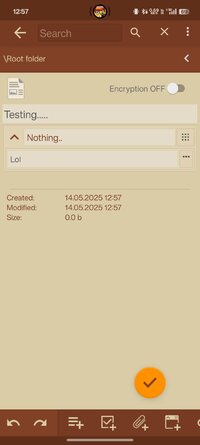
- encryption is disabled by default!
- data will be encrypted using you password
- note encryption is enabling in the note editing window.
- the note body and attached files will be encrypted, the note name is not encrypted!
- attached files are encrypted if encryption is enabled for the note they are attached to
Keywords:
encrypted notes, notepad, passwords manager, safe storage, encrypted files holder, encryption
What's New:
- Fixed the color of links in the Dark Blue theme
- Added a button for playing Gif animations in the image viewer
- Added variants of date's type in list notes (changed type of setting for it)
- Added auto-save options for notes when the app goes to the background
- Fixed the problem of rendering pages in a PDF file, for large images in PDF
- Fixed the visibility of black icons in the list of icons when uses black theme
- Other fixes
Requirements: 6.0+
Overview: Remember one password for: - see all other important information ( accounts, passwords, pin codes, credit cards details, etc.) - see photos of important documents and any other files.
Remember one password for:
- see all other important information ( accounts, passwords, pin codes, credit cards details, etc.)
- see photos of important documents and any other files
- edit attached files (text and html)
- store all of this encrypted in a secure storage not accessible for other applications
The size of attachments is limited only by the capabilities of your device.
Features:
- encryption AES-256
- attachments (will encrypted if enabled encryption for note)
- view and edit attached files inside application (text and html, photo)
- folders: unlimited nesting (only in full version)
- formatting text
- password's input methods ( digital/full/pattern 3x3/pattern 4x4)
- quick login (short password/fingerprint scanner/biometric)
- clearing data after many attempt to wrong password
- separate password for imperceptible data clearing
- auto-lock by time
- widgets and shortcuts for notes or attached files
- icon library (custom icons)
- color themes
- backup/restore database
- reminders
- labels
- support "Samsung DEX"
- does not contain advertising
- does not require Internet access
Some explanation::
- encryption is disabled by default!
- data will be encrypted using you password
- note encryption is enabling in the note editing window.
- the note body and attached files will be encrypted, the note name is not encrypted!
- attached files are encrypted if encryption is enabled for the note they are attached to
Keywords:
encrypted notes, notepad, passwords manager, safe storage, encrypted files holder, encryption
What's New:
- Fixed the color of links in the Dark Blue theme
- Added a button for playing Gif animations in the image viewer
- Added variants of date's type in list notes (changed type of setting for it)
- Added auto-save options for notes when the app goes to the background
- Fixed the problem of rendering pages in a PDF file, for large images in PDF
- Fixed the visibility of black icons in the list of icons when uses black theme
- Other fixes
*Special Features*
★ Untouched Paid apk with Original Hash Signature
★ Certificate MD5 digest: fd31bbf8cfdcd102e851d128defe6290
★ No changes were applied
➡ Languages: Full Multi Languages
➡ CPU architectures: Universal
➡ Screen DPIs: 120dpi, 160dpi, 240dpi, 320dpi, 480dpi, 640dpi
Credit: @
Free Download:
! Hidden Content !
You must be registered and either click Like under this post or leave a comment before you can see the hidden links.
You may need to refresh the page after clicking Like. If you’re still having trouble revealing the hidden links, please
read this.
Did you know? VIP Members can see all links instantly, no unlocking required.
Interested? Get VIP here.
Interested? Get VIP here.