Playstore Link :
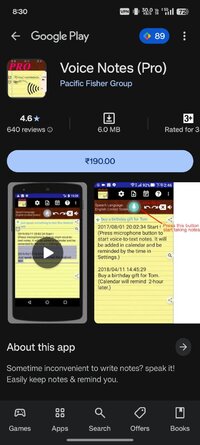
Voice Notes (Pro) - Apps on Google Play
Sometime inconvenient to write notes? speak it! Easily keep notes & remind you.
Voice Notes (Pro) v5.1.93 pro [Paid]
Requirements: 6.0+
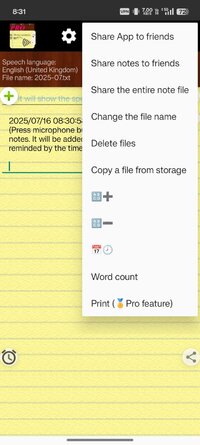
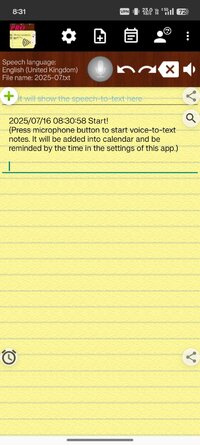
Overview: - Only one touch needed.
It can continuously receive your speech and convert to text. Note down and remind you later at the time you set.
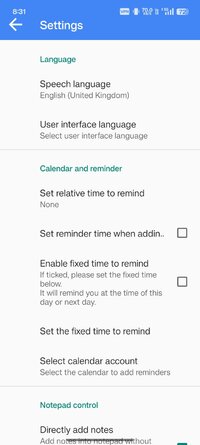
- Integrated with your Android calendar, you don't need to maintain another one.
- Automatically save your notes in a storage file, and easily to back up cloud.
- Also one touch easily to share voice-to-text to friends.
- It can work when the phone screen is turned off.
-Support headset button to control Start/Stop voice recognition
-Supported speech recognition 119 languages.
-Supported 20 user interface languages (including English)
Requirements:
- Google voice search (Google App) v6.15.24.21 or later is required as a speech to text engine. Most devices have it pre-installed. If your devices do not install it, This app will guide you to install.
https://play.google.com/store/apps/deta ... ksearchbox
Permissions Notice:
This app may ask for permission to access the following features
• Microphone for speech recognition
• External storage for saving notes file
• Calendar for adding reminder event
Keywords:
voice notes, speech notes, voice memo, speech memo, voice input notes, voice input memo, Notes , Memo, Voice , voice input, Speech, input, note , notepad, reminder, alarm, voice to text, speech to text, message, voice typing, calendar, schedule, to-do list
If you need, you can try this free version:
What's New:
- Fixed issue: When split-screen mode, resizing the screen might cause the shared-in text to be pasted repeatedly.
- Fixed issue: Under certain conditions, denying calendar permissions causes crash
- Fixed issue: On some Android 15 devices, the system bars might have display issue.
- Recognition session improved: For Android 12 and above support, one session can now last many minutes without restart and beep, instead of only a few seconds.
- Fix minor issues
Requirements: 6.0+
Overview: - Only one touch needed.
It can continuously receive your speech and convert to text. Note down and remind you later at the time you set.
- Integrated with your Android calendar, you don't need to maintain another one.
- Automatically save your notes in a storage file, and easily to back up cloud.
- Also one touch easily to share voice-to-text to friends.
- It can work when the phone screen is turned off.
-Support headset button to control Start/Stop voice recognition
-Supported speech recognition 119 languages.
-Supported 20 user interface languages (including English)
Requirements:
- Google voice search (Google App) v6.15.24.21 or later is required as a speech to text engine. Most devices have it pre-installed. If your devices do not install it, This app will guide you to install.
https://play.google.com/store/apps/deta ... ksearchbox
Permissions Notice:
This app may ask for permission to access the following features
• Microphone for speech recognition
• External storage for saving notes file
• Calendar for adding reminder event
Keywords:
voice notes, speech notes, voice memo, speech memo, voice input notes, voice input memo, Notes , Memo, Voice , voice input, Speech, input, note , notepad, reminder, alarm, voice to text, speech to text, message, voice typing, calendar, schedule, to-do list
If you need, you can try this free version:
What's New:
- Fixed issue: When split-screen mode, resizing the screen might cause the shared-in text to be pasted repeatedly.
- Fixed issue: Under certain conditions, denying calendar permissions causes crash
- Fixed issue: On some Android 15 devices, the system bars might have display issue.
- Recognition session improved: For Android 12 and above support, one session can now last many minutes without restart and beep, instead of only a few seconds.
- Fix minor issues
*Special Features*
● Supported Screen Dpi: Mdpi, Hdpi, Xhdpi, Xxhdpi, Xxxhdpi, Anydpi.
● Untouch Paid Apk With Original Hash Signature.
Free Download:
! Hidden Content !
You must be registered and either click Like under this post or leave a comment before you can see the hidden links.
You may need to refresh the page after clicking Like. If you’re still having trouble revealing the hidden links, please
read this.
Did you know? VIP Members can see all links instantly, no unlocking required.
Interested? Get VIP here.
Interested? Get VIP here.