PMT FREE MOD Zenless Zone Zero Ver. 2.5.0 LSPosed Module [Damage & Defense Multipliers]

App-Architecture
ARM64 (arm64-v8a | 64-Bit)
Here's the full tutorial for those who can't use it on LsPatch or any non rooted device:
1= Download NPatch (GitHub - 7723mod/NPatch: NPatch是一个复刻自LSPatch,以LSPosed为基础的免root的Xposed框架) and Shizuku on your phone, set up Shizuku (just look up a tutorial online), and authorize NPatch in the "Authorized Application".
Open NPatch, and if in the main screen you find "Shizuku service available" on top of all, that means it's working.
Download YasKashije's module from PLATINMODS, install the APK, then go to the play store, install ZZZ.
2=Go to the developers options on your phone, go down until you find "Reset to default values" tap it multiple times until the option "Turn on system optimization" can be seen, turn it off. I highly suggest you turn it on after installing the patched game.
3= Use Zarchiver or any other file opener, create a new folder and name it NPatch, copy the module in it. Open NPatch, go to setting and change the storage directory to the one you created (this will make sure that the module will show up), then go to the "manage" section, press the + button, and then "select an installed app", select ZZZ, press start patch, and that's it, its installed.
Long press on ZZZ in the manage section, press "module scope", and make sure that the module is selected.
And then just play the game I guess.
does this work with android 15?
 
Android 13 not working😭😭
Mine is Android 13 too.
And works fine.

I'm using Shizuku and N patch. to use this module.

Shizuku + N patch ver. Step :

- Download shizuku (Gplay)
- Download N patch (github)
- Download Zzz Module (platinmods)
- Download Original apk From Gplay.

- Install All of them.
- Run shizuku First (Pair, Notif on, and let it run in background)
- Run N patch (make sure Shizuku service is available and notif on all the time)
- Choose "manage", "+", "from installed App", choose "local" and "patch".
- The patched Zzz apk should be available in N patch.
- After that choose "module scoope"
Choose "Zzz module from Yaskashije" (you can turn on/off from here)
- finally "optimize" the app and if step are correctly you can now open and play the game with mod.
 
Mine is Android 13 too.
And works fine.

I'm using Shizuku and N patch. to use this module.

Shizuku + N patch ver. Step :

- Download shizuku (Gplay)
- Download N patch (github)
- Download Zzz Module (platinmods)
- Download Original apk From Gplay.

- Install All of them.
- Run shizuku First (Pair, Notif on, and let it run in background)
- Run N patch (make sure Shizuku service is available and notif on all the time)
- Choose "manage", "+", "from installed App", choose "local" and "patch".
- The patched Zzz apk should be available in N patch.
- After that choose "module scoope"
Choose "Zzz module from Yaskashije" (you can turn on/off from here)
- finally "optimize" the app and if step are correctly you can now open and play the game with mod.
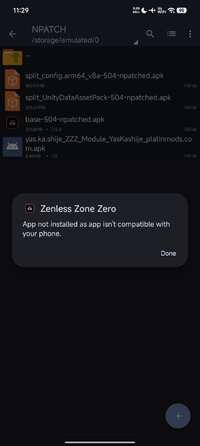
followed every step and still the mod not pop up :pepe002:
 

Attachments

  • Screenshot_2026-01-05-23-29-29-794_com.google.android.packageinstaller.jpg
    Screenshot_2026-01-05-23-29-29-794_com.google.android.packageinstaller.jpg
    57.5 KB · Views: 10
Ini juga tidak berfungsi pada Android 13 di sini

Punya saya juga Android 13.
Dan berfungsi dengan baik.

Saya menggunakan Shizuku dan N patch untuk menggunakan modul ini.

Shizuku + N patch ver. Langkah :

- Unduh Shizuku (Gplay)
- Unduh patch N (github)
- Unduh Modul Zzz (platinmods)
- Unduh apk asli dari Google Play.

- Instal semuanya.
- Jalankan Shizuku terlebih dahulu (Pasangkan, aktifkan notifikasi, dan biarkan berjalan di latar belakang)
- Jalankan patch N (pastikan layanan Shizuku tersedia dan notifikasi selalu aktif)
- Pilih "kelola", "+", "dari aplikasi terpasang", pilih "lokal" dan "patch".
- APK Zzz yang sudah ditambal seharusnya tersedia di patch N.
- Setelah itu pilih "module scoope"
Pilih "Modul Zzz dari Yaskashije" (Anda dapat mengaktifkan/menonaktifkan dari sini)
- Terakhir, "optimalkan" aplikasi dan jika langkah-langkahnya sudah benar, Anda sekarang dapat membuka dan memainkan game dengan mod tersebut.
Are u using custom rom?
 
For everyone that's complaining that it's not working properly on their specific Android version, I want you to know that:
1: The game is really graphically and battery hungry, If your phone still has Android 13 in 2026, don't even expect the normal game to work well🤦. And the mod menu makes the game laggy even on phones with Android 16.
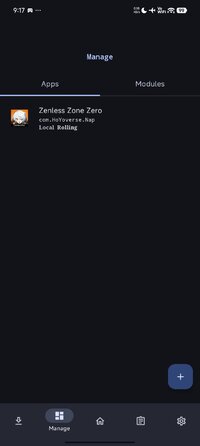
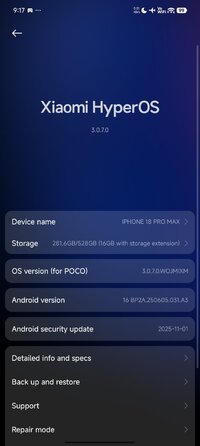
2: I tried the method that I have explained to y'all on 2 phones, one with Android 15 and one with 16, and they both work relatively great.
3: If you have a low power phone, I'll personally just forget the idea of playing this game on it, SOME DUDE WAS TRYING TO MOD THE GAME ON ANDROID 12, WTH😭
4: THERE IS LITERALLY NO OTHER WAY TO USE THIS MODS ON A NON-ROOTED DEVICE EXPECT ON LsPatch and NPatch, so if neither of them worked for you, just give up, play the game normally.
 
I finally solve it to my android 16 phone😭🙏🙏
 

Attachments

  • Screenshot_2026-01-06-09-17-17-947_org.lsposed.lspatch.jpg
    Screenshot_2026-01-06-09-17-17-947_org.lsposed.lspatch.jpg
    31.4 KB · Views: 17
  • Screenshot_2026-01-06-09-17-52-383_com.android.settings.jpg
    Screenshot_2026-01-06-09-17-52-383_com.android.settings.jpg
    75.3 KB · Views: 17
For everyone that's complaining that it's not working properly on their specific Android version, I want you to know that:
1: The game is really graphically and battery hungry, If your phone still has Android 13 in 2026, don't even expect the normal game to work well🤦. And the mod menu makes the game laggy even on phones with Android 16.
2: I tried the method that I have explained to y'all on 2 phones, one with Android 15 and one with 16, and they both work relatively great.
3: If you have a low power phone, I'll personally just forget the idea of playing this game on it, SOME DUDE WAS TRYING TO MOD THE GAME ON ANDROID 12, WTH😭
4: THERE IS LITERALLY NO OTHER WAY TO USE THIS MODS ON A NON-ROOTED DEVICE EXPECT ON LsPatch and NPatch, so if neither of them worked for you, just give up, play the game normally.
im using high end phone with android 15. yesterday it didnt work, surprisingly today it work lol thank you for your method.
 
Reported

Reason: "Wasn't working for the past months now".

Checked by myself
The mod works just fine for me, including all features. If it doesn't work for you, try a different device. Mods, especially ones which require root/are module based will never work on every single device. Thats impossible. I attached a 3+ Minute video which shows no force close and that the mod features work just fine.

Proof:

Emulator, Mumu Player 12 Version 5.14.3.2668, Android 12.0, rooted & patched with Magisk:
 
Tags Tags
action role playing action role-playing role playing role playing game zenless zone zero zenless zone zero cheat zenless zone zero hack zenless zone zero mod zenless zone zero module zzz zzz cheat zzz hack zzz mod

Similar threads

Back
Top Bottom