Playstore Link:

Adaptive Toons Icon Pack - Apps on Google Play
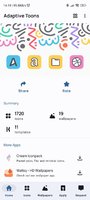
Flat illustration style minimal icons.
Why Adaptive Toons?
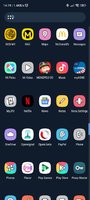
* Adaptive Toons Icon pack is designed with a Flat illustration style.
* The icons are Minimal and Clean.
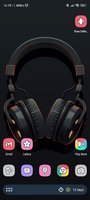
* The icons look Great on light as well as dark wallpapers.
* Adaptive Toons Icon pack comes with Flat design illustration wallpapers which go perfectly with the icons.
* The Pack has 11 Awesome widgets, specially made for Adaptive Toons.
Try our new Adaptive Toons Icon Pack!
FEATURES
* Dynamic calendar support.
* icon request tool.
* Beautiful and clear icons with 192 x 192 resolution.
* Compatible with multiple launchers.
* Help and FAQ section.
* Ads free.
* Cloud-based wallpapers.
HOW TO USE
You will need a launcher that supports custom icon packs, supported launchers are listed below...
* icon pack for NOVA (recommended)
nova settings --> look and feel --> icon theme --> choose Adaptive Toons Icon Pack.
* icon pack for ABC
themes --> download button(top right corner)--> icon pack--> choose Adaptive Toons Icon Pack.
* icon pack for ACTION
action settings--> appearance--> icon pack--> choose Adaptive Toons Icon Pack.
* icon pack for AWD
long press home screen--> AWD settings--> icon appearance --> underneath
Icon set, choose Adaptive Toons Icon Pack.
* icon pack for APEX
apex settings --> themes--> downloaded--> choose Adaptive Toons Icon Pack.
* icon pack for EVIE
Long press home screen--> settings--> icon pack--> choose Adaptive Toons Icon Pack.
* icon pack for HOLO
long press home screen--> settings--> appearance settings--> icon pack-->
choose Adaptive Toons Icon Pack.
* icon pack for LUCID
tap apply/ long press home screen--> launcher settings--> icon theme-->
choose Adaptive Toons Icon Pack.
* icon pack for M
tap apply/ long press home screen--> launcher--> look and feel-->icon pack->
local--> Choose Adaptive Toons Icon Pack.
* icon pack for NOUGAT
tap apply/ launcher settings--> look and feel--> icon pack--> local--> choose
Adaptive Toons Icon Pack.
* icon pack for SMART
Long press home screen--> themes--> underneath icon pack, choose Adaptive Toons Icon Pack.
What's New:
The widgets issue is fixed.
* Adaptive Toons Icon pack is designed with a Flat illustration style.
* The icons are Minimal and Clean.
* The icons look Great on light as well as dark wallpapers.
* Adaptive Toons Icon pack comes with Flat design illustration wallpapers which go perfectly with the icons.
* The Pack has 11 Awesome widgets, specially made for Adaptive Toons.
Try our new Adaptive Toons Icon Pack!
FEATURES
* Dynamic calendar support.
* icon request tool.
* Beautiful and clear icons with 192 x 192 resolution.
* Compatible with multiple launchers.
* Help and FAQ section.
* Ads free.
* Cloud-based wallpapers.
HOW TO USE
You will need a launcher that supports custom icon packs, supported launchers are listed below...
* icon pack for NOVA (recommended)
nova settings --> look and feel --> icon theme --> choose Adaptive Toons Icon Pack.
* icon pack for ABC
themes --> download button(top right corner)--> icon pack--> choose Adaptive Toons Icon Pack.
* icon pack for ACTION
action settings--> appearance--> icon pack--> choose Adaptive Toons Icon Pack.
* icon pack for AWD
long press home screen--> AWD settings--> icon appearance --> underneath
Icon set, choose Adaptive Toons Icon Pack.
* icon pack for APEX
apex settings --> themes--> downloaded--> choose Adaptive Toons Icon Pack.
* icon pack for EVIE
Long press home screen--> settings--> icon pack--> choose Adaptive Toons Icon Pack.
* icon pack for HOLO
long press home screen--> settings--> appearance settings--> icon pack-->
choose Adaptive Toons Icon Pack.
* icon pack for LUCID
tap apply/ long press home screen--> launcher settings--> icon theme-->
choose Adaptive Toons Icon Pack.
* icon pack for M
tap apply/ long press home screen--> launcher--> look and feel-->icon pack->
local--> Choose Adaptive Toons Icon Pack.
* icon pack for NOUGAT
tap apply/ launcher settings--> look and feel--> icon pack--> local--> choose
Adaptive Toons Icon Pack.
* icon pack for SMART
Long press home screen--> themes--> underneath icon pack, choose Adaptive Toons Icon Pack.
What's New:
The widgets issue is fixed.
★★★ Patched ★★★
Modded Google play/LP not needed
Security check removed
Unwanted files/Folders removed
Optimized graphics/ zipalighned
Remove default .source name of java files;
Debug Info Removed
Original package signature changed;
Free Download:
! Hidden Content !
You must be registered and either click Like under this post or leave a comment before you can see the hidden links.
You may need to refresh the page after clicking Like. If you’re still having trouble revealing the hidden links, please
read this.
Did you know? VIP Members can see all links instantly, no unlocking required.
Interested? Get VIP here.
Interested? Get VIP here.