Playstore Link:

AI Enlarger: Image Upscaler - Apps on Google Play
AI Photo Upscaler & Enhancer & Fix blurry & Improve Photo Quality & Clear Photo
AI Enlarger – Photo Enhancer & Image Upscaler
Enhance your photos with a powerful all-in-one AI image upscaler and photo enhancer.
AI Enlarger helps you upscale images, improve quality, and restore details with advanced AI models and easy-to-use tools.
Enlarge photos by 2×, 4×, or 8×, fix blurry images, retouch portraits, and apply professional enhancements — all in one simple and intuitive app.
Whether you're restoring old photos, improving low-resolution images, enhancing anime artwork, or creating high-quality visuals for social media, AI Enlarger delivers sharp, clean, and natural-looking results.
- Key Features
AI Image Upscale & Enlarge (2× / 4× / 8×)
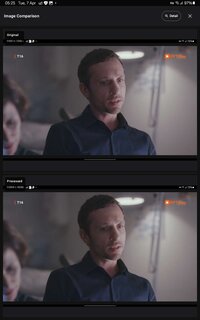
Upscale photos with AI-powered super resolution
Improve image clarity, sharpness, and details
Supports both real photos and anime images
Choose between online AI processing or offline local models
Export high-resolution images (4K / 8K)
- Batch Image Upscaling
Process multiple images at once
Automatically enhance quality during batch processing
Ideal for photo collections, product images, and design workflows
- Advanced Face Retouch Tools
Enhance portraits with natural and detailed adjustments:
Eye enhancement (sharpness, brightness)
Eyebrow enhancement (density, contrast)
Face shaping and smoothing
Skin tone balance and beautification
Lip color adjustment with presets
- AI Photo Enhancement Studio
48 preset filters (portrait, vintage, cinematic, anime, etc.)
LUT filters for professional color grading
Lighting controls (exposure, contrast, highlights, shadows)
Color adjustments (temperature, tint, saturation, vibrance)
Detail tools (sharpen, clarity, noise reduction, dehaze, vignette)
- Performance & Stability
Improved processing speed and stability
Optimized memory usage for large image processing
Smooth and responsive editing experience
- How It Works
Select a photo from your device
Choose a feature: Upscale / Batch / Retouch / Enhance
Select your preferred scale (2× / 4× / 8×)
Preview and save your high-resolution result
- Perfect For
Enhancing low-resolution photos
Restoring old or blurry images
Improving anime and artwork quality
Creating high-resolution images for social media
E-commerce product photos
Wallpapers, prints, and digital design
Enhance your photos with a powerful all-in-one AI image upscaler and photo enhancer.
AI Enlarger helps you upscale images, improve quality, and restore details with advanced AI models and easy-to-use tools.
Enlarge photos by 2×, 4×, or 8×, fix blurry images, retouch portraits, and apply professional enhancements — all in one simple and intuitive app.
Whether you're restoring old photos, improving low-resolution images, enhancing anime artwork, or creating high-quality visuals for social media, AI Enlarger delivers sharp, clean, and natural-looking results.
- Key Features
AI Image Upscale & Enlarge (2× / 4× / 8×)
Upscale photos with AI-powered super resolution
Improve image clarity, sharpness, and details
Supports both real photos and anime images
Choose between online AI processing or offline local models
Export high-resolution images (4K / 8K)
- Batch Image Upscaling
Process multiple images at once
Automatically enhance quality during batch processing
Ideal for photo collections, product images, and design workflows
- Advanced Face Retouch Tools
Enhance portraits with natural and detailed adjustments:
Eye enhancement (sharpness, brightness)
Eyebrow enhancement (density, contrast)
Face shaping and smoothing
Skin tone balance and beautification
Lip color adjustment with presets
- AI Photo Enhancement Studio
48 preset filters (portrait, vintage, cinematic, anime, etc.)
LUT filters for professional color grading
Lighting controls (exposure, contrast, highlights, shadows)
Color adjustments (temperature, tint, saturation, vibrance)
Detail tools (sharpen, clarity, noise reduction, dehaze, vignette)
- Performance & Stability
Improved processing speed and stability
Optimized memory usage for large image processing
Smooth and responsive editing experience
- How It Works
Select a photo from your device
Choose a feature: Upscale / Batch / Retouch / Enhance
Select your preferred scale (2× / 4× / 8×)
Preview and save your high-resolution result
- Perfect For
Enhancing low-resolution photos
Restoring old or blurry images
Improving anime and artwork quality
Creating high-resolution images for social media
E-commerce product photos
Wallpapers, prints, and digital design
*Special Features*
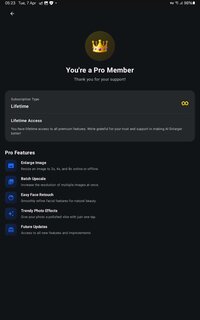
● Pro Feature Unlock.
● Analytics / Crashlytics Removed / Disabled.
● Receivers, Services And Provider Removed / Disabled.
● Google Play Services Check Removed / Disabled.
● Google Play Store Install Package Removed / Disabled.
● In-App Billing Service Removed / Disabled.
● Play Services, Transport, Firebase Properties Removed.
● All Unnecessary Garbage Folder & File Removed.
● Duplicate Dpi Item Remove Like:
- Bar Length, Drawable Size, Gap Between Bars.
● Splits0 File Removed (Resources & AndroidManifest).
● Splits0 Releated Unnecessary Meta-Data Remove Like:
- Stamp Source, Stamp Type Standalone Apk, Android Vending Splits, Android Vending Derived Apk.
● Removed Debug Information (Source, Line, Param, Prologue, Local).
Credit: TryRoom
Free Download:
! Hidden Content !
You must be registered and either click Like under this post or leave a comment before you can see the hidden links.
You may need to refresh the page after clicking Like. If you’re still having trouble revealing the hidden links, please
read this.
Did you know? VIP Members can see all links instantly, no unlocking required.
Interested? Get VIP here.
Interested? Get VIP here.