I prepared a fix zip for you: OntouchstartCE_FIX_v2.zip
STEP 1 - Where to extract:
Open your game zip Akane the Perfect Beautiful Shrine Maiden.zip with ZArchiver
Go to www/js/plugins/
Full path: Akane, the Perfect Beautiful Shrine Maiden/www/js/plugins/
Copy all 3 files from my fix zip into that folder
Update/Save the zip
In JoiPlay, remove the game and add it again
STEP 2 - If it still doesn't work, update to Patreon version:
Download latest JoiPlay and RPG Maker Plugin for JoiPlay from the official Patreon (not Play Store) - version 1.20.53+
Install them
Open JoiPlay > Settings > scroll to bottom > Clear Runtime Packages
Re-add the game
I prepared a fix zip for you: OntouchstartCE_FIX_v2.zip
STEP 1 - Where to extract:
Open your game zip Akane the Perfect Beautiful Shrine Maiden.zip with ZArchiver
Go to www/js/plugins/
Full path: Akane, the Perfect Beautiful Shrine Maiden/www/js/plugins/
Copy all 3 files from my fix zip into that folder
Update/Save the zip
In JoiPlay, remove the game and add it again
STEP 2 - If it still doesn't work, update to Patreon version:
Download latest JoiPlay and RPG Maker Plugin for JoiPlay from the official Patreon (not Play Store) - version 1.20.53+
Install them
Open JoiPlay > Settings > scroll to bottom > Clear Runtime Packages
Re-add the game
Please try this and let me know if it fixes the issue.
1. LONG PRESS game icon in JoiPlay -> Edit
a) Try Enable WebGL 2 = best, fixes black without lag
b) Disable WebGL = fixes black but more laggy (25-30 fps)
c) Enable Path Cache = first boot takes 2-3 mins but fixes after
Please try this and let me know if it fixes the issue.
1. LONG PRESS game icon in JoiPlay -> Edit
a) Try Enable WebGL 2 = best, fixes black without lag
b) Disable WebGL = fixes black but more laggy (25-30 fps)
c) Enable Path Cache = first boot takes 2-3 mins but fixes after
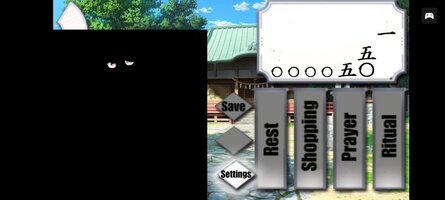
This game uses Spine animations which require WebGL, that's why you get 'Cannot read properties of null (reading render)' when you disable WebGL. Keep WebGL ON.
> Path Cache is not in global settings. To find it: In JoiPlay main menu, LONG PRESS the game icon -> Settings -> you will see Path Cache and Prebuilt Path Cache.
> Or: 3 dots top right -> Settings -> RPG Settings.
> Try this: WebGL ON, WebGL 2 ON, Prebuilt Path Cache ON, Path Cache OFF. Close JoiPlay completely and launch again.
> If still black, it's a GPU limit (texture >4096px). Try Maldives emulator instead of JoiPlay.
This section is not suitable for children and may contain adult content. If you are not over the age of 18 please leave this section.
This site uses cookies to help personalise content, tailor your experience and to keep you logged in if you register.
By continuing to use this site, you are consenting to our use of cookies.