Playstore Link:

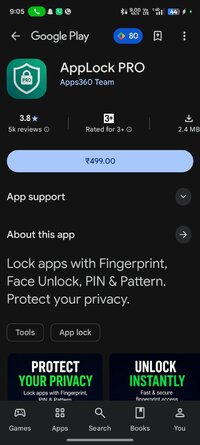
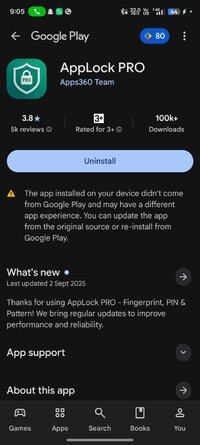
AppLock PRO - Apps on Google Play
Lock apps with Fingerprint, Face Unlock, PIN & Pattern. Protect your privacy.
AppLock PRO is a powerful app lock, app locker, and privacy lock designed to protect your apps and personal information. Lock apps using fingerprint lock, face unlock, PIN, password, or pattern lock and prevent unauthorized access to your private data.
Whether you want to protect WhatsApp, Instagram, Facebook, Messenger, Telegram, Gallery, Photos, banking apps, or other personal apps, AppLock PRO gives you an easy and reliable way to secure apps.
- Fingerprint Lock, Face Unlock & Pattern Lock
Choose your preferred protection method with fingerprint lock, face unlock, PIN, password, or pattern lock. Enjoy quick and convenient access while keeping your protected apps secure.
- Lock Apps & Protect Your Privacy
Protect private conversations, emails, photos, videos, contacts, and sensitive information. AppLock PRO works as a reliable privacy lock to help keep your digital life private.
- Lock Your Apps
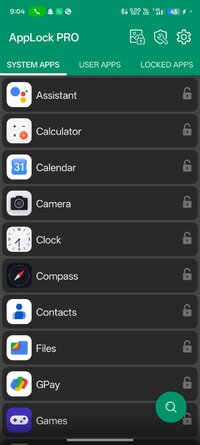
Lock almost any app on your device, including WhatsApp, Instagram, Facebook, Messenger, Telegram, Snapchat, Gmail, Gallery, Photos, Videos, Contacts, Messages, Settings, banking apps, payment apps, and more.
- Notification Lock & Hide Notifications
Keep sensitive information private with notification lock. Hide notifications and prevent private messages, previews, and other sensitive notification content from being seen by others.
- Photo Vault, Gallery Lock & Photo Lock
Protect your personal memories with powerful photo vault, gallery lock, and photo lock features. Keep photos, videos, and other personal media away from unauthorized access.
- Intruder Selfie & Detection
Automatically capture a photo when someone enters an incorrect password, PIN, fingerprint, or pattern, helping you identify unauthorized access attempts.
- Automatically Lock New Apps
Automatically protect newly installed apps so your privacy stays secure without requiring additional setup.
- Settings Lock
Prevent others from changing important settings, uninstalling protected apps, or accessing sensitive device controls.
- Secure Banking & Payment Apps
Protect banking apps, payment apps, digital wallets, and other financial applications to help keep your sensitive financial information private.
- Invisible Pattern Lock
Hide your unlock pattern while drawing to help prevent others from observing your pattern.
- Random PIN Keyboard
Randomize the PIN keypad layout to make it harder for others to observe or guess your PIN.
- App Disguise
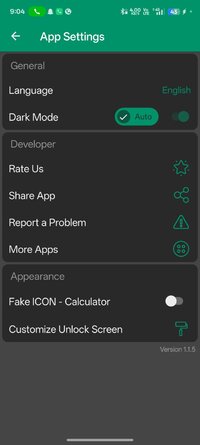
Use app disguise to make AppLock PRO less noticeable. Replace the app icon with a Calculator-style icon for discreet protection.
- Fast, Lightweight & Reliable
Enjoy smooth performance, low battery consumption, and dependable protection with a lightweight app locker designed for everyday privacy.
Why Choose AppLock PRO?
- Fingerprint Lock & Face Unlock
- PIN, Password & Pattern Lock
- Privacy Lock & App Locker
- Lock Apps & Secure Apps
- Notification Lock & Hide Notifications
- Photo Vault, Gallery Lock & Photo Lock
- Protect WhatsApp, Instagram, Facebook & Telegram
- Secure Banking & Payment Apps
- Intruder Selfie & Detection
- Automatically Lock New Apps
- Settings Lock
- Invisible Pattern Lock
- Random PIN Keyboard
- App Disguise
- Custom Themes
- Fast & Lightweight
- Built for Your Privacy
AppLock PRO helps you take control of your digital privacy by protecting your apps, photos, videos, messages, notifications, contacts, and sensitive information on your device.
Whether you need an app lock, fingerprint lock, face unlock, pattern lock, privacy lock, photo vault, gallery lock, or photo lock, AppLock PRO provides convenient protection for your private apps and data.
Whether you want to protect WhatsApp, Instagram, Facebook, Messenger, Telegram, Gallery, Photos, banking apps, or other personal apps, AppLock PRO gives you an easy and reliable way to secure apps.
- Fingerprint Lock, Face Unlock & Pattern Lock
Choose your preferred protection method with fingerprint lock, face unlock, PIN, password, or pattern lock. Enjoy quick and convenient access while keeping your protected apps secure.
- Lock Apps & Protect Your Privacy
Protect private conversations, emails, photos, videos, contacts, and sensitive information. AppLock PRO works as a reliable privacy lock to help keep your digital life private.
- Lock Your Apps
Lock almost any app on your device, including WhatsApp, Instagram, Facebook, Messenger, Telegram, Snapchat, Gmail, Gallery, Photos, Videos, Contacts, Messages, Settings, banking apps, payment apps, and more.
- Notification Lock & Hide Notifications
Keep sensitive information private with notification lock. Hide notifications and prevent private messages, previews, and other sensitive notification content from being seen by others.
- Photo Vault, Gallery Lock & Photo Lock
Protect your personal memories with powerful photo vault, gallery lock, and photo lock features. Keep photos, videos, and other personal media away from unauthorized access.
- Intruder Selfie & Detection
Automatically capture a photo when someone enters an incorrect password, PIN, fingerprint, or pattern, helping you identify unauthorized access attempts.
- Automatically Lock New Apps
Automatically protect newly installed apps so your privacy stays secure without requiring additional setup.
- Settings Lock
Prevent others from changing important settings, uninstalling protected apps, or accessing sensitive device controls.
- Secure Banking & Payment Apps
Protect banking apps, payment apps, digital wallets, and other financial applications to help keep your sensitive financial information private.
- Invisible Pattern Lock
Hide your unlock pattern while drawing to help prevent others from observing your pattern.
- Random PIN Keyboard
Randomize the PIN keypad layout to make it harder for others to observe or guess your PIN.
- App Disguise
Use app disguise to make AppLock PRO less noticeable. Replace the app icon with a Calculator-style icon for discreet protection.
- Fast, Lightweight & Reliable
Enjoy smooth performance, low battery consumption, and dependable protection with a lightweight app locker designed for everyday privacy.
Why Choose AppLock PRO?
- Fingerprint Lock & Face Unlock
- PIN, Password & Pattern Lock
- Privacy Lock & App Locker
- Lock Apps & Secure Apps
- Notification Lock & Hide Notifications
- Photo Vault, Gallery Lock & Photo Lock
- Protect WhatsApp, Instagram, Facebook & Telegram
- Secure Banking & Payment Apps
- Intruder Selfie & Detection
- Automatically Lock New Apps
- Settings Lock
- Invisible Pattern Lock
- Random PIN Keyboard
- App Disguise
- Custom Themes
- Fast & Lightweight
- Built for Your Privacy
AppLock PRO helps you take control of your digital privacy by protecting your apps, photos, videos, messages, notifications, contacts, and sensitive information on your device.
Whether you need an app lock, fingerprint lock, face unlock, pattern lock, privacy lock, photo vault, gallery lock, or photo lock, AppLock PRO provides convenient protection for your private apps and data.
*Special Features*
● Supported Languages: af, am, ar, as, az, be, bg, bn, bs, ca, cs, da, de, el, en-AU, en-CA, en-GB, en-IN, en-XC, es, es-419, es-US, et, eu, fa, fi, fr, fr-CA, gl, gu, hi, hr, hu, hy, in, is, it, iw, ja, ka, kk, km, kn, ko, ky, lo, lt, lv, mk, ml, mn, mr, ms, my, nb, ne, nl, or, pa, pl, pt, pt-BR, pt-PT, ro, ru, si, sk, sl, sq, sr, sr-Latn, sv, sw, ta, te, th, tl, tr, uk, ur, uz, vi, zh, zh-CN, zh-HK, zh-TW, zu;
● Supported Cpu Architecture: Armeabi-v7a, Arm64-v8a, X86, X86_64;
● Supported Screen Dpi: Ldpi, Mdpi, Tvdpi, Hdpi, Xhdpi, Xxhdpi, Xxxhdpi.
● Untouched Paid Apk With Original Hash Signature.
● Certificate MD5 Digest: 6ee6ce49f25f945d1da4a4fc76f0022f.
.Apks Bundle Installation:
SAI Instructions: [No Root]
1. Download And Install Latest SAI App (Split APK Installer) - Releases · Aefyr/SAI
2. Download this .apks Archive App;
3. Install And Open SAI / Choose "Install APKs" Button / Find And Select Downloaded .apks Archive App;
4. Wait For Install And Done. Enjoy!.
Lucky Patcher Instructions: [No Root]
1. Download And Install Latest Lucky Patcher App;
2. Install And Open Lucky Patcher And Choose 'Rebuild & Install';
3. Find And Select Downloaded This .apks Archive App;
4. Wait For Install And Done. Enjoy!.
PS: Make Sure After Open SAI or Lucky Patcher You Allowed Storage Permission And Install Unknown Apps Permission!
Credit: TryRoom
Free Download:
! Hidden Content !
You must be registered and either click Like under this post or leave a comment before you can see the hidden links.
You may need to refresh the page after clicking Like. If you’re still having trouble revealing the hidden links, please
read this.
Did you know? VIP Members can see all links instantly, no unlocking required.
Interested? Get VIP here.
Interested? Get VIP here.