Playstore Link :

AutoLaunch - Apps on Google Play
Launch and Query apps by name and other characteristics in Tasker.
AutoLaunch Full Ver. 1.1.4 build 32 MOD APK l Pro, Paid Unlocked
Requirements: 5.0+ | Tasker
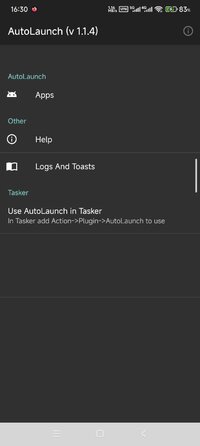
Overview: Launch apps in Tasker dynamically with AutoLaunch. Also, query your apps and act on them!
Launch apps in Tasker dynamically with AutoLaunch. Also, query your apps and act on them!
You can use Tasker variables to do this, so this makes it possible to do stuff like you see in the video where you can see apps being launched by voice commands.
You can also query the apps you have on your device and do what you want with the results. You can, for instance, create a custom app launcher menu like you can see in the video.
Please read the AutoLaunch FAQ if you're having any trouble launching apps:FAQ – Tasker and Join
Lite version is restricted to interacting with 20 of your apps. You can get the full version by unlocking it with an in-app purchase or by getting the unlock key here:AutoLaunch Unlock Key - Apps on Google Play
Before leaving any negative feedback, please send me an email or put a post on the joaomgcd Google+ Community so I can try and help you first. It's much easier for me to help you directly than through Google Play reviews. I might miss the reviews, because there's nothing alterting me to new ones, so it will be much faster to contact me directly.
Check out AutoLaunch's home page for more info:AutoLaunch – Tasker and Join
What's New:
Updated target API to 36. Might break stuff. Let me know if it does.
Requirements: 5.0+ | Tasker
Overview: Launch apps in Tasker dynamically with AutoLaunch. Also, query your apps and act on them!
Launch apps in Tasker dynamically with AutoLaunch. Also, query your apps and act on them!
You can use Tasker variables to do this, so this makes it possible to do stuff like you see in the video where you can see apps being launched by voice commands.
You can also query the apps you have on your device and do what you want with the results. You can, for instance, create a custom app launcher menu like you can see in the video.
Please read the AutoLaunch FAQ if you're having any trouble launching apps:FAQ – Tasker and Join
Lite version is restricted to interacting with 20 of your apps. You can get the full version by unlocking it with an in-app purchase or by getting the unlock key here:AutoLaunch Unlock Key - Apps on Google Play
Before leaving any negative feedback, please send me an email or put a post on the joaomgcd Google+ Community so I can try and help you first. It's much easier for me to help you directly than through Google Play reviews. I might miss the reviews, because there's nothing alterting me to new ones, so it will be much faster to contact me directly.
Check out AutoLaunch's home page for more info:AutoLaunch – Tasker and Join
What's New:
Updated target API to 36. Might break stuff. Let me know if it does.
*Special Features*
1 . PRO / Paid features Unlocked
Credit to : derrin
Free Download:
! Hidden Content !
You must be registered and either click Like under this post or leave a comment before you can see the hidden links.
You may need to refresh the page after clicking Like. If you’re still having trouble revealing the hidden links, please
read this.
Did you know? VIP Members can see all links instantly, no unlocking required.
Interested? Get VIP here.
Interested? Get VIP here.