Playstore Link :

BlurWall: blur wallpaper - Apps on Google Play
Apply a blurry effect to images and set them as your home screen or lock screen
Blur any image to achieve a fantastic look on your home screen background. It utilizes a super quick method to apply a blur effect to any image!
 ️ Features:
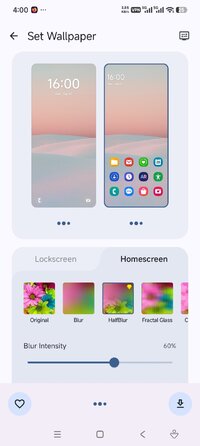
- High-quality HD wallpapers and backgrounds available online
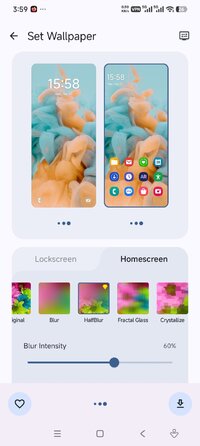
- Preview the blur wallpaper effect directly in the list
- One-step application for both lock screen and home screen
- Adjust image colors before set background
- Fractal Glass blur effect
- Crystallize blur effect
- Support zoom and move or crop wallpaper
- Support hige qulity large images as wallpaper
- Add blur level option
- Add home blur option
- Android Material 3 design UI
- Support p'ick your self image as wallpaper
- Support zoom and move wallpaper
- Support hige qulity large images as wallpaper
- New app icon design
Q:how to blur home screen wallpaper samsung?
A: Open app select your wallpaper image to enter set wallpaper page, adjst blur effect then tap apply button.
For further inquiries or assistance: [email protected]
️ Features:- High-quality HD wallpapers and backgrounds available online
- Preview the blur wallpaper effect directly in the list
- One-step application for both lock screen and home screen
- Adjust image colors before set background
- Fractal Glass blur effect
- Crystallize blur effect
- Support zoom and move or crop wallpaper
- Support hige qulity large images as wallpaper
- Add blur level option
- Add home blur option
- Android Material 3 design UI
- Support p'ick your self image as wallpaper
- Support zoom and move wallpaper
- Support hige qulity large images as wallpaper
- New app icon design
Q:how to blur home screen wallpaper samsung?
A: Open app select your wallpaper image to enter set wallpaper page, adjst blur effect then tap apply button.
For further inquiries or assistance: [email protected]
*Special Features*
1 . Premium Features Unlocked
Credit to : Doom's Morphe patches
Free Download:
! Hidden Content !
You must be registered and either click Like under this post or leave a comment before you can see the hidden links.
You may need to refresh the page after clicking Like. If you’re still having trouble revealing the hidden links, please
read this.
Did you know? VIP Members can see all links instantly, no unlocking required.
Interested? Get VIP here.
Interested? Get VIP here.