Playstore Link :

Business Calendar 2 Pro - Apps on Google Play
Discover the full power of the leading mobile calendar app
 Included in "The Essential Android Apps for 2018" list of the Lifehacker weblog.
Business Calendar 2 Pro is the premium version of our popular calendar app. It provides an excellent overview of your appointments, it’s easy to use and it gives you powerful tools for planning and scheduling your events and tasks.
Premium features:
 Speed Up Event Creation
▪ use templates for new events & tasks
▪ location auto-completion using suggestions from TomTom
 Edit Your Schedule in No Time
▪ easily move and copy events using drag&drop in our weekly planner
▪ delete, move or copy multiple events at once using multi-selection
▪ copy the same event to multiple days at once e.g. to place your work shifts
 Choose Your Design
▪ 22 beautiful themes for the app (e.g. dark theme)
▪ 14 unique widget themes for each widget
▪ individually configurable font sizes
 Don’t Miss Anything
▪ repeating alarms
▪ individual ringtones for different calendars
 How is the Weather?
▪ integrated weather report in month, day and agenda view
 Enjoy Premium Tools
▪ attach files & photos
▪ privately link contacts
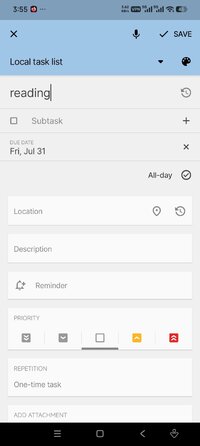
▪ repeated tasks, subtasks & priorities for tasks
▪ print your schedule to PDF
▪ import & export calendar data (.ics, .ical)
 Schedule on Your Home Screen
▪ premium "Day Pro" widget shows everything that matters in one view
 No Ads▪ completely free of ads
A free version of Business Calendar 2 is also available. You may want to try the free version out before buying the premium app. Here are the features that are available in both versions of Business Calendar 2:
 Your Personal Organizer
▪ calendar, schedule planner & task organizer in one app
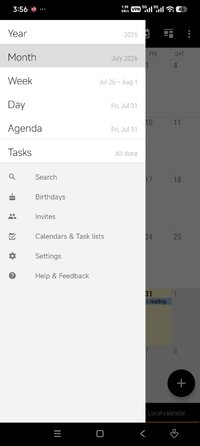
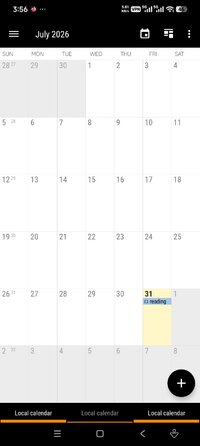
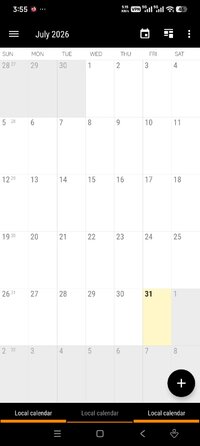
▪ 6 clearly designed main views: month, week, day, agenda, year and tasks
▪ popup with event details directly in month view
▪ flexible daily and weekly planner, quickly adjustable to 1-14 days
▪ the calendar widget of your choice: agenda widget, month widget, week widget etc.
▪ sync with Google Calendar, Microsoft Outlook, Exchange etc.
▪ intuitive navigation with simple swipes between month, week and day
▪ quickly show and hide calendars with the favorite bar
▪ birthday calendar and public holidays calendar
 Quick Appointment Scheduler
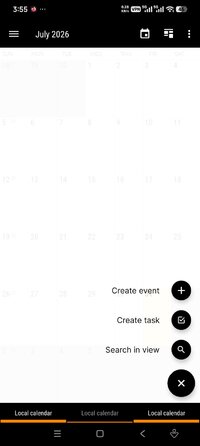
▪ convenient dialogs to enter event details hassle-free
▪ smart suggestions for title, location and attendees based on previous entries
▪ powerful voice input feature to quickly add events, tasks and birthdays
▪ flexible recurrences
 Reminders
▪ status bar reminders or popup notifications
▪ snooze reminders, show map, write email to attendees or check tasks directly from notification
 Unique Widgets
▪ 7 professional calendar widgets
▪ agenda, month, week, day, task & icon widget
▪ adapt each calendar widget to your personal needs
 Synchronized or Local
▪ sync of events with Google Calendar, Microsoft Exchange, Outlook etc. by using the Android calendar synchronization
▪ sync of tasks with Google Tasks
▪ you can also use our calendar app as local organizer if you want
 Always the Right Tools
▪ easily invite attendees to meetings
▪ view and answer meeting invitations in dedicated view
▪ heat map in year view to find free days quickly
▪ ongoing notification with event countdown
▪ live search in all views
▪ share your events and tasks easily
 Add Emoticons
▪ add over 600 emoticons to your events and tasks (Emoji artwork provided free by EmojiOne: JoyPixels | Stunning emoji for beautiful brands & agencies!)
 Developed with Energy and Passion
Business Calendar is developed by a small, dedicated team in Berlin. We’re completely self-sustained and only funded by the revenue of our calendar apps. By upgrading Business Calendar you will not only get a lot of professional premium features but also greatly support the continuous development of the app.
 Follow us
Read our tip of the week on Facebook:
www.facebook.com/BusinessCalendar2
Twitter: twitter.com/BizCalPro
*Special Features*
Untouched [Paid] apk with Original Hash Signature,
no [Mod] or changes was applied
Free Download:
! Hidden Content !
You must be registered and either click Like under this post or leave a comment before you can see the hidden links.
You may need to refresh the page after clicking Like. If you’re still having trouble revealing the hidden links, please
read this.
Did you know? VIP Members can see all links instantly, no unlocking required.
Interested? Get VIP here.
Interested? Get VIP here.