Playstore Link :

Chaozhuyin Ver. 3.5.0 b26021801 MOD APK | Premium Unlocked
Requirements: 8.0+
Overview: Chaozhuyin is a Chinese phonetic symbol keyboard.
Chaozhuyin is a Chinese phonetic symbol Input Method (Bopomofo IME). It is very easy to use with zero learning curve.
Features:
● To input a Chinese phrase, you only need to input the first phonetic symbol of each word, and you can add any remain symbols arbitrarily to narrow down the candidates you may want.
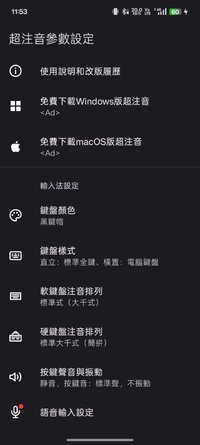
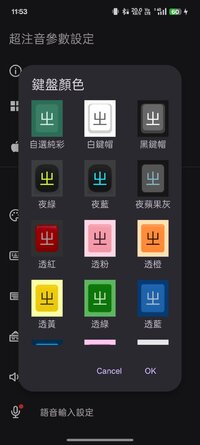
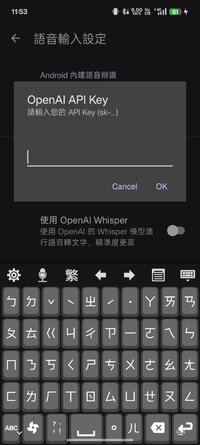
● Provide several kinds of skins and colors of the soft keyboard. Keyboard and font size can be adjusted freely.
● Proximity correction: it'll smartly guess what word or phrase you want to input from neighbor keys.
● Swiping keyboard.
● English input method.
● Keyboard fan-shaped selector.
● Candidate selection dropdown.
● "Smart proximity correction" feature.
● You can remove your user phrase now.
● Eten keyboard layout.
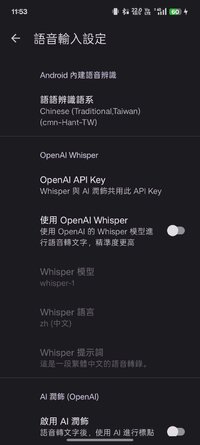
● Up/down/left/right arrow keys, and voice recognition button.
● Move the system phrase database file to and from SD card.
● Backup/restore user phrase by yourself.
● With great functionality of word or phrase guessing.
● Support mobile and tablet devices, support hard keyboard.
● Able to import Chinese names in your contacts.
● Able to output Simplified Chinese.
● Support Android 4+.
This version can be used for free for 28 days with full functions. During the trial period, there will be a banner ads at the bottom of the setting screen. After the trial period, the following functions will be closed:
● Swiping keyboard.
● Keyboard fan-shaped selector.
● Candidate selection dropdown.
● Word or phrase guessing.
● "Smart proximity correction" feature.
● English input method.
● Up/down/left/right arrow keys.
● Voice recognition button.
● Import Chinese names in your contacts.
● Move the system phrase database file to and from SD card.
● Backup/restore user phrase by yourself.
● Remove your user phrase.
Apk Details:
arm7+arm64
Size: 86.9 MB
SHA-256: 6cb397375cd1f385cd9d1fa23cf40aaca353ebcfc960dcf5e30e8b58f80b5948
What's New:
Ver 3.4.14:
* Fix: Mitigate the issue where the keyboard bottom edge overlaps with the navigation bar on Android 16.
* Fix: Resolve the issue where the cursor position is abnormal when pressing left and right keys in some apps.
Requirements: 8.0+
Overview: Chaozhuyin is a Chinese phonetic symbol keyboard.
Chaozhuyin is a Chinese phonetic symbol Input Method (Bopomofo IME). It is very easy to use with zero learning curve.
Features:
● To input a Chinese phrase, you only need to input the first phonetic symbol of each word, and you can add any remain symbols arbitrarily to narrow down the candidates you may want.
● Provide several kinds of skins and colors of the soft keyboard. Keyboard and font size can be adjusted freely.
● Proximity correction: it'll smartly guess what word or phrase you want to input from neighbor keys.
● Swiping keyboard.
● English input method.
● Keyboard fan-shaped selector.
● Candidate selection dropdown.
● "Smart proximity correction" feature.
● You can remove your user phrase now.
● Eten keyboard layout.
● Up/down/left/right arrow keys, and voice recognition button.
● Move the system phrase database file to and from SD card.
● Backup/restore user phrase by yourself.
● With great functionality of word or phrase guessing.
● Support mobile and tablet devices, support hard keyboard.
● Able to import Chinese names in your contacts.
● Able to output Simplified Chinese.
● Support Android 4+.
This version can be used for free for 28 days with full functions. During the trial period, there will be a banner ads at the bottom of the setting screen. After the trial period, the following functions will be closed:
● Swiping keyboard.
● Keyboard fan-shaped selector.
● Candidate selection dropdown.
● Word or phrase guessing.
● "Smart proximity correction" feature.
● English input method.
● Up/down/left/right arrow keys.
● Voice recognition button.
● Import Chinese names in your contacts.
● Move the system phrase database file to and from SD card.
● Backup/restore user phrase by yourself.
● Remove your user phrase.
Apk Details:
arm7+arm64
Size: 86.9 MB
SHA-256: 6cb397375cd1f385cd9d1fa23cf40aaca353ebcfc960dcf5e30e8b58f80b5948
What's New:
Ver 3.4.14:
* Fix: Mitigate the issue where the keyboard bottom edge overlaps with the navigation bar on Android 16.
* Fix: Resolve the issue where the cursor position is abnormal when pressing left and right keys in some apps.
*Special Features*
1 . Premium Features Unlocked
Credit to : youarefinished
Free Download:
! Hidden Content !
You must be registered and either click Like under this post or leave a comment before you can see the hidden links.
You may need to refresh the page after clicking Like. If you’re still having trouble revealing the hidden links, please
read this.
Did you know? VIP Members can see all links instantly, no unlocking required.
Interested? Get VIP here.
Interested? Get VIP here.