Shared [Tested] Civilization VI: NETFLIX Ver. 1.2.5-netflix MOD APK | Unlock Full Content

App-Architecture
ARM64 (arm64-v8a | 64-Bit)
After you install the apk don't open it. Make the obb folder and then copy the obb file inside first. Only after that you can open the game.
Y open the game when the files are in the obb. But the message "internet connection required to download" appears. What i am doing wrong? I need to install/configure the APK in a specific way?
 
Y open the game when the files are in the obb. But the message "internet connection required to download" appears. What i am doing wrong? I need to install/configure the APK in a specific way?
This is a matter of sequence.when you install civilization6,you open the app,the app will create a obb folder itself and check the file ,if the folder is empty ,it will download the obb file and won't stop. After that,you put the another obb file in ,it will not work. So what we do is adding obb file before the app check.
 
If it stiil don't work
check the obb folder's name or download it again
Thanks for your answers. That is possible the application is open automatically when i intall it even if I don't open it manually? A special Software installation it is necessary?
The only différence with your tutorial is y have two data directory. That is important ?
 
Hey dudes, I kinda new here, can you guys teach me where can I find the download of the file of the Netflix Civ 6 moded, I can't see where it is, only I see is the docs, thank you
 
I'm little busy right now , I will make a video tomorrow to answer your question,
Hey dude, it's me again, I tried installing the mods dlc and I swear I put it all in the right place, I used shizuku and File app to move the files to mods, yet when I open the app it sticks on a loop of Netflix logo, you know how to fix it?
 
Hey dude, it's me again, I tried installing the mods dlc and I swear I put it all in the right place, I used shizuku and File app to move the files to mods, yet when I open the app it sticks on a loop of Netflix logo, you know how to fix it?
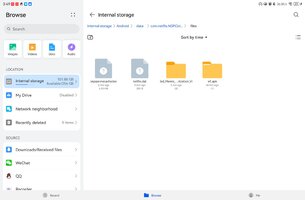
Check this four files
If the app stuck at the interface of loading
 

Attachments

  • Screenshot_20260419_154939_com.huawei.filemanager.jpg
    Screenshot_20260419_154939_com.huawei.filemanager.jpg
    81.7 KB · Views: 7
Hey dude, it's me again, I tried installing the mods dlc and I swear I put it all in the right place, I used shizuku and File app to move the files to mods, yet when I open the app it sticks on a loop of Netflix logo, you know how to fix it?
Is the Civ6 itself (without mod) run smoothly?
 
Yup it runs smoothly, I have installed some mods from your link, but some mods don't work, but based on what you recently uploaded about the 4 files, I checked, I don't have the wf folder, what should I do, add it?
I tried troubleshooting the mods by installing each and try if the app will not goes on a logo loop, and the result is some mods causes the logo loop.
 
There are too many thing l don't konw,like your phone model, the version of Android is your phone running on and so on.you can send me some photos to let me kown better.
Here is the solution:Civilization VI: NETFLIX Ver. 1.2.5-netflix MOD APK | Unlock Full Content
Thanks for your answer. It's a Samsung s21 Android 15. Only différence y see is the second data directory.
With your other link, the same thing appears: internet connection required to download...
 
Thanks for your answer. It's a Samsung s21 Android 15. Only différence y see is the second data directory.
With your other link, the same thing appears: internet connection required to download...
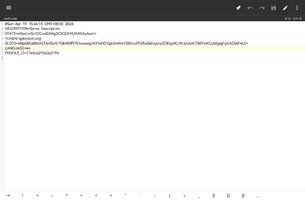
Is the system language of your phone English?language data pack downloading is a problem
 

Attachments

  • Screenshot_20260419_162622_bin.mt.plus.jpg
    Screenshot_20260419_162622_bin.mt.plus.jpg
    64.5 KB · Views: 5
Tags Tags
day 13 month 04 working jrptt mohd hafiz

Similar threads

Replies
9
Views
10K
Back
Top Bottom