
You are using an out of date browser. It may not display this or other websites correctly.
You should upgrade or use an alternative browser.
You should upgrade or use an alternative browser.
Filled Request Clovis Medieval Grand Strategy
- Thread starter Agam Sibabiutan
- Start date


kaddenvraxx
Solid & Active Platinian
Okay disregard my message, I was gonna DM but you already gave it a tryMay I know the detailed step-by-step instructions or screenshots when patching using Lucky Patcher

darkknight44466
Rookie
How?Followed the steps and it works
Guys, you should definitely try it too!
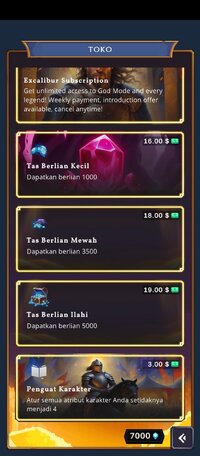
View attachment 819244View attachment 819247View attachment 819248

kaddenvraxx
Solid & Active Platinian
just follow the instructions here in the comments. If it still doesn’t work, just message me and I’ll help you out as much as I can.How?
darkknight44466
Rookie
I do the instructions and it didn't workjust follow the instructions here in the comments. If it still doesn’t work, just message me and I’ll help you out as much as I can.
kaddenvraxx
Solid & Active Platinian
Maybe you missed a step or it’s just a device issue. It worked for me when I followed the instructions.I do the instructions and it didn't work

Yaguracchii
Platinian
Someone pls mod this, I can't get my lucky patcher to work :""
kaddenvraxx
Solid & Active Platinian
Maybe u missed a step in the instructions or clicked something wrong. Try checking it again carefully it should work after that!Someone pls mod this, I can't get my lucky patcher to work :""

Chrisvonae
Rookie
For me, I've used LP before (so it's not new to me) tried several times following the Instructions (all except the 'saved purchases' in the in-game shop, as that isn't an option) and I get the error message 'Sorry there's an issue with Internet connection' or something.. if I tinker with the GP switches in LP I end an endless loading circle.Maybe u missed a step in the instructions or clicked something wrong. Try checking it again carefully it should work after that!
So unless I'm missing something obvious with the 'saved purchase' bit (which is the only bit of the Instructions I'm unable to do) I am unsure how you go this working
kaddenvraxx
Solid & Active Platinian
Hmm maybe the issue comes from that missing ‘saved purchase’ option or one of the LP settings. Try checking if u followed all the patch steps correctly especially the ‘Apk Rebuilt For InApp and LVL Emulation’ part. Also make sure Google Billing Emulation is turned ON before opening the game, then OFF again after u play. Sometimes that internet connection error happens if one of those switches is set wrong or if the device isn’t fully compatible.For me, I've used LP before (so it's not new to me) tried several times following the Instructions (all except the 'saved purchases' in the in-game shop, as that isn't an option) and I get the error message 'Sorry there's an issue with Internet connection' or something.. if I tinker with the GP switches in LP I end an endless loading circle.
So unless I'm missing something obvious with the 'saved purchase' bit (which is the only bit of the Instructions I'm unable to do) I am unsure how you go this working
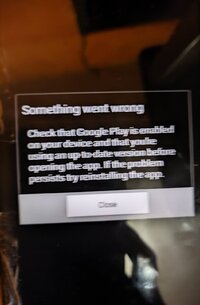
kaddenvraxx
Solid & Active Platinian
You could try this, go to Lucky Patcher → ‘Switches’ and turn ON Google Billing Emulation before opening the game. Then open it againI've got this error and then the game force close, can someone help me.
 it still bugs out, go back and turn OFF Google Billing Info in LP then relaunch. That message usually means the billing got a bit messed up or smth lol. If it still acts up, try reinstalling the modded apk after rebuilding it with ‘Apk Rebuilt for InApp and LVL Emulation’ checked.
Aditya Yeshri
Rookie
I got the same problem.What to do next please help.whenever I open the app it directs me to Google play app and tell me to get the game.What happens if it says "get this game from play" if you try to play on the modified version?

rizaliox
Platinian
It doesn't work but after I install parallel space and put the game there, it's now began to work.You could try this, go to Lucky Patcher → ‘Switches’ and turn ON Google Billing Emulation before opening the game. Then open it again

Sebastian739
Rookie
Can you lads help me ? When I open the modded game it keeps sending me to play store to get the game from there. What I missed or did wrong ?
how to do this?
or does this just doesn't for me?
how to do this I've followed the step by step but keep saying error every time i try to by does the mod require internet??Followed the steps and it works
Guys, you should definitely try it too!
View attachment 819244View attachment 819247View attachment 819248
or does this just doesn't for me?
where is the saved pourchase option?When you did all the step, install the modified game and open the game goto shop click saved purchase, and if you somehow close the game and tries to go back in the game and it keeps closing goto lucky patcher, switches - google billing information (off) it should be turn off everytime you play the game
Can you help me?You could try this, go to Lucky Patcher → ‘Switches’ and turn ON Google Billing Emulation before opening the game. Then open it again