Playstore Link :

CrookCatcher: Anti-Theft - Apps on Google Play
See who tried to unlock your phone with an intruder selfie, location & alerts
CrookCatcher • Anti Theft Ver. 3.0.8 MOD APK l Pro, Paid Unlocked
Requirements: 8.0+
Overview: Capture photos/video on wrong unlock attempts, emailed to you with GPS location.
CrookCatcher: Your Personal Phone Security Guard
Worried about phone theft or snooping? Me too, that's why I built this app. CrookCatcher protects your phone by capturing photos whenever someone enters the wrong password, PIN, or pattern. Then, it emails you with intruder photos, GPS location, and estimated address. But CrookCatcher can do lots more!
Trusted by Millions
- 8+ million downloads
- 500M+ intruder photos captured in 190+ countries since 2014
Free Features everyone needs
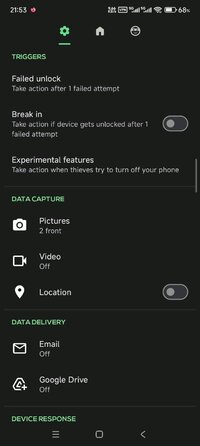
Capture intruder photos
Detect GPS location
Send alert emails
Upgrade to PRO for Advanced Security
Record Intruders in Detail
- Capture VIDEOS with sound for clear evidence of intruders.
- Use the back-facing camera for environment details.
- Auto-upload photos/videos to Google Drive for access on any device.
Outsmart Thieves
- Display a fake home screen to trick intruders.
- Show a custom lock screen message warning thieves.
Advanced App Security
- Hide the app with a disguised icon and name.
- Customize alert email subjects and hide notifications.
- Lock access to CrookCatcher with a pattern code.
Catch Even After Unlock
Break-in detection captures a photo if the intruder successfully guesses your password after failed attempts.
Protection Against Shutdown Attempts
CrookCatcher can block the power menu, quick settings, and notification shade to capture evidence when thieves try to turn off your phone or enable airplane mode. CrookCatcher uses the accessibility permission to detect these elements on the lock screen. (Experimental feature, may not work on all devices.)
Battery-Friendly
Inactive unless someone enters the wrong PIN, ensuring minimal battery usage.
Important Notes
- Unlock your phone once after rebooting to re-enable CrookCatcher.
- Not compatible with pop-up cameras or fingerprint errors.
- On Android 13+, a system notification appears when the camera is in use.
- Uses Device Administrator permission to monitor unlock attempts securely.
Help & Privacy
Visit CrookCatcher - Recover Stolen Android Phones | Anti-Theft App for help and FAQs. Privacy matters — learn more at Privacy Policy • CrookCatcher Android App.
Don’t Wait Until It’s Too Late!
Download CrookCatcher today and outsmart thieves!
Modifications:
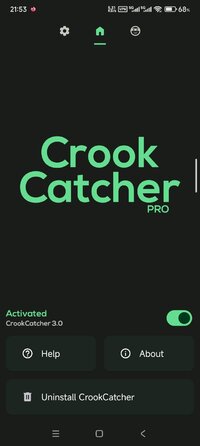
Pro / Paid Features Unlocked
Graphics & Resources Optimized
Install Referrer Tracking Disabled
Ads links removed and invokes methods nullified
Advertising & Billing Activities Disabled
Debug code removed
Removed default .source tags name of the corresponding java files
Removed All Unnecessary Files
Languages: Multiple Languages
CPUs: Armeabi-v7a, Arm64-v8a
Released by HEROMODS
What's New:
Bug fixes
Requirements: 8.0+
Overview: Capture photos/video on wrong unlock attempts, emailed to you with GPS location.
CrookCatcher: Your Personal Phone Security Guard
Worried about phone theft or snooping? Me too, that's why I built this app. CrookCatcher protects your phone by capturing photos whenever someone enters the wrong password, PIN, or pattern. Then, it emails you with intruder photos, GPS location, and estimated address. But CrookCatcher can do lots more!
Trusted by Millions
- 8+ million downloads
- 500M+ intruder photos captured in 190+ countries since 2014
Free Features everyone needs
Capture intruder photos
Detect GPS location
Send alert emails
Upgrade to PRO for Advanced Security
Record Intruders in Detail
- Capture VIDEOS with sound for clear evidence of intruders.
- Use the back-facing camera for environment details.
- Auto-upload photos/videos to Google Drive for access on any device.
Outsmart Thieves
- Display a fake home screen to trick intruders.
- Show a custom lock screen message warning thieves.
Advanced App Security
- Hide the app with a disguised icon and name.
- Customize alert email subjects and hide notifications.
- Lock access to CrookCatcher with a pattern code.
Catch Even After Unlock
Break-in detection captures a photo if the intruder successfully guesses your password after failed attempts.
Protection Against Shutdown Attempts
CrookCatcher can block the power menu, quick settings, and notification shade to capture evidence when thieves try to turn off your phone or enable airplane mode. CrookCatcher uses the accessibility permission to detect these elements on the lock screen. (Experimental feature, may not work on all devices.)
Battery-Friendly
Inactive unless someone enters the wrong PIN, ensuring minimal battery usage.
Important Notes
- Unlock your phone once after rebooting to re-enable CrookCatcher.
- Not compatible with pop-up cameras or fingerprint errors.
- On Android 13+, a system notification appears when the camera is in use.
- Uses Device Administrator permission to monitor unlock attempts securely.
Help & Privacy
Visit CrookCatcher - Recover Stolen Android Phones | Anti-Theft App for help and FAQs. Privacy matters — learn more at Privacy Policy • CrookCatcher Android App.
Don’t Wait Until It’s Too Late!
Download CrookCatcher today and outsmart thieves!
Modifications:
Pro / Paid Features Unlocked
Graphics & Resources Optimized
Install Referrer Tracking Disabled
Ads links removed and invokes methods nullified
Advertising & Billing Activities Disabled
Debug code removed
Removed default .source tags name of the corresponding java files
Removed All Unnecessary Files
Languages: Multiple Languages
CPUs: Armeabi-v7a, Arm64-v8a
Released by HEROMODS
What's New:
Bug fixes
*Special Features*
1 . Pro / Paid Features Unlocked
Credit to : HEROMODS
Free Download:
! Hidden Content !
You must be registered and either click Like under this post or leave a comment before you can see the hidden links.
You may need to refresh the page after clicking Like. If you’re still having trouble revealing the hidden links, please
read this.
Did you know? VIP Members can see all links instantly, no unlocking required.
Interested? Get VIP here.
Interested? Get VIP here.