Playstore Link :

Cx File Explorer - Apps on Google Play
File manager & storage cleaner app to provide easier management of files
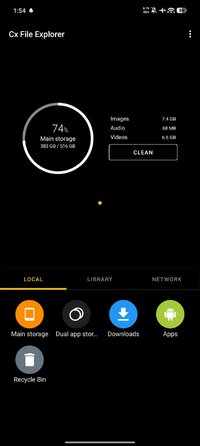
With this file manager app, you can quickly browse and manage the files on your mobile device, PC, and cloud storage, just like you use Windows Explorer or Finder on your PC or Mac. Also it provides a rich set of features that advanced users are looking for without feeling bloated. You can even manage the space used on your mobile device with a visualized storage analysis.
Key features
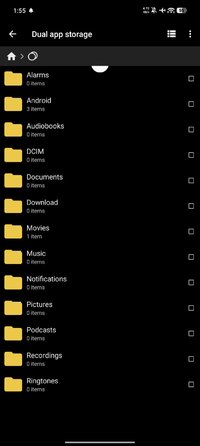
Organize your files and folders: With a user-friendly UI, you can easily browse, move, copy, compress, rename, extract, delete, create and share files (folders) on both internal and external storage of your mobile device.
Access files on cloud storage: You can manage the files on cloud storages.
Access files on NAS (Network-attached storage): You can access files within remote or shared storage like FTP, FTPS, SFTP, SMB, WebDAV, and LAN. Also you can access your mobile dev ice from PC using FTP(File Transfer Protocol).
Manage your apps: you can manage the apps installed on your mobile device.
Analyze and manage your storage: Cx File Explorer provides visualized storage analysis so that you can quickly scan the available space and manage it. The Recycle bin also helps you easily manage your storage.
Material Design interface: Cx File Explorer uses the Material Design interface.
If you are looking for a file manager app that has simple and sleek interface with full features, Cx File Explorer would be the best choice.
Key features
Organize your files and folders: With a user-friendly UI, you can easily browse, move, copy, compress, rename, extract, delete, create and share files (folders) on both internal and external storage of your mobile device.
Access files on cloud storage: You can manage the files on cloud storages.
Access files on NAS (Network-attached storage): You can access files within remote or shared storage like FTP, FTPS, SFTP, SMB, WebDAV, and LAN. Also you can access your mobile dev ice from PC using FTP(File Transfer Protocol).
Manage your apps: you can manage the apps installed on your mobile device.
Analyze and manage your storage: Cx File Explorer provides visualized storage analysis so that you can quickly scan the available space and manage it. The Recycle bin also helps you easily manage your storage.
Material Design interface: Cx File Explorer uses the Material Design interface.
If you are looking for a file manager app that has simple and sleek interface with full features, Cx File Explorer would be the best choice.
*Special Features*
- AdFree
- No active trackers
- Analytics disabled
- Cleared Manifest, etc.
- Debug code removed
- Multilanguages
- CPUs: NoArch
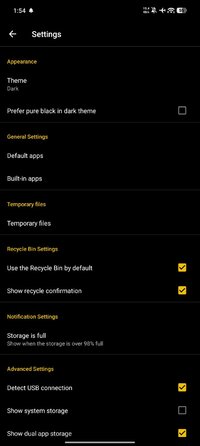
- Enable Amoled theme for the app in settings: Switch Theme setting to Dark!
Credit to : cenzo402
Free Download:
! Hidden Content !
You must be registered and either click Like under this post or leave a comment before you can see the hidden links.
You may need to refresh the page after clicking Like. If you’re still having trouble revealing the hidden links, please
read this.
Did you know? VIP Members can see all links instantly, no unlocking required.
Interested? Get VIP here.
Interested? Get VIP here.