Playstore Link :

Device Info: System & CPU Info - Apps on Google Play
Monitor CPU, GPU, RAM, battery health, hardware tests and run device diagnostics
Device Info: System & CPU Info Ver. 3.4.1.4 MOD APK | Donate / Paid Unlocked
Requirements: 12L+
Overview: Device Info is a simple and powerful Android application that gives you complete information about your mobile device with advanced user interfaces.
Device Info is a powerful hardware monitor trusted by over 1 million users. Get comprehensive real-time information about your device's CPU, GPU, RAM, battery health, storage, sensors, display, camera, network connectivity (Wi-Fi, Bluetooth, mobile data), and thermal performance. Run hardware tests, benchmark your device, and export detailed reports—all with zero tracking or data collection
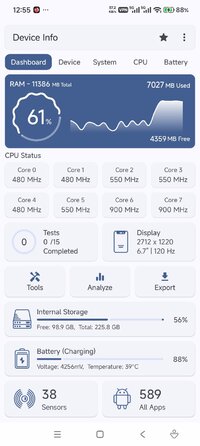
Dashboard
Overview of your device's software and hardware info, including RAM, Internal Storage, External Storage, Battery, CPU, Sensors Available, and Apps Installed.
Device Information
Complete phone info including model, manufacturer, brand, hardware, board, build fingerprint, device age, manufactured date, USB host, SIM and network details, and IMEI.
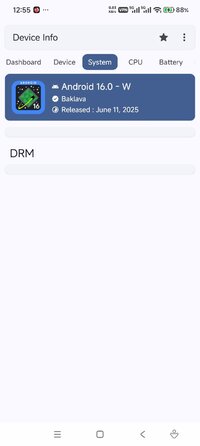
System Information
Complete system and software information including codename, API level, released version, one ui version, bootloader, baseband, Java VM, Android version, security patch level, kernel, Google Play Services, Vulkan support, OpenGL ES, Treble, seamless updates, system uptime, root apps, and language.
CPU
Display all details about the System on Chip(SoC), Processors, CPU Architecture, Supported ABIs, CPU Hardware, CPU Governor, Number of Cores, CPU Frequency, GPU Renderer, GPU Vendor & GPU Version.
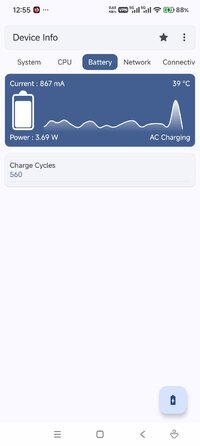
Battery
Monitor your battery's health, level, status, power source, technology, temperature, voltage, power (watts), current (mA), and capacity in real-time.
Network
Show information about IP Address, Gateway, Subnet Mask, DNS, Lease Duration, Interface, Frequency, Wifi Standard, Security & Link Speed.
Connectivity
Get details of your device's connectivity options, such as Wifi, Bluetooth, NFC, Ultra-Wideband, and USB.
Display
Display information including resolution, pixel density, font scale, physical size, refresh rates, HDR support, brightness, screen timeout, and orientation.
Memory
Detailed RAM usage, RAM type, RAM frequency, storage capacity, and internal and external storage with real-time usage statistics.
Sensors
Details of all sensors, including Sensor Name, Sensor Vendor, Type, Power, Wake-Up or Dynamic Sensor & Maximum Range
Apps
Detailed info about User Apps and Installed Apps, including App Version, Minimum OS, Target OS, Permissions, Activities, Services, Providers, Receivers & Extract App Apks
App Analyzer
Analyze all your applications with the help of advanced graphs. You can also group them by target SDK, min SDK, install location, platform, installer & signature.
WiFi Analyzer
Built-in Wi-Fi analyzer to scan nearby networks and analyze signal strength, channels, Wi-Fi standards, security protocols, and estimated distance.
Device Tests & Benchmarks
Benchmark your device with the following tests: Display, Multi-touch, Flashlight, Loudspeaker, Ear Speaker, Microphone, Ear Proximity, Light, Accelerometer, Charging, Headset, Vibration, Bluetooth, Fingerprint, Volume up button, and Volume down button.
Temperature
View all thermal zones' values given by the system for accurate temperature monitoring.
Camera
Advanced camera specifications including aperture, focal length, ISO range, RAW capability, resolution, crop factor, focus modes, flash modes, image formats, and face detection modes.
Themes
Material You light and dark themes with custom color schemes.
Material You Widgets
Modern and customizable Material You widgets to monitor battery, RAM usage, storage, and other system stats directly from your home screen.
Export Reports
Export detailed device and system information as text or PDF reports for diagnostics or technical support.
Tools
App Analyzer, Permission Analyzer, Export Reports, Widgets, Wifi Analyzer, Data Usage, Compass
What's New:
* Improved 5G detection
* Widgets now using material font colors
* Bug fixes and performance improvements
Mod Info:
Donate / Paid features unlocked;
Disabled / Removed unwanted Permissions + Receivers + Providers + Services;
Optimized and zipaligned graphics and cleaned resources for fast load;
Ads Permissions / Services / Providers removed from AndroidManifest;
Ads links removed and invokes methods nullified;
Ads layouts visibility disabled;
Google Play Store install package check disabled;
Debug code removed;
Remove default .source tags name of the corresponding java files;
Analytics / Crashlytics / Firebase disabled;
No active trackers or advertisements - offline mode;
Removed feedback dialog on exit;
Languages: Full Multi Languages;
CPUs: armeabi-v7a, arm64-v8a, x86, x86_64;
Screen DPIs: 120dpi, 160dpi, 240dpi, 320dpi, 480dpi, 640dpi;
Original package signature changed;
Release by Balatan.
Requirements: 12L+
Overview: Device Info is a simple and powerful Android application that gives you complete information about your mobile device with advanced user interfaces.
Device Info is a powerful hardware monitor trusted by over 1 million users. Get comprehensive real-time information about your device's CPU, GPU, RAM, battery health, storage, sensors, display, camera, network connectivity (Wi-Fi, Bluetooth, mobile data), and thermal performance. Run hardware tests, benchmark your device, and export detailed reports—all with zero tracking or data collection
Dashboard
Overview of your device's software and hardware info, including RAM, Internal Storage, External Storage, Battery, CPU, Sensors Available, and Apps Installed.
Device Information
Complete phone info including model, manufacturer, brand, hardware, board, build fingerprint, device age, manufactured date, USB host, SIM and network details, and IMEI.
System Information
Complete system and software information including codename, API level, released version, one ui version, bootloader, baseband, Java VM, Android version, security patch level, kernel, Google Play Services, Vulkan support, OpenGL ES, Treble, seamless updates, system uptime, root apps, and language.
CPU
Display all details about the System on Chip(SoC), Processors, CPU Architecture, Supported ABIs, CPU Hardware, CPU Governor, Number of Cores, CPU Frequency, GPU Renderer, GPU Vendor & GPU Version.
Battery
Monitor your battery's health, level, status, power source, technology, temperature, voltage, power (watts), current (mA), and capacity in real-time.
Network
Show information about IP Address, Gateway, Subnet Mask, DNS, Lease Duration, Interface, Frequency, Wifi Standard, Security & Link Speed.
Connectivity
Get details of your device's connectivity options, such as Wifi, Bluetooth, NFC, Ultra-Wideband, and USB.
Display
Display information including resolution, pixel density, font scale, physical size, refresh rates, HDR support, brightness, screen timeout, and orientation.
Memory
Detailed RAM usage, RAM type, RAM frequency, storage capacity, and internal and external storage with real-time usage statistics.
Sensors
Details of all sensors, including Sensor Name, Sensor Vendor, Type, Power, Wake-Up or Dynamic Sensor & Maximum Range
Apps
Detailed info about User Apps and Installed Apps, including App Version, Minimum OS, Target OS, Permissions, Activities, Services, Providers, Receivers & Extract App Apks
App Analyzer
Analyze all your applications with the help of advanced graphs. You can also group them by target SDK, min SDK, install location, platform, installer & signature.
WiFi Analyzer
Built-in Wi-Fi analyzer to scan nearby networks and analyze signal strength, channels, Wi-Fi standards, security protocols, and estimated distance.
Device Tests & Benchmarks
Benchmark your device with the following tests: Display, Multi-touch, Flashlight, Loudspeaker, Ear Speaker, Microphone, Ear Proximity, Light, Accelerometer, Charging, Headset, Vibration, Bluetooth, Fingerprint, Volume up button, and Volume down button.
Temperature
View all thermal zones' values given by the system for accurate temperature monitoring.
Camera
Advanced camera specifications including aperture, focal length, ISO range, RAW capability, resolution, crop factor, focus modes, flash modes, image formats, and face detection modes.
Themes
Material You light and dark themes with custom color schemes.
Material You Widgets
Modern and customizable Material You widgets to monitor battery, RAM usage, storage, and other system stats directly from your home screen.
Export Reports
Export detailed device and system information as text or PDF reports for diagnostics or technical support.
Tools
App Analyzer, Permission Analyzer, Export Reports, Widgets, Wifi Analyzer, Data Usage, Compass
What's New:
* Improved 5G detection
* Widgets now using material font colors
* Bug fixes and performance improvements
Mod Info:
Donate / Paid features unlocked;
Disabled / Removed unwanted Permissions + Receivers + Providers + Services;
Optimized and zipaligned graphics and cleaned resources for fast load;
Ads Permissions / Services / Providers removed from AndroidManifest;
Ads links removed and invokes methods nullified;
Ads layouts visibility disabled;
Google Play Store install package check disabled;
Debug code removed;
Remove default .source tags name of the corresponding java files;
Analytics / Crashlytics / Firebase disabled;
No active trackers or advertisements - offline mode;
Removed feedback dialog on exit;
Languages: Full Multi Languages;
CPUs: armeabi-v7a, arm64-v8a, x86, x86_64;
Screen DPIs: 120dpi, 160dpi, 240dpi, 320dpi, 480dpi, 640dpi;
Original package signature changed;
Release by Balatan.
*Special Features*
1 . Donate / Paid features unlocked
Credit to : Balatan
Free Download:
! Hidden Content !
You must be registered and either click Like under this post or leave a comment before you can see the hidden links.
You may need to refresh the page after clicking Like. If you’re still having trouble revealing the hidden links, please
read this.
Did you know? VIP Members can see all links instantly, no unlocking required.
Interested? Get VIP here.
Interested? Get VIP here.