Playstore Link:

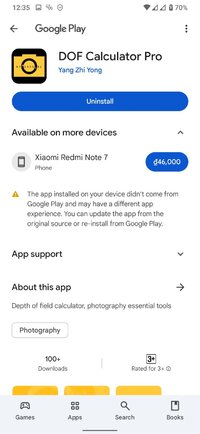
DOF Calculator Pro - Apps on Google Play
Depth of field calculator, photography essential tools
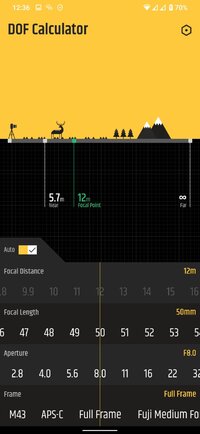
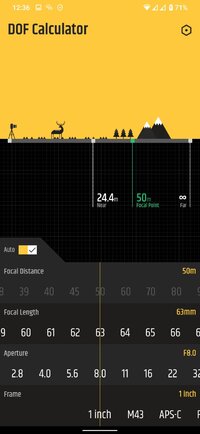
After manually setting the frame, aperture and lens focal length, it can automatically determine the focus distance of the hyperfocal distance, and identify the depth of field near limit and far limit (infinity).
2. After manually setting the frame, aperture, lens focal length and focus distance, it can identify the depth of field near limit and far limit (infinity).
3. Automatically save the previous settings, so you don’t have to set the values every time.
4. Supported frame range: Full Frame, APS-C, M43, Fuji medium format, 6x4.5, 6x6, 6x7, 6x9, 6x12, 6x17, 4x5, 5x7, 8x10, 1 inch.
5. Supported aperture range: F0.95 ~ F64.
6. Supported lens focal length range: 3mm ~ 1200mm.
7. Supported focus distance range: 0.1m ~ Infinity.
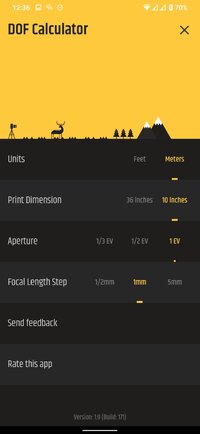
8. Supported meters and feet.
9. Supported print dimension: 10 inches and 36 inches
10. No Ads.
2. After manually setting the frame, aperture, lens focal length and focus distance, it can identify the depth of field near limit and far limit (infinity).
3. Automatically save the previous settings, so you don’t have to set the values every time.
4. Supported frame range: Full Frame, APS-C, M43, Fuji medium format, 6x4.5, 6x6, 6x7, 6x9, 6x12, 6x17, 4x5, 5x7, 8x10, 1 inch.
5. Supported aperture range: F0.95 ~ F64.
6. Supported lens focal length range: 3mm ~ 1200mm.
7. Supported focus distance range: 0.1m ~ Infinity.
8. Supported meters and feet.
9. Supported print dimension: 10 inches and 36 inches
10. No Ads.
*Special Features*
● Supported Languages: af, am, ar, as, az, be, bg, bn, bs, ca, cs, da, de, el, en-AU, en-CA, en-GB, en-IN, en-XC, es, es-419, es-US, et, eu, fa, fi, fr, fr-CA, gl, gu, hi, hr, hu, hy, in, is, it, iw, ja, ka, kk, km, kn, ko, ky, lo, lt, lv, mk, ml, mn, mr, ms, my, nb, ne, nl, or, pa, pl, pt, pt-BR, pt-PT, ro, ru, si, sk, sl, sq, sr, sr-Latn, sv, sw, ta, te, th, tl, tr, uk, ur, uz, vi, zh, zh-CN, zh-HK, zh-MO, zh-SG, zh-TW, zu;
● Supported Cpu Architecture: None;
● Supported Screen Dpi: Ldpi, Mdpi, Hdpi, Xhdpi, Xxhdpi, Xxxhdpi, Anydpi, Nodpi.
● Untouch Paid Apk With Original Hash Signature.
● Certificate MD5 Digest: b22423f4700538ec725f5b0f7b7376c2.[/b]
.Apks Bundle Installation:[/COLOR]
SAI Instructions: [No Root]
1. Download And Install Latest SAI App (Split APK Installer) - Releases · Aefyr/SAI
2. Download this .apks Archive App;
3. Install And Open SAI / Choose "Install APKs" Button / Find And Select Downloaded .apks Archive App;
4. Wait For Install And Done. Enjoy!.
Lucky Patcher Instructions: [No Root]
1. Download And Install Latest Lucky Patcher App;
2. Install And Open Lucky Patcher And Choose 'Rebuild & Install';
3. Find And Select Downloaded This .apks Archive App;
4. Wait For Install And Done. Enjoy!.
PS: Make Sure After Open SAI or Lucky Patcher You Allowed Storage Permission And Install Unknown Apps Permission!
Credit: TryRoom
Free Download:
! Hidden Content !
You must be registered and either click Like under this post or leave a comment before you can see the hidden links.
You may need to refresh the page after clicking Like. If you’re still having trouble revealing the hidden links, please
read this.
Did you know? VIP Members can see all links instantly, no unlocking required.
Interested? Get VIP here.
Interested? Get VIP here.