Playstore Link:

Easy Excel Spreadsheet Editor - Apps on Google Play
Your go to excel app for easy data entry. Export spreadsheets to pdf & excel.
Introducing Excelled, the ultimate Android app for an easy and seamless experience on the go. Excelled is not just an Excel editor; it's your go-to spreadsheet editor and a powerful yet easy spreadsheet maker. Transform your mobile device into a versatile excel sheet maker with a range of features tailored for effortless spreadsheet management.
Key Features:
1. Quick Table and Excel Sheets Editor:
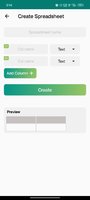
- Craft and edit Excel spreadsheets effortlessly with our intuitive quick table feature.
- Excelled is a comprehensive tool for managing your excel sheets on your Android device.
2. Backup & Restore:
- Enjoy peace of mind with easy backup and restore options, ensuring your data is always secure.
- Excelled is your trusted excel app for Android.
3. Ready Excel Templates and Spreadsheet Maker:
- Accelerate your workflow with ready-to-use templates, including Barcode Scanner, Contacts Backup, Attendance Tracker, Invoice Creator, and more.
- It's a dynamic spreadsheet maker offering versatility and convenience
for excel sheet for mobile; .
4. Import Excel Seamlessly:
- Easily import spreadsheet, simplifying the transfer and management of your data across devices.
- Excelled, makes importing and working with spreadsheets a seamless experience.
5. Share Excel Anywhere:
- Collaborate seamlessly by exporting your Excel tables to xls or xlsx formats and sharing them with others.
6. Custom Templates and Easy Spreadsheet:
- Tailor your experience with custom templates, whether you're tracking expenses, managing inventory, or creating personalized tables.
- Experience easy spreadsheet creation with custom templates.
7. Notes & Notebooks:
- Organize your thoughts with a built-in notes feature, allowing you to create multiple notes and save them under different notebooks.
8. Effortless Data Input:
- Enjoy a simplified interface for data input, adding or updating entries using a form based on your chosen columns and input types.
9. Search Option for Excel Sheets:
- Effortlessly search through your spreadsheet entries using the search option.
10. Offline Access for Excel:
- Benefit from the convenience of offline access, making Excelled your go-to app for mobile spreadsheets anytime, anywhere.
Key Features:
1. Quick Table and Excel Sheets Editor:
- Craft and edit Excel spreadsheets effortlessly with our intuitive quick table feature.
- Excelled is a comprehensive tool for managing your excel sheets on your Android device.
2. Backup & Restore:
- Enjoy peace of mind with easy backup and restore options, ensuring your data is always secure.
- Excelled is your trusted excel app for Android.
3. Ready Excel Templates and Spreadsheet Maker:
- Accelerate your workflow with ready-to-use templates, including Barcode Scanner, Contacts Backup, Attendance Tracker, Invoice Creator, and more.
- It's a dynamic spreadsheet maker offering versatility and convenience
for excel sheet for mobile; .
4. Import Excel Seamlessly:
- Easily import spreadsheet, simplifying the transfer and management of your data across devices.
- Excelled, makes importing and working with spreadsheets a seamless experience.
5. Share Excel Anywhere:
- Collaborate seamlessly by exporting your Excel tables to xls or xlsx formats and sharing them with others.
6. Custom Templates and Easy Spreadsheet:
- Tailor your experience with custom templates, whether you're tracking expenses, managing inventory, or creating personalized tables.
- Experience easy spreadsheet creation with custom templates.
7. Notes & Notebooks:
- Organize your thoughts with a built-in notes feature, allowing you to create multiple notes and save them under different notebooks.
8. Effortless Data Input:
- Enjoy a simplified interface for data input, adding or updating entries using a form based on your chosen columns and input types.
9. Search Option for Excel Sheets:
- Effortlessly search through your spreadsheet entries using the search option.
10. Offline Access for Excel:
- Benefit from the convenience of offline access, making Excelled your go-to app for mobile spreadsheets anytime, anywhere.
*Special Features*
● Pro Feature Unlock.
● A Skip Video Tutorial Dialog.
● A Unnecessary Navigation Menu Item Remove Like:
- Help, Privacy Policy, More App, About, Rate.
● Ads Removed / Disabled.
● Ads Related Activity & Code Removed / Disabled.
● Ads Related Layouts Visibility Gone.
● Analytics / Crashlytics Removed / Disabled.
● Receivers, Services And Provider Removed / Disabled.
● Google Play Store Install Package Removed / Disabled.
● In-App Billing Service Removed / Disabled.
● Play Services, Transport, Firebase Properties Removed.
● All Unnecessary Garbage Folder & File Removed.
● Removed Debug Information (Source, Line, Param, Prologue, Local).
Credit: TryRoom
Free Download:
! Hidden Content !
You must be registered and either click Like under this post or leave a comment before you can see the hidden links.
You may need to refresh the page after clicking Like. If you’re still having trouble revealing the hidden links, please
read this.
Did you know? VIP Members can see all links instantly, no unlocking required.
Interested? Get VIP here.
Interested? Get VIP here.

 •
•