Playstore Link :

Floating Teleprompter - Cuyvo - Apps on Google Play
Read scripts on camera, record videos and stay natural with a floating autocue.
Record videos, deliver speeches, and present confidently with Cuyvo, a teleprompter, autocue, video prompter, and script reader for Android phones and tablets.
Keep your words visible while looking toward the camera. Use the floating teleprompter over a camera or social app, or record with the built-in video teleprompter. Adjust scrolling to your pace, customize the reading view, and focus on natural delivery instead of memorizing every line.
WHY USE CUYVO?
• Speak naturally without memorizing long scripts
• Keep text close to the lens for better eye contact
• Record in Cuyvo or display a script over another app
• Create clean videos with no watermark
FLOATING TELEPROMPTER OVER OTHER APPS
Display your script in a movable overlay while using a camera, social media, livestreaming, or video meeting app. The floating autocue helps you follow your lines without repeatedly looking away from the lens.
Position and resize the script window for vertical videos, livestreams, remote meetings, and recordings made with your preferred camera app.
BUILT-IN VIDEO TELEPROMPTER
Record directly in Cuyvo while your script scrolls near the camera. Keeping text close to the lens helps you maintain natural eye contact.
Use the video recorder for:
• YouTube videos, vlogs, TikToks, Reels, and Shorts
• Tutorials, online courses, and product demos
• Marketing videos and business presentations
• Self-tape auditions and news reports
SCROLL AT YOUR OWN PACE
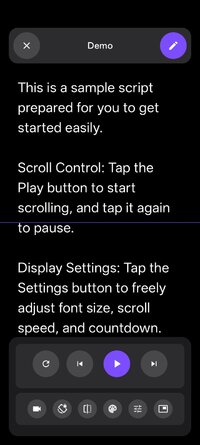
Match the autocue to the way you speak. Adjust scroll speed in real time, pause when needed, and choose vertical or horizontal scrolling for comfortable reading.
CUSTOMIZE YOUR SCRIPT READER
• Change font size, style, and text color
• Adjust background color and opacity
• Set margins and line spacing
• Resize and position the floating window
• Prepare layouts for phones, tablets, tripods, or studios
REMOTE CONTROL SUPPORT
Use a compatible Bluetooth keyboard or remote to play, pause, and adjust scrolling without touching the screen. It is helpful when filming alone, standing away from the device, or using a tablet on a tripod.
PROFESSIONAL TELEPROMPTER TOOLS
• Mirror mode for physical teleprompter rigs
• Countdown timer before recording
• Vertical and horizontal text scrolling
• No watermark on recorded videos
• Large-screen layouts for tablet setups
WHO IS CUYVO FOR?
• YouTubers, vloggers, and social media creators
• Business professionals making presentations and pitches
• Public speakers, performers, and actors rehearsing lines
• Educators and tutors creating lessons or courses
• Journalists and reporters reading scripts on camera
• Tablet users who prefer a larger reading display
COMMON QUESTIONS
Can I use Cuyvo while recording with another app?
Yes. Floating teleprompter mode displays your script over compatible camera, social, livestreaming, and meeting apps.
Can I record video inside Cuyvo?
Yes. The built-in video teleprompter lets you record while reading your scrolling script near the camera.
Can I control the teleprompter from a distance?
Use a compatible Bluetooth keyboard or remote to control playback and scrolling.
Can I use Cuyvo with a physical teleprompter?
Yes. Mirror mode flips the text for compatible reflective teleprompter rigs.
Does Cuyvo work on tablets?
Yes. Its layouts support phones and tablets, including studio, tripod, and desk setups.
A TELEPROMPTER FOR VIDEO, SPEECHES, AND MORE
Whether you are recording a video, hosting a livestream, giving a presentation, teaching a lesson, reporting the news, or rehearsing a speech, Cuyvo keeps your script readable and your delivery confident.
Stop memorizing every line. Turn your phone or tablet into a flexible video teleprompter and speak with confidence using Cuyvo.
Keep your words visible while looking toward the camera. Use the floating teleprompter over a camera or social app, or record with the built-in video teleprompter. Adjust scrolling to your pace, customize the reading view, and focus on natural delivery instead of memorizing every line.
WHY USE CUYVO?
• Speak naturally without memorizing long scripts
• Keep text close to the lens for better eye contact
• Record in Cuyvo or display a script over another app
• Create clean videos with no watermark
FLOATING TELEPROMPTER OVER OTHER APPS
Display your script in a movable overlay while using a camera, social media, livestreaming, or video meeting app. The floating autocue helps you follow your lines without repeatedly looking away from the lens.
Position and resize the script window for vertical videos, livestreams, remote meetings, and recordings made with your preferred camera app.
BUILT-IN VIDEO TELEPROMPTER
Record directly in Cuyvo while your script scrolls near the camera. Keeping text close to the lens helps you maintain natural eye contact.
Use the video recorder for:
• YouTube videos, vlogs, TikToks, Reels, and Shorts
• Tutorials, online courses, and product demos
• Marketing videos and business presentations
• Self-tape auditions and news reports
SCROLL AT YOUR OWN PACE
Match the autocue to the way you speak. Adjust scroll speed in real time, pause when needed, and choose vertical or horizontal scrolling for comfortable reading.
CUSTOMIZE YOUR SCRIPT READER
• Change font size, style, and text color
• Adjust background color and opacity
• Set margins and line spacing
• Resize and position the floating window
• Prepare layouts for phones, tablets, tripods, or studios
REMOTE CONTROL SUPPORT
Use a compatible Bluetooth keyboard or remote to play, pause, and adjust scrolling without touching the screen. It is helpful when filming alone, standing away from the device, or using a tablet on a tripod.
PROFESSIONAL TELEPROMPTER TOOLS
• Mirror mode for physical teleprompter rigs
• Countdown timer before recording
• Vertical and horizontal text scrolling
• No watermark on recorded videos
• Large-screen layouts for tablet setups
WHO IS CUYVO FOR?
• YouTubers, vloggers, and social media creators
• Business professionals making presentations and pitches
• Public speakers, performers, and actors rehearsing lines
• Educators and tutors creating lessons or courses
• Journalists and reporters reading scripts on camera
• Tablet users who prefer a larger reading display
COMMON QUESTIONS
Can I use Cuyvo while recording with another app?
Yes. Floating teleprompter mode displays your script over compatible camera, social, livestreaming, and meeting apps.
Can I record video inside Cuyvo?
Yes. The built-in video teleprompter lets you record while reading your scrolling script near the camera.
Can I control the teleprompter from a distance?
Use a compatible Bluetooth keyboard or remote to control playback and scrolling.
Can I use Cuyvo with a physical teleprompter?
Yes. Mirror mode flips the text for compatible reflective teleprompter rigs.
Does Cuyvo work on tablets?
Yes. Its layouts support phones and tablets, including studio, tripod, and desk setups.
A TELEPROMPTER FOR VIDEO, SPEECHES, AND MORE
Whether you are recording a video, hosting a livestream, giving a presentation, teaching a lesson, reporting the news, or rehearsing a speech, Cuyvo keeps your script readable and your delivery confident.
Stop memorizing every line. Turn your phone or tablet into a flexible video teleprompter and speak with confidence using Cuyvo.
*Special Features*
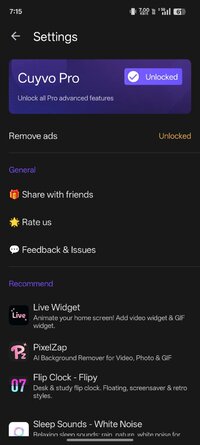
◆ Cuyvo Pro unlocked
◆ Ads removed (app-open, banner, interstitial gates read the Pro hub)
◆ PairIP signature/license check neutralized
◆ Single 16KB-aligned signed APK (arm64-v8a)
◆ Screen densities: mdpi, hdpi, xhdpi, xxhdpi, xxxhdpi (160/240/320/480/640)
◆ Language: English (en + en-rAU, en-rCA, en-rGB, en-rIN, en-rXC)
◆ Uninstall the Play Store version first, then install this APK
Credit to : MetaApks
Free Download:
! Hidden Content !
You must be registered and either click Like under this post or leave a comment before you can see the hidden links.
You may need to refresh the page after clicking Like. If you’re still having trouble revealing the hidden links, please
read this.
Did you know? VIP Members can see all links instantly, no unlocking required.
Interested? Get VIP here.
Interested? Get VIP here.