Playstore Link:
GitHub - OpenHub-Store/GitHub-Store:
 A free, open-source app store for GitHub releases — browse, discover, and install apps with one click. Powered by Kotlin and Compose Multiplatform for Android & Desktop (Linux, MacOS, Windows).
GitHub Store is a cross‑platform “play store” for GitHub releases. It discovers repositories that ship real installable binaries and lets you install, track, and update them across platforms from one place.
GitHub Store is a Kotlin Multiplatform app (Android + Desktop) that turns GitHub releases into a clean, app‑store style experience:
- Only shows repositories that actually provide installable assets (APK, EXE, DMG, AppImage, DEB, RPM, etc.).
- Detects your platform and surfaces the correct installer.
- Always installs from the latest published release, highlights its changelog, and can notify you when updates are available for installed apps (on Android).
- Presents a polished details screen with stats, README, and developer info.
Features
Smart discovery
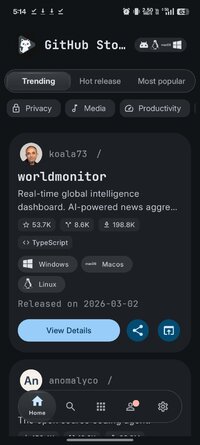
- Home sections for “Trending”, “Recently Updated”, and “New” projects with time‑based filters.
- Only repos with valid installable assets are shown.
- Platform‑aware topic scoring so Android/desktop users see relevant apps first.
Latest‑release installs
- Fetches /releases/latest for each repo.
- Shows only assets from the latest release.
- Single “Install latest” action, plus an expandable list of all installers for that release.
Rich details screen
- App name, version, “Install latest” button.
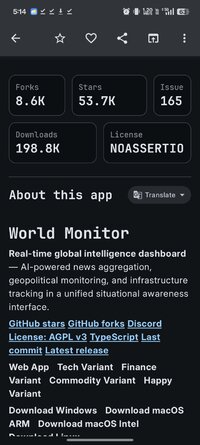
- Stars, forks, open issues.
- Rendered README content (“About this app”).
- Latest release notes (body) with markdown formatting.
- List of installers with platform labels and file sizes.
Cross‑platform UX
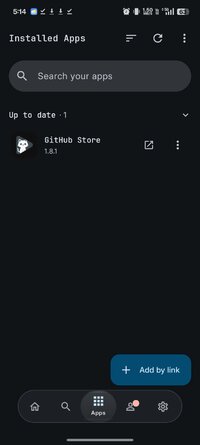
- Android: opens APK downloads with the package installer, tracks installations in a local database, and shows them in a dedicated Apps screen with update indicators.
- Desktop (Windows/macOS/Linux): downloads installers to the user’s Downloads folder and opens them with the default handler; no hidden temp locations.
- Appearance & theming
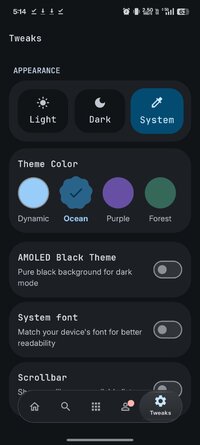
- Material 3 design with Material 3 Expressive components on all platforms.
- Material You dynamic color support on Android where available.
- Optional AMOLED black mode for dark theme on OLED devices.
- Safety & inspection (Android)
- Optional GitHub sign‑in via OAuth device flow for higher rate limits with minimal scopes.
- “Open in AppManager” action to inspect an APK’s permissions and trackers before installing.
GitHub Store is a Kotlin Multiplatform app (Android + Desktop) that turns GitHub releases into a clean, app‑store style experience:
- Only shows repositories that actually provide installable assets (APK, EXE, DMG, AppImage, DEB, RPM, etc.).
- Detects your platform and surfaces the correct installer.
- Always installs from the latest published release, highlights its changelog, and can notify you when updates are available for installed apps (on Android).
- Presents a polished details screen with stats, README, and developer info.
Features
Smart discovery
- Home sections for “Trending”, “Recently Updated”, and “New” projects with time‑based filters.
- Only repos with valid installable assets are shown.
- Platform‑aware topic scoring so Android/desktop users see relevant apps first.
Latest‑release installs
- Fetches /releases/latest for each repo.
- Shows only assets from the latest release.
- Single “Install latest” action, plus an expandable list of all installers for that release.
Rich details screen
- App name, version, “Install latest” button.
- Stars, forks, open issues.
- Rendered README content (“About this app”).
- Latest release notes (body) with markdown formatting.
- List of installers with platform labels and file sizes.
Cross‑platform UX
- Android: opens APK downloads with the package installer, tracks installations in a local database, and shows them in a dedicated Apps screen with update indicators.
- Desktop (Windows/macOS/Linux): downloads installers to the user’s Downloads folder and opens them with the default handler; no hidden temp locations.
- Appearance & theming
- Material 3 design with Material 3 Expressive components on all platforms.
- Material You dynamic color support on Android where available.
- Optional AMOLED black mode for dark theme on OLED devices.
- Safety & inspection (Android)
- Optional GitHub sign‑in via OAuth device flow for higher rate limits with minimal scopes.
- “Open in AppManager” action to inspect an APK’s permissions and trackers before installing.
*Special Features*
Untouched Apk With Original Hash Signature
Credit: OpenHub-Store
Free Download:
! Hidden Content !
You must be registered and either click Like under this post or leave a comment before you can see the hidden links.
You may need to refresh the page after clicking Like. If you’re still having trouble revealing the hidden links, please
read this.
Did you know? VIP Members can see all links instantly, no unlocking required.
Interested? Get VIP here.
Interested? Get VIP here.