Playstore Link :

GPS Emulator - Apps on Google Play
Fake GPS location & route simulator. Mock coordinates, history & favorites.
GPS Emulator is the ultimate tool for mocking your phone’s location and teleporting anywhere in the world. More than just a simple Fake GPS app, it includes an advanced GPS route simulator that makes your device appear to move naturally along real roads and paths.
Designed for developers, software testing, and location-based app verification, GPS Emulator lets you set mock GPS coordinates so other apps and services recognize your device as being at the selected location.
 Key Features
 One-Tap Fake GPS Location
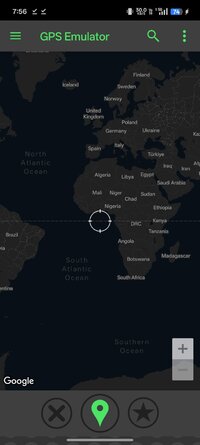
Instantly change your current GPS location. Simply tap anywhere on the map to spoof your device’s location anywhere in the world within seconds.
 GPS Route Simulation
Simulate realistic movement with advanced route generation features.
• Manual Route Creation
Add multiple waypoints on the map to create fully customizable movement paths.
• Road-Based Route Simulation
Automatically generate routes that follow real streets and roads. Supports both walking and driving simulation modes.
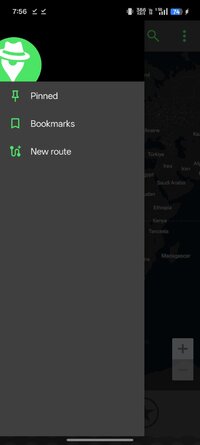
 Favorites & Saved Routes
Save your most-used fake GPS locations and custom simulated routes. Reuse them anytime with a single tap.
 Smart History Log
Previously used mock locations and simulated routes are automatically saved, making it easy to revisit and reuse past setups.
 Advanced GPS Mocking Settings
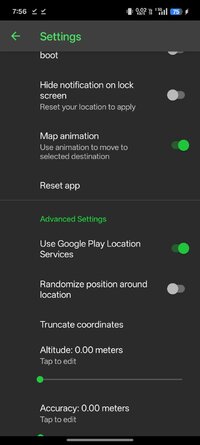
• Adjust GPS Accuracy and Altitude
• Configure the simulated location time
• Enable or disable Fake GPS coordinate injection for Google Play Location Services
 Multiple Map Modes
Choose between Normal, Satellite, and Terrain map views to accurately select and simulate locations.
 Important Notes
This app is intended for developer testing, debugging, and GPS-related feature validation purposes only. The use of this app for cheating in games is not supported or encouraged. The developer is not responsible for account suspensions, bans, or other consequences resulting from misuse.
To ensure proper functionality, enable Developer Options on your Android device and set this app as your default “Mock Location App.”
Designed for developers, software testing, and location-based app verification, GPS Emulator lets you set mock GPS coordinates so other apps and services recognize your device as being at the selected location.
Key Features One-Tap Fake GPS LocationInstantly change your current GPS location. Simply tap anywhere on the map to spoof your device’s location anywhere in the world within seconds.
GPS Route SimulationSimulate realistic movement with advanced route generation features.
• Manual Route Creation
Add multiple waypoints on the map to create fully customizable movement paths.
• Road-Based Route Simulation
Automatically generate routes that follow real streets and roads. Supports both walking and driving simulation modes.
Favorites & Saved RoutesSave your most-used fake GPS locations and custom simulated routes. Reuse them anytime with a single tap.
Smart History LogPreviously used mock locations and simulated routes are automatically saved, making it easy to revisit and reuse past setups.
Advanced GPS Mocking Settings• Adjust GPS Accuracy and Altitude
• Configure the simulated location time
• Enable or disable Fake GPS coordinate injection for Google Play Location Services
Multiple Map ModesChoose between Normal, Satellite, and Terrain map views to accurately select and simulate locations.
Important NotesThis app is intended for developer testing, debugging, and GPS-related feature validation purposes only. The use of this app for cheating in games is not supported or encouraged. The developer is not responsible for account suspensions, bans, or other consequences resulting from misuse.
To ensure proper functionality, enable Developer Options on your Android device and set this app as your default “Mock Location App.”
*Special Features*
✰ Paid features unlocked.
✰ Unnecessary receivers/activities/alarms/permissions/metadata etc removed from manifest
Credit to : youarefinished
Free Download:
! Hidden Content !
You must be registered and either click Like under this post or leave a comment before you can see the hidden links.
You may need to refresh the page after clicking Like. If you’re still having trouble revealing the hidden links, please
read this.
Did you know? VIP Members can see all links instantly, no unlocking required.
Interested? Get VIP here.
Interested? Get VIP here.