Playstore Link :

HDx Video Player all formats - Apps on Google Play
Fast HD video player with all video format support, TV cast & music.
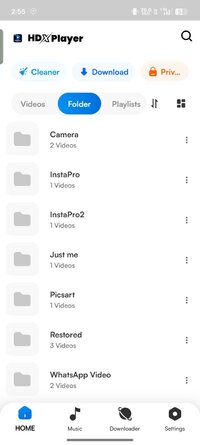
HDx Video Player is a fast, lightweight media player for smooth HD and 4K video and music playback. Enjoy customizable subtitles, gesture controls, floating window mode, background playback, and a PIN-protected private folder — all in one easy-to-use app.
Whether you're watching movies, TV shows, personal recordings, or listening to music, HDx Video Player supports a wide range of formats for a seamless experience.
Key Features
● Smooth playback of HD, Full HD, and 4K video
● Supports MP4, MKV, AVI, MOV, FLV, RMVB, 3GP, MP3, and more
● Customizable subtitles: size, style, color, and closed captions
● Floating window (Picture-in-Picture) for multitasking
● Background playback for video and music
● Cast local videos to supported TV devices
● Gesture controls for brightness, volume, and playback
● Adjustable playback speed
● Screen rotation and resume-playback support
● Built-in music player with albums, artists, and playlists
● Optional PIN-protected private folder for personal videos
● On-device tools to find duplicate and large media files
Smooth, Reliable Playback
Hardware-accelerated playback, quick resume, screen rotation, and an intuitive interface make watching effortless — even for large 4K files.
Built-in Music Player
Browse your music by album, artist, or playlist, and keep listening in the background while using other apps.
Subtitle Customization
Adjust subtitle size, color, and style, and enable closed captions when available, for a comfortable viewing experience.
Cast to TV
Cast compatible local videos from your Android device to supported TV devices for watching on a bigger screen.
Private Folder
Keep personal videos in a PIN-protected folder, accessible only to you.
Smart Media Tools
Find duplicate files, locate large media, and keep your storage organized with quick search and sorting.
Permissions Used
● Photos and videos — to find and play media stored on your device
● Notifications — to show and control media playback
HDx Video Player works entirely on your device. Your videos and music are never uploaded, collected, or shared without your permission.
Feedback Questions or suggestions? Contact us at [email protected]
Whether you're watching movies, TV shows, personal recordings, or listening to music, HDx Video Player supports a wide range of formats for a seamless experience.
Key Features
● Smooth playback of HD, Full HD, and 4K video
● Supports MP4, MKV, AVI, MOV, FLV, RMVB, 3GP, MP3, and more
● Customizable subtitles: size, style, color, and closed captions
● Floating window (Picture-in-Picture) for multitasking
● Background playback for video and music
● Cast local videos to supported TV devices
● Gesture controls for brightness, volume, and playback
● Adjustable playback speed
● Screen rotation and resume-playback support
● Built-in music player with albums, artists, and playlists
● Optional PIN-protected private folder for personal videos
● On-device tools to find duplicate and large media files
Smooth, Reliable Playback
Hardware-accelerated playback, quick resume, screen rotation, and an intuitive interface make watching effortless — even for large 4K files.
Built-in Music Player
Browse your music by album, artist, or playlist, and keep listening in the background while using other apps.
Subtitle Customization
Adjust subtitle size, color, and style, and enable closed captions when available, for a comfortable viewing experience.
Cast to TV
Cast compatible local videos from your Android device to supported TV devices for watching on a bigger screen.
Private Folder
Keep personal videos in a PIN-protected folder, accessible only to you.
Smart Media Tools
Find duplicate files, locate large media, and keep your storage organized with quick search and sorting.
Permissions Used
● Photos and videos — to find and play media stored on your device
● Notifications — to show and control media playback
HDx Video Player works entirely on your device. Your videos and music are never uploaded, collected, or shared without your permission.
Feedback Questions or suggestions? Contact us at [email protected]
*Special Features*
1 . Premium features unlocked
Credit to : TRUMods
Free Download:
! Hidden Content !
You must be registered and either click Like under this post or leave a comment before you can see the hidden links.
You may need to refresh the page after clicking Like. If you’re still having trouble revealing the hidden links, please
read this.
Did you know? VIP Members can see all links instantly, no unlocking required.
Interested? Get VIP here.
Interested? Get VIP here.