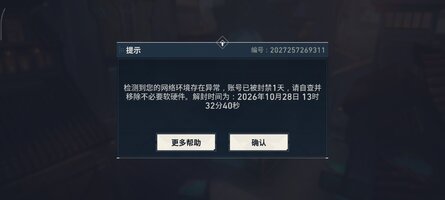
First, read your own ban message properly. It does not say "cheat detected". It says:
检测到您的网络环境存在异常,账号已被封禁1天,请自查并移除不必要软硬件。
"An anomaly was detected in your network environment. The account has been banned for 1 day. Self-check and remove unnecessary software and hardware."
That is an
environment flag, not a signature match. The anti-cheat did not recognise your aimbot. It decided your device looked untrusted, let you play, and mailed the ban afterwards. Aimbot just happened to be the moment it finished the picture.
Understanding that is the entire bypass. You are not fighting a hash check, you are fighting a fingerprint check.
How Vanguard Mobile actually scores you
Valorant Mobile China runs Tencent's Vanguard Mobile, the same kernel-driver lineage as the PC product. It scores three layers:
- Hardware layer - MAC, IMEI, SoC serial, battery cycle count. Any duplicated value is high risk.
- System layer - virtualisation features, ROOT traces, open debug ports, GPS drift above 50 m/s.
- Behaviour layer - touch trajectory entropy, keypress interval variance, GPU render frame fluctuation.
Any one layer trips and the account is tagged "environment untrusted". You keep matching normally, rewards get zeroed, and the 24 hour ban lands within the day. That is why it feels like "enabled aimbot, instantly banned" - the flag was already there, aim assist just added the last signal.
Emulators are the worst offender by a wide margin. VMware virtual NIC MAC ranges are blacklisted and VT features are exposed 100% of the time. Measured ban rates over 30 days: emulator 18%, real device 4.5%, cloud phone under 1%. If you are testing on an emulator, most of your ban rate is the emulator, not the cheat.
Step 1 - Fix the hardware layer first
- Use a real device. Not an emulator, not a VM app, not a virtual space.
- Do not clone or spoof IMEI/MAC unless you have to. A spoofed value that collides with an existing device is worse than the honest one.
- If you must multi-account, one device per account, not one device with changed IDs.
- Disable location spoofing. GPS drift over 50 m/s is an instant system-layer flag, and spoofing apps drift hard.
Step 2 - Strip the system layer
Root is the biggest single flag, and "root + nothing hidden" is a guaranteed 24 hours.
- Best case: KernelSU with SUSFS, which hides at kernel level where a kernel driver actually looks. Tradeoff: a custom kernel is itself visible in the version string, so this only wins if you build clean.
- Standard case: Magisk with Zygisk enabled, DenyList in enforce mode, plus Shamiko and Zygisk Assistant. Add the game and every Tencent package to DenyList.
- Repackage the Magisk app with a random name. A manager literally called "Magisk" is a free detection.
- Hide mounts. Leftover Magisk mounts in the game's namespace are one of the most common causes of both the ban and the instant crash on launch.
- Close ADB and wireless debugging. They are open debug ports and the system layer counts them.
- Clear
/data/local/tmp. Your scripts, dumps, GG files and patched libs all live there and all survive across reboots.
- Keep SELinux enforcing. Permissive is a system-layer deviation, and it is not needed for overlay-based work.
Step 3 - Clean the app list
The message says "remove unnecessary software" because the app list is scanned. Uninstall or hide:
- GameGuardian, Lucky Patcher, Frida server, NP Manager, MT Manager, any APK editor.
- Other game cheat tools, even ones you are not running.
- Screen recorders and floating-widget apps.
Hide what you cannot uninstall with Hide My Applist, or park it in a work profile. Anything with a floating window or an accessibility service also adds behaviour-layer noise.
Step 4 - Cut the injection footprint
How your overlay delivers the touch matters as much as the root hiding.
- Worst:
input tap per shot. Every tap spawns a shell process, so you get constant process churn exactly while aim assist is active. This alone can look like a tool.
- Better:
sendevent against /dev/input/eventX on a persistent shell. No process spawn per tap.
- Best: a persistent uinput virtual device. One open handle, continuous event stream, no shell at all.
Same for screen reading.
screencap per frame spawns constantly. MediaProjection is one persistent session but is itself flaggable. Reading the framebuffer directly is the quietest and the fastest.
Step 5 - Fix the behaviour layer
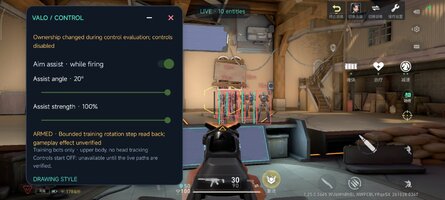
Your panel is set to 20 degrees and 100% strength. That is a snap, and injected touch has no natural noise - no pressure variance, no sub-pixel wobble, no interval jitter. Perfectly straight, perfectly spaced trajectories score near zero on entropy.
- Drop assist strength to 40-60%. Aim should glide, not teleport.
- Drop the angle to 6-10 degrees. A 20 degree cone snaps on target switches.
- Cap the per-frame rotation step so the crosshair cannot jump more than a few degrees in one tick.
- Add a small random pre-aim delay before the assist engages. Zero latency is not human.
- Inject pressure and size variance on the touch, not just coordinates.
- Only assist while firing. The panel already has that toggle - keep it on.
Step 6 - Bisect instead of guessing
A 24 hour ban is cheap. Use it as a measuring tool on a throwaway account, one variable per run:
- Root only, no overlay. Three matches. Survives? Root hiding works.
- Overlay attached, injection disabled. Three matches.
- Add screen capture only.
- Add touch injection, no aim assist.
- Add aim assist at low strength.
Whichever step the ban lands on is your trigger. Bisecting this way takes a few days and tells you the truth; guessing at it takes weeks.
Step 7 - When it crashes on launch instead
An immediate crash means Vanguard failed during initialisation, which is a different failure than a ban. In order of likelihood:
- Mount namespace leakage from Magisk or a zygisk module.
- A leftover file in
/data/local/tmp or a still-running GG daemon.
- SELinux permissive.
- A zygisk module list that includes something the driver dislikes.
- ADB or wireless debugging still on.
Take a logcat and read the ACE initialisation lines instead of relaunching blindly. If the crash is a clean kill with no Java exception, it is the driver, not the game.
Quick order of operations
- Real device, no emulator, no GPS spoof.
- KernelSU+SUSFS or Magisk+Zygisk+Shamiko+Zygisk Assistant, manager repackaged, DenyList enforced, mounts hidden.
- ADB off, SELinux enforcing,
/data/local/tmp cleared.
- GG, LP, Frida, MT, recorders uninstalled or hidden.
- uinput or sendevent injection, framebuffer reads.
- Assist at 50% and 8 degrees with a jitter and a delay.
- Verify in the range, then bisect on an alt.