
You are using an out of date browser. It may not display this or other websites correctly.
You should upgrade or use an alternative browser.
You should upgrade or use an alternative browser.
Tutorial How to Dump libil2cpp.so and global-metadata.dat with PMT Dumper
- Thread starter Mika Cybertron
- Start date

because it is not full version of pmt dumperI can't do it
susanuzwer
Rookie
Thank you
priyanshu88064
Platinian
While using il2cpp dumper I am getting this error just before creating dll -> System.Exception: Invalid compressed integer format
danishnawaz2430
Platinian
Nicee33


I still haven't had time to update that appView attachment 872213
I suppose PMT Dumper is not up to date anymore?

Guuji
Platinian
Thanks for response though^^I still haven't had time to update that app
What you suggest is the easiest way now to get the dump.cs from il2cpp dumper assuming metadata is encrypted?
RightSickRick
Platinian
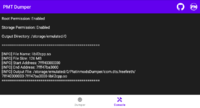
I just tried this and it worked great for my game. Had to manually go back and change permissions to "Allow management of all files" as it defaults to media access only for some reason, which causes "Storage Permission: Disabled", as is shown in the Console options. "Allow management of all files" changes it to "Enabled".
Also, have to select the "Dump Option" button and select "Show all running processes" to get the game to show up in the list, so it could then be added under Process Name.
If I understand it correctly, I can change an offset in libil2cpp.so, stick it back into the game's installed runtime folder (no signing/no reinstall), run the game, dump the libil2cpp.so from it, then verify if the offset was actually modified or not. Game doesn't seem to care if offset has been altered via hex, but does care if signature is altered. Now I can at least look and see if it's getting overwritten
Also, have to select the "Dump Option" button and select "Show all running processes" to get the game to show up in the list, so it could then be added under Process Name.
If I understand it correctly, I can change an offset in libil2cpp.so, stick it back into the game's installed runtime folder (no signing/no reinstall), run the game, dump the libil2cpp.so from it, then verify if the offset was actually modified or not. Game doesn't seem to care if offset has been altered via hex, but does care if signature is altered. Now I can at least look and see if it's getting overwritten