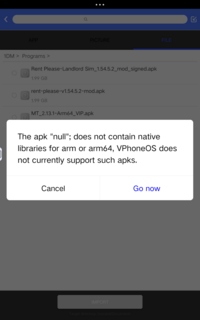
Important:
Before you call an emulation a fake and nonsense, read the thread, watch the video and try the VPhoneGaGa/VPhoneOS app. If you don't understand the term 'emulation', please take a look at video game console emulators.
Although Parallel Space claims to support 32-bit, it is not an emulator. It requires you to have apps installed on your device that you want to clone, but this is impossible if you have a 64-bit device only.
There's very limited information out there on how to run 32-bit (armeabi-v7a) apps on 64-bit-only (arm64-v8a) devices.
It is not possible to add native 32-bit support to a 64-bit CPU. Device manufacturers are not permitted to add 32-bit emulation to Google-certified devices. However, it is most likely available for non-certified devices, particularly Xiaomi phones in China. Therefore, an emulator is the ONLY method!
Currently, the working method I've found is the VPhoneGaGa/VPhoneOS app and the cloud VM apps. VPhoneGaGa/VPhoneOS runs a free Android 7.1.2 virtual machine with support for both 32-bit and 64-bit architectures (armeabi, armeabi-v7a, and arm64-v8a), running under emulation. Every other VM I've tried either gets stuck on the loading screen, hangs at boot, or crashes outright. Keep in mind that emulation will always be slower than native support.
As proof, here's a video of me running a 32-bit app (Flappy Bird) on my Google Pixel 8 Pro (arm64-v8a) using VPhoneGaGa 3.9.1. If the video doesn't load, try using a VPN.
I hope more VMs add 32-bit emulation in the future as 64-bit-only phones become more common.

If your device already supports armeabi-v7a and armeabi, there is no need to emulate unless you want to run old apps that don't run on modern Android versions.
Do not use modded VPhoneGaGa, they don't work properly, and latest mod version might be fake
1. Download VPhoneGaGa APK from the official sources:
- Official website: VPhoneOS website
- Play Store (Root options not included): VPhoneOS: Android Emulator - Apps on Google Play
2. Install VPhoneGaGa. Ensure to allow installation from unknown sources
3. Create a new instance. Select Android 7 version and 64-bit & 32-bit mixed version as Architecture.

4. Start the VM

5. It will ask you to disable child process restriction in the developer settings. Follow the guide to disable it


6. Grant required permissions

7. Wait it for the ROM to be downloaded and installed. If it gets stuck, reboot your phone and try again.

You can import your favorite 32-bit APKs, or enable Google Service Framework from VM settings and download your favorite 32-bit apps from Play Store
How to (unofficially) add 32-bit support to your Pixel 7 phone
Before you call an emulation a fake and nonsense, read the thread, watch the video and try the VPhoneGaGa/VPhoneOS app. If you don't understand the term 'emulation', please take a look at video game console emulators.
Although Parallel Space claims to support 32-bit, it is not an emulator. It requires you to have apps installed on your device that you want to clone, but this is impossible if you have a 64-bit device only.
There's very limited information out there on how to run 32-bit (armeabi-v7a) apps on 64-bit-only (arm64-v8a) devices.
It is not possible to add native 32-bit support to a 64-bit CPU. Device manufacturers are not permitted to add 32-bit emulation to Google-certified devices. However, it is most likely available for non-certified devices, particularly Xiaomi phones in China. Therefore, an emulator is the ONLY method!
Currently, the working method I've found is the VPhoneGaGa/VPhoneOS app and the cloud VM apps. VPhoneGaGa/VPhoneOS runs a free Android 7.1.2 virtual machine with support for both 32-bit and 64-bit architectures (armeabi, armeabi-v7a, and arm64-v8a), running under emulation. Every other VM I've tried either gets stuck on the loading screen, hangs at boot, or crashes outright. Keep in mind that emulation will always be slower than native support.
As proof, here's a video of me running a 32-bit app (Flappy Bird) on my Google Pixel 8 Pro (arm64-v8a) using VPhoneGaGa 3.9.1. If the video doesn't load, try using a VPN.
I hope more VMs add 32-bit emulation in the future as 64-bit-only phones become more common.
Check your device hardware
Use the AIDA64 app and confirm that your phone only supports arm64-v8a ABI. This is the CPU info from my Google Pixel 8 Pro phoneIf your device already supports armeabi-v7a and armeabi, there is no need to emulate unless you want to run old apps that don't run on modern Android versions.
VPhoneGaGa/VPhoneOS
Official VPhoneGaGa version is free to use with Android 7.1.2 ROM. However, in order to enable Magisk support or use Android 10 ROM, you need to pay for it.Do not use modded VPhoneGaGa, they don't work properly, and latest mod version might be fake
1. Download VPhoneGaGa APK from the official sources:
- Official website: VPhoneOS website
- Play Store (Root options not included): VPhoneOS: Android Emulator - Apps on Google Play
2. Install VPhoneGaGa. Ensure to allow installation from unknown sources
3. Create a new instance. Select Android 7 version and 64-bit & 32-bit mixed version as Architecture.
4. Start the VM
5. It will ask you to disable child process restriction in the developer settings. Follow the guide to disable it
6. Grant required permissions
7. Wait it for the ROM to be downloaded and installed. If it gets stuck, reboot your phone and try again.
You can import your favorite 32-bit APKs, or enable Google Service Framework from VM settings and download your favorite 32-bit apps from Play Store
Cloud VM solution
Cloud Android emulator also support 32-bit. They don't run on your phone, they run in the datacenter for 24/7. Cloud Android emulator costs money. It probably not reliable for you. If you have the money, want to use less resources on your phone, or run games in 24/7, go for it.
LDCloud
Official website: LDCloud | Best Android Cloud Gaming Emulator - 24/7 Online Cross-platfrom Cloud Phone
Play Store: https://play.google.com/store/apps/details?id=com.ldcloud.cloudphonenet
Redfinger
Official website: REDFINGER GLOBAL | Best Cloud Android Emulator, Cross-Platform Virtual Android Smartphone | Cloud Gaming App
Play Store: Redfinger: multiple smartphone - Apps on Google Play
LT Cloud Phone
Official website: LT云手机官网 - 云端安卓手机|模拟器 | 手游挂机多开24小时不掉线
Play Store: LT Cloud Phone - Emulator - Apps on Google Play
UgPhone
Official website: UgPhone
Play Store: UgPhone - Andorid Cloud Phone - Apps on Google Play
LDCloud
Official website: LDCloud | Best Android Cloud Gaming Emulator - 24/7 Online Cross-platfrom Cloud Phone
Play Store: https://play.google.com/store/apps/details?id=com.ldcloud.cloudphonenet
Redfinger
Official website: REDFINGER GLOBAL | Best Cloud Android Emulator, Cross-Platform Virtual Android Smartphone | Cloud Gaming App
Play Store: Redfinger: multiple smartphone - Apps on Google Play
LT Cloud Phone
Official website: LT云手机官网 - 云端安卓手机|模拟器 | 手游挂机多开24小时不掉线
Play Store: LT Cloud Phone - Emulator - Apps on Google Play
UgPhone
Official website: UgPhone
Play Store: UgPhone - Andorid Cloud Phone - Apps on Google Play
What about rooted devices?
Currently, there is limited information about rooting methods. However, if you have a rooted Google Pixel 7, you can manually enable 32-bit app support.How to (unofficially) add 32-bit support to your Pixel 7 phone
Got a tip to share?
Please write in the comments if you got a tip to shareAdditional info
Tango translator (China ROM)Xiaomi devices running China ROM and OnePlus phones (starting from the OnePlus 12) now include a built-in 32-bit to 64-bit ARM binary translator called Tango. This feature allows you to run 32-bit apps seamlessly - no root access required. Tango is developed by Amanieu Systems. Here's a link to Amanieu Systems' page describing Tango: Amanieu Systems - Technology
More info:
More info:
Last edited:


 . You may wish you could go back to 2012 for easier lifes