Important: Magisk must be installed into boot image/recovery image/system partition first. Please read one of the following guide how to install Magisk
Phone/tablet: topjohnwu.github.io/Magisk/install.html
Emulator: platinmods.com/threads/how-to-install-magisk-on-android-emulators-easy-installation.165579/
Launch the Magisk app
Click on the "Settings" icon (usually a gear or cogwheel) within the Magisk app.

Scroll down to the "Magisk" section within the settings menu.
Toggle the "Zygisk" switch to the on position.

Reboot your device to apply the changes.
Launch the Magisk app again
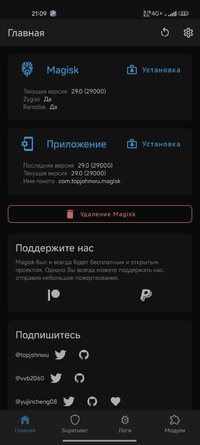
In the home screen, it should say "Zygisk Yes", means it is working!

Phone/tablet: topjohnwu.github.io/Magisk/install.html
Emulator: platinmods.com/threads/how-to-install-magisk-on-android-emulators-easy-installation.165579/
Launch the Magisk app
Click on the "Settings" icon (usually a gear or cogwheel) within the Magisk app.
Scroll down to the "Magisk" section within the settings menu.
Toggle the "Zygisk" switch to the on position.
Reboot your device to apply the changes.
Launch the Magisk app again
In the home screen, it should say "Zygisk Yes", means it is working!
Last edited: