
You are using an out of date browser. It may not display this or other websites correctly.
You should upgrade or use an alternative browser.
You should upgrade or use an alternative browser.
Tutorial How to Hack Mob Control Save Files: Full Guide for Cities, Skipets & Cards!
- Thread starter Bangerfist
- Start date
Bangerfist
Platinian
Check your inboxIm still new to this site so it's not allowing me to dm you. I cant even attach my sizeabledata file on this comment I made
BigTasty615
Rookie
Good morning, I was curious, can you by chance give a specific line to modify safely for the army and buildings? I get the state indicators where they need to be 3 to enable them for the army but the blueprint values needed and levels I am not 100% sure on. Looking to learn this myself if at all possible and a true example would great help me visually see what you're talking about.
Bangerfist
Platinian
Good morning, I was curious, can you by chance give a specific line to modify safely for the army and buildings? I get the state indicators where they need to be 3 to enable them for the army but the blueprint values needed and levels I am not 100% sure on. Looking to learn this myself if at all possible and a true example would great help me visually see what you're talking about.
Good morning to you! Happy to break down a clean, safe example for you visually.
When you look at a card entry in your file, you want to target Level, Tier, and State, while keeping Blueprints at a baseline (like 0 or leaving existing inventory numbers alone) to avoid infinite loading screens. Here is what a safe, maxed-out entry looks like:
{"Id": 0, "State": {"RemainingCoinsToLevelUp": 1500, "Level": 100, "Tier": 4, "RvsUsedToLevelUp": 0, "Blueprints": 0, "Experience": 0, "State": 3, "MigratedToLegend": false}}
- Level: Set to max (100).
- Tier: Set to max (4).
- State: Set to 3 to force it unlocked and active in your armory.
- MigratedToLegend: Keep as false to avoid breaking normal game progression checks or causing loading loops.
Bangerfist
Platinian
 IMPORTANT UPDATE & SAFETY GUIDELINES FOR DATA FILE EDITING
Since the original top post can no longer be edited, please read these essential safety rules and guidelines here before making any changes to your files to prevent loading loops or desyncs:
- 1. Always Back Up Your Save Folder First
Before touching any file, copy the entireNakamaLocalfolder to a safe location outside your game directory. If a typo happens or the game hangs on load, you can restore your clean files immediately without losing progress.
- 2. Only Modify Unlocked/Active Cards ("State": 3)
"State": 3means the card is unlocked and active in your armory—these are completely safe to adjust to"Level": 100and"Tier": 4."State": 1means the card is still locked. Do NOT change State 1 cards unless you know what you are doing, as forcing locked entries improperly can break initialization checks and trigger an infinite loading loop.
- 3. Keep "MigratedToLegend" Set to false
Never change"MigratedToLegend": falsetotrue. Forcing Legend migration status prematurely confuses the game's progression checks and causes profile sync errors.
- 4. Do Not Inflate Massive Inventory/Blueprint Totals
Leave existing"Blueprints"and deck item counts alone (keep them at0or your current baseline). Massive artificial spikes in raw resource totals get flagged during server syncs or cause loading hangs.
- 5. Keep Format & Encoding Clean (UTF-8)
Always decode and encode using the UTF-8 source character set on a single continuous line, and never alter the"Version"hash at the end of your string.[cite: 3] Force-close the game completely before replacing the.datafile so background processes don't overwrite your changes.
Safe Reference Example (Single Line UTF-8 Block):
Code:
{"Id": 0, "State": {"RemainingCoinsToLevelUp": 1500, "Level": 100, "Tier": 4, "RvsUsedToLevelUp": 0, "Blueprints": 0, "Experience": 0, "State": 3, "MigratedToLegend": false}}Credit also goes to @Wxrmin for breaking down the server-side ledger audit mechanics behind why direct save-file edits stick compared to live memory edits!
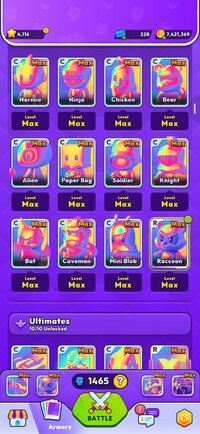
Bangerfist
Platinian
Thanks for sharingHere it is tha k you very much!!!

Please share the main screen too so everyone can see all building are maxed out.
Hello all... I came back to mob after awhile and am trying to catch up without breaking the bank lol.
Few questions,
can i max out cards i have not yet revealed (racoon, champ overdrive etc.)?
Decoding the file i noticed all my maxed cards are tier 3, here i am reading about tier 4?
Few questions,
can i max out cards i have not yet revealed (racoon, champ overdrive etc.)?
Decoding the file i noticed all my maxed cards are tier 3, here i am reading about tier 4?
Bangerfist
Platinian
Here's how both of those work when editing the decoded cards file:Hello all... I came back to mob after awhile and am trying to catch up without breaking the bank lol.
Few questions,
can i max out cards i have not yet revealed (racoon, champ overdrive etc.)?
Decoding the file i noticed all my maxed cards are tier 3, here i am reading about tier 4?
- Unrevealed / locked cards: Yes, you can set levels/tiers on cards that are still locked or unrevealed in your save file—just be careful not to force states on exclusive/subscription-tied items unless your account actually has access to them, and keep values realistic so the game loads cleanly without glitches.
- Tier 3 vs. "Tier 4": When people talk about the 4th/max tier in-game, the value in the decoded file is actually Tier: 3 (since tier numbering starts at 0). So seeing 3 on maxed cards in the file is normal—you don't need to bump it to 4.
Bangerfist
Platinian
No problem at all! Since the save file uses IDs rather than card names, the easiest way to match them without guessing is to compare your before-and-after file:Tnx for info, much appreciated... Unrevealed seems tricky then since by the code i dont know which is which...
- Use a diff / compare tool: Make a backup copy of your decoded Cards.data, unlock or get a copy of one card in-game (or level up a single known card), decode again, and compare the two text files—whichever ID changes is the one you just touched.
- Check surrounding entries: Cards of the same type or batch often sit near each other in the list, which helps narrow down unfamiliar IDs.
- Test one at a time: Edit just one entry, re-encode, and open the Armory to verify it matches the card you expected before touching others.